


Issue importing Varicam avcintra LT footage
Issue:
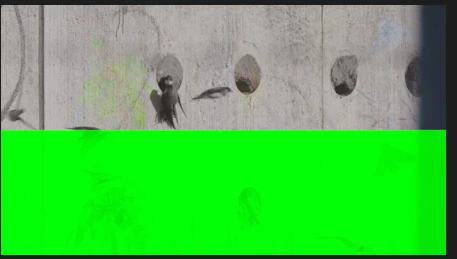
Panasonic VariCam LT AVC-Intra LT MXF footage shows severe green frame corruption in Adobe Premiere Pro 2026 version 26.5.2 (Build 5) on Windows.
Steps to Reproduce:
- Launch Adobe Premiere Pro 2026 version 26.5.2 (Build 5).
- Create a new empty project.
- Import original Panasonic VariCam LT AVC-Intra LT MXF footage.
- Place the clip on a timeline.
- Play or scrub through the footage.
- Parts of the decoded image turn solid bright green.
Expected Result:
The AVC-Intra LT footage should decode and display normally without any corruption.
Actual Result:
Large portions of individual frames become solid bright green during playback and scrubbing. This makes the footage unusable for editing.
Premiere Version:
Adobe Premiere Pro 2026
Version 26.5.2 (Build 5)
Operating System:
Microsoft Windows 11 Pro
Version 10.0.26200
CPU:
Intel Core i9-14900K
RAM:
64 GB
GPU:
NVIDIA GeForce RTX 4070 Ti
12 GB dedicated VRAM
GPU Driver:
NVIDIA Studio Driver 616.92
Driver version 32.0.16.1692
Driver date: September 9, 2026
Video Format:
Panasonic VariCam LT
AVC-Intra LT
MXF
Intraframe AVC — not Long-GOP
Project Size:
The issue can be reproduced in a completely new and empty Premiere project with a single original VariCam LT clip. It therefore does not appear to be related to project size or complexity.
System Compatibility Report:
Premiere Pro reports no compatibility issues.
Troubleshooting Performed:
- Media Cache completely cleared
- Tested in a new empty project
- Issue remains reproducible in Premiere Pro 26.5.2
- NVIDIA Studio Driver is installed
- Premiere System Compatibility Report shows no issues
Additional Context:
Premiere Pro 26.5.2 includes a fix for green-frame corruption affecting certain Long-GOP 10-bit 4:2:2 media. However, this Panasonic VariCam LT footage is AVC-Intra LT / intraframe, not Long-GOP.
This therefore appears to be either a separate AVC-Intra decoder regression, or a broader decoding issue not addressed by the 26.5.2 fix.
The corruption is clearly visible as a solid bright-green section covering a large part of the decoded frame.
Regression: The same original VariCam LT footage plays correctly in Premiere Pro [25.6.6], but is corrupted in 26.5.2 Build 5.
 AdChoices