
Issue with Crop Percentage - Not Applying Correctly to Shapes
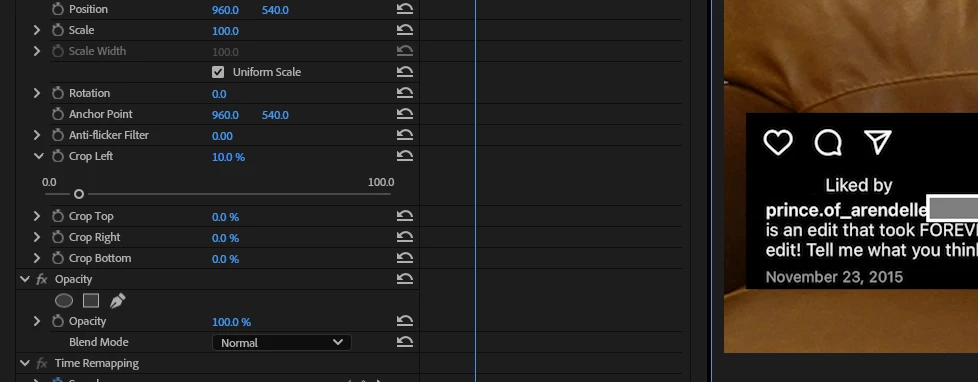
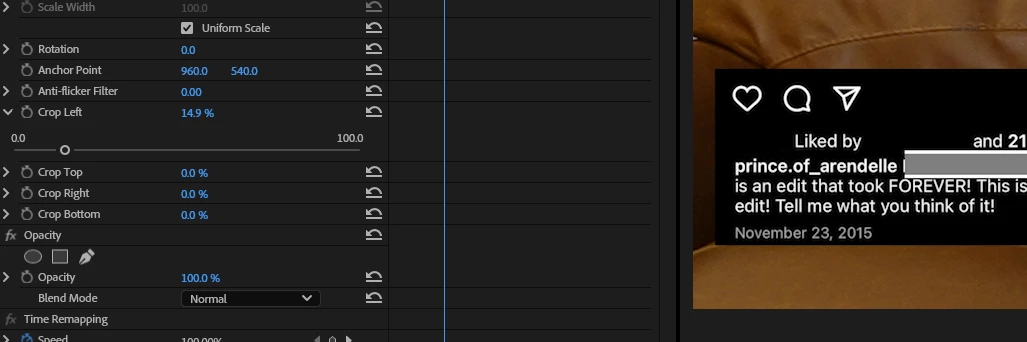
So I have a .png on screen with text on it, that I want to slowly reveal the text of. This is an effect I've done many times before so I tried doing what I normally do, and draw a shape over the top of it (the shape is smaller than the comp), and just animate a crop of that layer as the text is being read. The issue is the crop doesn't start showing up on the layer until it gets to ~14%, when it normally shows up on a Crop-Left immediately once it goes above 0%. This seems to be relative to the entire comp, not just that shape I drew.
I've tried this both with the crop that automatically shows up with crops now in the 2025 version, as well by applying Crop from the effects panel (as I did in prior versions). I know as a workaround I can find that exact percentage the crop starts showing up at, but I have a number of spots I'm doing that, and it's a real pain to make sure it is a perfectly smooth animation. I've opened onld project files where I've done the animation before, and things seem fine there, so I have no idea what might be going on with this project file.
Here's an image showing the crop being applied at 10%, but the gray box I drew with an outline so you can see the intended size is apparent. It doesn't start showing up until ~ 15%
Version - 25.0.0 (Build 61) - Windows 11 - (Though I did breifly do some cuts on my Mac, before sending the project file back over).


 AdChoices