


Participating Frequently
Oct 17, 2026 8:56 PM UTC
In Development

Issues with "Validating Ingredients"

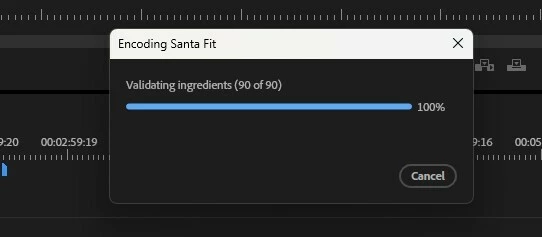
I am using Adobe Premiere version 26.5.2. Whenever I attempt to export a video that includes content created with AI, a "Validating ingredients" box appears. Even though it reaches 100%, it takes an additional 5 to 10 minutes before the actual export process begins—a very long wait. I recently updated to version 26.5.2. This appears to be a mandatory feature imposed by Adobe Premiere; however, it should not be compulsory. Users should have the choice of whether or not to validate AI-generated content. What is the point of optimizing workflows, using a high-end graphics card, and having plenty of RAM if I am forced to endure such a long delay due to an "ingredient validation" process that the system runs without my authorization? Please fix this issue.
 

    20 replies

    Participant
    Nov 3, 2026 12:00 AM UTC

    I HAVE NO AI IMAGES AND CANT EXPORT


    Translate
    Participant
    Nov 2, 2026 11:59 PM UTC

    Pathetic Adobe Davinci just gained a new customer 
    Ive been with you for almost 20 years this is just silly and you cost me a valuable client

    Translate
    Participant
    Nov 2, 2026 7:52 PM UTC

    What is the update on this?  I can’t export anything using AI anymore, even when I turn off Content Credential.  When is Adobe going to address this?

    Translate
    Amy the Stuv
    Community Manager
    Community Manager
    Nov 2, 2026 10:10 PM UTC

    Hello ​@jacob_0172 

     We are currently working on this issue and unfortunately if you are unable to export your sequence, the best workaround is to install 26.3.2 or 26.2.2


    A project created in 26.5.2 will open in the these earlier versions as they are all still part of the Version 26 family.


    For more information on this, please see Generative AI content labeling FAQ

    Translate
    Amy the Stuv
    Community Manager
    Community Manager
    Oct 27, 2026 4:48 PM UTC

    Update. We are currently working on this issue and unfortunately if you are unable to export your sequence, the best workaround is to install 26.3.2 or 26.2.2


    A project created in 26.5.2 will open in the these earlier versions as they are all still part of the Version 26 family.


    For more information on this, please see Generative AI content labeling FAQ

    Translate
    Participant
    Oct 24, 2026 5:17 PM UTC

    Same problem. Working on a Saturday on a deadline and stopped in my tracks because suddenly export is broken. I am using a bunch of AI generated media, is Premiere now deciding I’m not allowed to export it until it checks “credentials”? How do I turn this credential-checking thing off? I can’t have my editing software making judgment calls on my before deciding if I can export, I am going to have to quickly rebuild my edit in different software just so I can share a rough cut with my client. This is madness.

    Translate
    Amy the Stuv
    Community Manager
    Community Manager
    Oct 27, 2026 1:26 PM UTC

    Hello ​@defaultod16u9co9mot 

    Adobe has no intention of preventing users from editing with any specific type of media, but there are laws that Premiere has to abide by. For more information on this, please see Generative AI content labeling FAQ


    I am sorry you’re experiencing a bug regarding this feature. Are you on a Windows 11 system? Would you mind providing your specs and sharing a screen shot of your Project Panel showing the Content Credentials Column?

    • Operating System: Specify Windows or macOS, along with the version.
    • Chip (Mac Only): Specify which M-series Chip or CPU/GPU combo.
    • GPU and Driver (Windows only): Please let us know your video card and driver version. We recommend updating to the most recent version; for NVIDIA users, we strongly recommend the Studio version of the driver.
    • Video Format: In the case of AI, who did you use to generate the media?
    • Project Size: About how big is your project file? Is it in a Production? Approximately how many clips are involved in a rough estimate?

    Additionally, do you have any other automated systems integrated into your machine? Claude? Co Pilot? Power Automate? Siri? Does revoking their access to Premiere resolve this issue?

    Hoping to help,

    Amy

    Translate
    Participating Frequently
    Oct 20, 2026 4:50 PM UTC

    Hello.
    Thank you for your response.
    Here is the information, provided as you suggested.
    Problem: After editing a video, when I attempt to export it, a window appears during the generation process that says: "Validating Ingredients."
    Steps to reproduce: 1. Click on "File." 2. Click on "Export." 3. Click on "Media." 4. In the export window that appears, select the required parameters (Preset: "Match Source - Adaptive Low Bitrate"; Format: "H.264"; Target Bitrate: 2.75—though these parameters may vary depending on the project, I have encountered this issue with other settings as well). 5. Click on "Export."
    Expected result: The export process should begin immediately, and the video should be generated.
    Actual result: A window appears with the text "Validating Ingredients." Even though the progress bar reaches 100%, the process takes a long time—anywhere from 5 to 10 minutes, depending on the number of video clips on the timeline.
    Premiere version: Adobe Premiere Pro, version 26.5.2.
    Operating system: Windows 11 Pro, version 25H2.
    GPU and driver (Windows only): ASUS NVIDIA GeForce RTX 3060 (12 GB); driver version: 32.0.16.1088.
    Video format: The video files I use are generated by Google Omni Flash 1.1 on the Google Flow platform; they are downloaded as MP4 files.
    Project size: The Adobe Premiere project file is 33 KB. Approximately how many clips does it contain? It contains 76 video clips.
    Does this affect all projects or only some? It affects projects in which I use AI-generated videos.
    Does it also happen in new, empty projects? Yes.
    When did this problem begin to occur? Two weeks ago as of today, 20/10/2026.

    I cannot attach videos as you suggest, because the Adobe platform does not allow for the inclusion of videos.


    Translate
    Amy the Stuv
    Community Manager
    Community Manager
    Oct 20, 2026 5:53 PM UTC

    Thank you for the information ​@David Flor 

    I’ve DM’d you a private upload link for videos and screen recordings you’re able to share. We can test the time and export of the AI assets on our end if you would be willing to upload your project and media experiencing this.


    That progress message happens, when Premiere is still scanning for credentials on large source files, that were imported right before export or if we don't validate content credentials on import.

    You can check / set the preference "Validate Content Credentials on import" in the "Media" section of Premiere Preferences.


    You can also check the Metadata Display column "Content Credentials" in the Project Panel, if all media has been scanned and validated, an entry could be AI-generated, not validated


    You may also force scan and validation via the context menu in the project panel, right click → "Scan for Content Credentials"


    For more information on this, please see Generative AI content labeling FAQ

    Translate
    Participating Frequently
    Oct 20, 2026 6:51 PM UTC

    Regarding your suggestion: You can check or configure the "Validate Content Credentials on import" preference under the "Media" section in Premiere’s preferences. As you can see in the shared image, it is already enabled. What I’m not sure about is whether I should disable it or keep it enabled. As for your second suggestion: You can also check the "Content Credentials" column in the Metadata Display within the Project Panel; if all media has been scanned and validated, an item might otherwise be flagged as "AI-generated, not validated." I didn’t find any such information or alert. Regarding your third suggestion: You can also force a scan and validation via the context menu in the Project Panel—right-click and select "Scan for Content Credentials." As you can see in the image I sent, nothing happens when I click "Scan for Content Credentials." What really bothers me is that this implies I need to perform additional configuration before I can even start editing—a process that is already quite lengthy. In my view, professional tools should help us work faster, not force us to deal with extra setup steps. Two weeks ago, before the latest updates, this wasn't an issue; I would use AI-generated files, and the video export process would begin immediately. That’s what I’m referring to. Thanks for looking into this.

    Translate
    trentoffmusic
    Participating Frequently
    Oct 20, 2026 6:18 AM UTC

    Mine was paused for over 8 hours  on 100% as I went to sleep, woke up and it still hadnt validated. Its also asking to validate via linked etc with id when I dont physically have it with me. Despite taking the money from my credit card no haste. Absolutely absurd

    Translate
    Amy the Stuv
    Community Manager
    Community Manager
    Oct 20, 2026 3:01 PM UTC

    Hello ​@trentoffmusic 

    Thank you for posting. The inability to complete an export is different from just adding 5-10min of time. Please supply us with some of the information in How do I write a bug report? so that we can identify if it is system specific. 


    A screenshot of the prompt requesting to validate via linked would be helpful as well. 


    For more information on this process, please see Generative AI content labeling FAQ


    Hoping to help,

    Amy

    Translate
    trentoffmusic
    Participating Frequently
    Oct 20, 2026 6:17 AM UTC

    Same problem, trying to export the same thing I exported a week ago but with one change. nonsense


    Translate
    Amy the Stuv
    Community Manager
    Community Manager
    Oct 19, 2026 12:32 PM UTC

    Hi ​@David Flor ,

    Welcome to the Premiere forums! We are glad to see you here. We need a few more details. Please see, How do I write a bug report? for our preferred format.

    Thanks for reaching out.

    Amy


    Translate