
Participating Frequently
Oct 17, 2026 8:56 PM UTC
In Development

Issues with "Validating Ingredients"

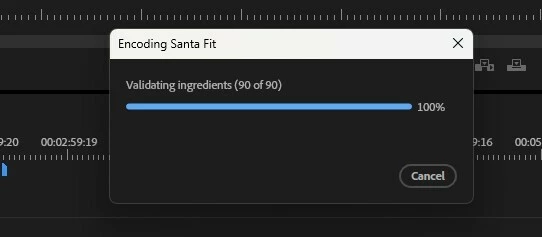
I am using Adobe Premiere version 26.5.2. Whenever I attempt to export a video that includes content created with AI, a "Validating ingredients" box appears. Even though it reaches 100%, it takes an additional 5 to 10 minutes before the actual export process begins—a very long wait. I recently updated to version 26.5.2. This appears to be a mandatory feature imposed by Adobe Premiere; however, it should not be compulsory. Users should have the choice of whether or not to validate AI-generated content. What is the point of optimizing workflows, using a high-end graphics card, and having plenty of RAM if I am forced to endure such a long delay due to an "ingredient validation" process that the system runs without my authorization? Please fix this issue.
 

    Pinned Reply By Amy the Stuv

    Update. We are currently working on this issue and unfortunately if you are unable to export your sequence, the best workaround is to install 26.3.2 or 26.2.2


    A project created in 26.5.2 will open in the these earlier versions as they are all still part of the Version 26 family.


    For more information on this, please see Generative AI content labeling FAQ

    43 replies

    PolkaFever
    Inspiring
    Nov 26, 2026 1:34 PM UTC

    ​@Mystic_Lullaby7f2c , ​@DejiousEditing  & ​@kang31504826qq7w 
    As far as I know, ​@Dennis5FDD was earlier this week able to reproduce the error and working on a fix.

    Hopefully they’ll find a solution.🤞

    Translate
    Participant
    Nov 26, 2026 7:00 AM UTC

    please fix this issue. can’t be able to export videos. Screen stuck on validating ingredients.

    Translate
    Participant
    Nov 26, 2026 6:43 AM UTC

    My yearly subscription ends in a month, I will be exploring other options. This issue just screwed me at my job. If a feature hasn’t worked for over a month, then it should be removed until a solution can be found. 

    Translate
    Participant
    Nov 25, 2026 6:59 AM UTC

    When will this issue be fixed?

    Translate
    PolkaFever
    Inspiring
    Nov 12, 2026 7:51 PM UTC

    Hi all,

    I was stuck on a v27 Project unable to roll back to v26 and open the project (roll back fix suggested by ​@Amy the Stuv). I found a solution that might help some of you (If roll back fix or screen recording isn’t sufficient enough).
    Important! Remember to backup your v26 before going to v27! 


    My solution was to export the audio and video separate in latest AME Beta (v27). The video was exported as a TIFF image sequence. That enabled me to bypass the bug and to import the files (audio / video) (not the project) in PPro 26.2. Merged audio/video in a sequence and then export without any errors. Phew!😅
    Hope that helps someone with this nasty bug.
    Note: My timeline was just 4 minutes long. Think twice before fixing a feature film this way. But in desperate times comes desperate measures.🤞

    Translate
    Participating Frequently
    Nov 11, 2026 8:31 PM UTC

    I’ve been waiting an hour for the video to process. The GPU isn’t encoding the video, and Premiere is doing absolutely nothing. The "ingredient validation" reaches 100%, but then nothing else happens. Premiere essentially pauses or enters a state of limbo.
    Are you already working on a fix?

    Translate
    Participating Frequently
    Nov 11, 2026 8:37 PM UTC

    I had to use a screen recorder to be able to send a sample to the client. Adobe really puts us in such an embarrassing position. Thanks for that.

    Translate
    PolkaFever
    Inspiring
    Nov 10, 2026 12:50 PM UTC

    Both PPro and PPro Beta (27.1.0 - b43) hangs on the same “Validating ingredients” message. Both are updated to latest version. I have 17 Gemini illustrations that has gone through an edit in Photoshop before ending up in Premiere. I am on:
    Processor Intel(R) Xeon(R) w7-2495X (2.50 GHz)
    RAM 192 GB
    Windows 11 Enterprise 25H2, Build    26200.9711, Pack 1000.26100.372.0
    Nvidia RTX 4500 ada gen graphic

    The bug results in the validation of ingredients (17 images) to hang and keeping me from export (AME and PPro). Deadline is critical. Tried delete media cache, on/off “validate content credentials on import” setting. I can share project files to help solve the problem ​@Amy the Stuv . Really can’t wait for a fix of this magnitude.

    Translate
    Amy the Stuv
    Community Manager
    Community Manager
    Nov 10, 2026 1:10 PM UTC

    ​@PolkaFever you can use your Creative Cloud Account to Install 26.3 or 26.2 to complete your export. A 26.5.2 project will open in these earlier versions as they are all part of Version 26 in Premiere.


    https://helpx.adobe.com/download-install/apps/download-install-apps/creative-cloud-apps/install-previous-versions-creative-cloud-apps.html

    Translate
    Participant
    Nov 10, 2026 2:23 PM UTC

    When will this be fixed?

    Translate
    Participant
    Nov 9, 2026 11:03 PM UTC

    The solution is obvious, until you fix the problem, REMOVE IT!!! Why do I have to change my workflow for your mistakes! If only you guys had the money to hire programmers that could do their job correctly. Unfortunately, I really did like Premiere but I think it’s time my team look at other solutions. More reasonably priced and less intrusive in our workflow. We’re not all social media wannabe influencers stealing others work. Many of us are actually working creative professionals that generate most of the content on their system rather than download it from AI.

    Translate
    Participant
    Nov 9, 2026 4:52 PM UTC

    Adobe seems to have confused being deeply embedded in professional workflows with being entitled to remain there.

    I can finish an entire edit, only to have your software refuse to perform its most basic function: exporting the finished work. Then the recommended solution is to install an older version. That is an embarrassing verdict on the product you’re currently shipping.

    Adobe’s leadership is responsible for hiring capable people, supporting its engineering teams, and enforcing quality standards before a release reaches paying customers. Whatever decisions you’re making internally, customers are living with the results—and this experience suggests those standards have slipped badly.

    Every hour I spend troubleshooting your software is an hour taken away from the work I bought it to do. Your customers have deadlines, clients, and professional reputations. We bear the consequences when your product fails, while Adobe continues collecting its subscription fees.

    The most frustrating part is how little confidence I now have that an update will improve my working day. Professional software should earn trust with every release. You’re teaching me to dread them.

    Adobe expects dependable payments. It’s time you delivered dependable software.

    Translate
    Participant
    Nov 3, 2026 12:00 AM UTC

    I HAVE NO AI IMAGES AND CANT EXPORT


    Translate
    Dennis5FDD
    Community Manager
    Community Manager
    Nov 11, 2026 1:44 PM UTC

    ​@Blissful_Dragonfly1ef0 Does your export also get stuck at “Validating ingredients,” or does it stop at a different stage?

    Translate