



Keyboard shortcuts don´t work on Mac - Why
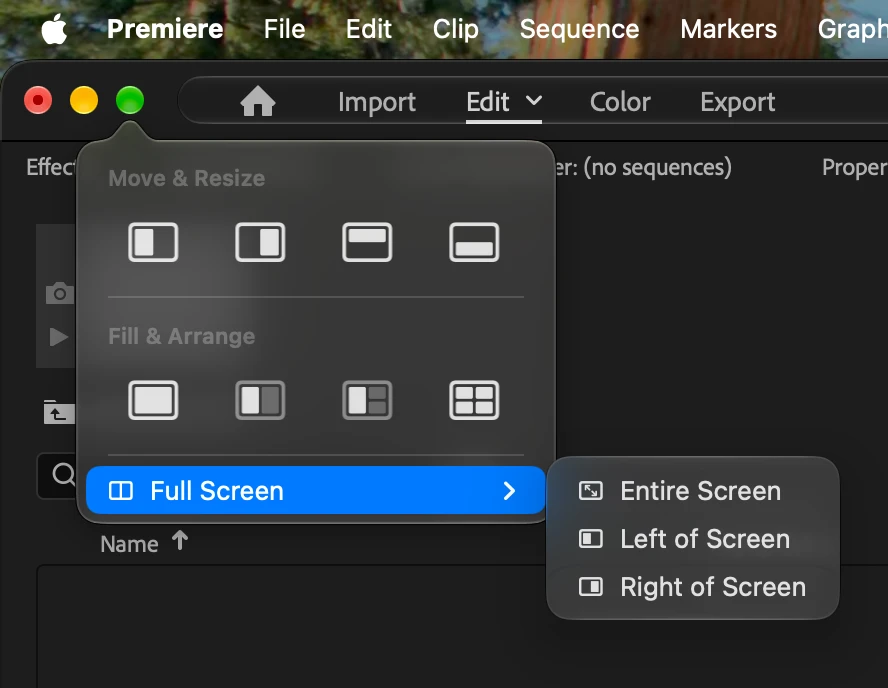
On Mac there are Apple OS native keyboard shorcuts to resize and arrange windows, iow keyboard shortcuts for Move & Resize and Fill & Move and Full Screen. (See the attached image)
They are very useful for arranging windows but for some reason none of them works in Adobe video apps.
Question:
Is there any special reason behind to why those keyboard shortcuts not work in many Adobe apps such as Premiere, After Effects, Photoshop and Media Encoder?
All shorcuts include the Fn-key and the Fn-key is not used, or cannot even be used, in the Keyboard Shortcuts dialog in those Adobe apps so that can´t be the reason behind this.
Why are those macOS shortcuts ignored in Adobe video apps?
The macOS shortcuts:
Single Window Shortcuts
- Fill desktop: Fn + Control + F
- Center window: Fn + Control + C
- Move to Left half: Fn + Control + Left Arrow
- Move to Right half: Fn + Control + Right Arrow
- Move to Top half: Fn + Control + Up Arrow
- Move to Bottom half: Fn + Control + Down Arrow
- Return to previous size: Fn + Control + R
Multiple Window & Arrangement Shortcuts
- Tile Left & Right: Fn + Control + Shift + Left Arrow
- Tile Right & Left: Fn + Control + Shift + Right Arrow
- Tile Top & Bottom: Fn + Control + Shift + Up Arrow
 AdChoices