

morphinapg
Inspiring
December 2, 2025

Keyframe graph editor - can't adjust scaling with mouse
  • December 2, 2025
  • 5 replies
  • 256 views

867301iD5123831CFFBF0CE.png

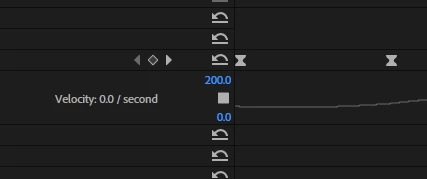
I'm talking about here, where it says 200. When I drag with the mouse, the numbers change, but it's like they're snapping back to where they were originally, so the changes all hover around the original value. This used to work correctly. The auto scale doesn't seem to take into account the actual velocity of the keyframe, so the scale is always way off where I need it to be, and I can no longer adjust it easily with the mouse like I used to be able to do.

Premiere 25.6.2

Windows 11 25H2

5 replies

morphinapg
Inspiring
December 4, 2025

I mainly animate anchor point and it happens every time I've tried it there, but I did try it on other properties as well, like position, scale, rotation, opacity, etc, and they all appear to be encountering the same problem. 

Yes I can manually type in a scale and that's what I've needed to do. Slower or faster mouse drags don't help. I've also tried moving the mouse up/down rather than left/right, same problem. It's like the values start going in the direction I want, but they keep being pulled back towards the original value.

Community Manager
December 4, 2025

Hi @morphinapg


Thanks for reporting a problem. Is this happenning with all your keyframes, or only some? Are you able to select the 200 and input a number with your keyboard? Do you see any difference in a slow drag vs a fast drag? 


Sorry for the frustration, 

Dani

Peru Bob
Community Expert
Community Expert
December 3, 2025

Try resetting the preferences:
https://helpx.adobe.com/in/premiere-pro/using/reset-preferences.html

If that doesn't work, try creating a new project and import the old one into it.

morphinapg
Inspiring
December 3, 2025

That doesn't solve it for me. Already didn't have caps lock on, and already had num lock on.

Peru Bob
Community Expert
Community Expert
December 2, 2025

I had that happen once.  Turning off caps lock and turning on num lock fixed it.