



Keyframes in Effect Controls overlap the parameter values when the panel is narrow
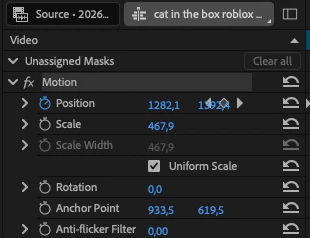
It's 2026, almost 2027. Adobe pushes so many AI features and annoying bugs every single update, but YET they never seemed to care to fix the most important bug...
The keyframe player overlapping the numbers is something so annoying to see, and to know that they ignore this every single update is infuriating .. can someone from Adobe please see this and let them know to update and fix...
In my screenshot you can see the Position Y value covered by the keyframe diamonds.
Steps to reproduce:
- Open Effect Controls with Show Timeline View on
- Add a couple of Position keyframes to a clip
- Make the panel narrower
- The keyframe area starts overlapping the values column
Expected: the values column should keep a minimum width, or the timeline view should shrink or auto-hide when there isn't enough space. Basically one column shouldn't render over the other.
This bug has been in Premiere for as long as I've been using it and it's never been fixed. It's really annoying when you're working with keyframes and need to read the values. Would love to finally see it sorted.
 AdChoices