Damiano G.
Participant
April 27, 2026

Localization Error: "Match Source - Adaptive High/Low Bitrate" presets are swapped in Italian

  • April 27, 2026
  • 1 reply
  • 20 views

I found a localization error in the Italian version of Premiere Pro regarding the export presets.

The issue occurs with these two specific presets:

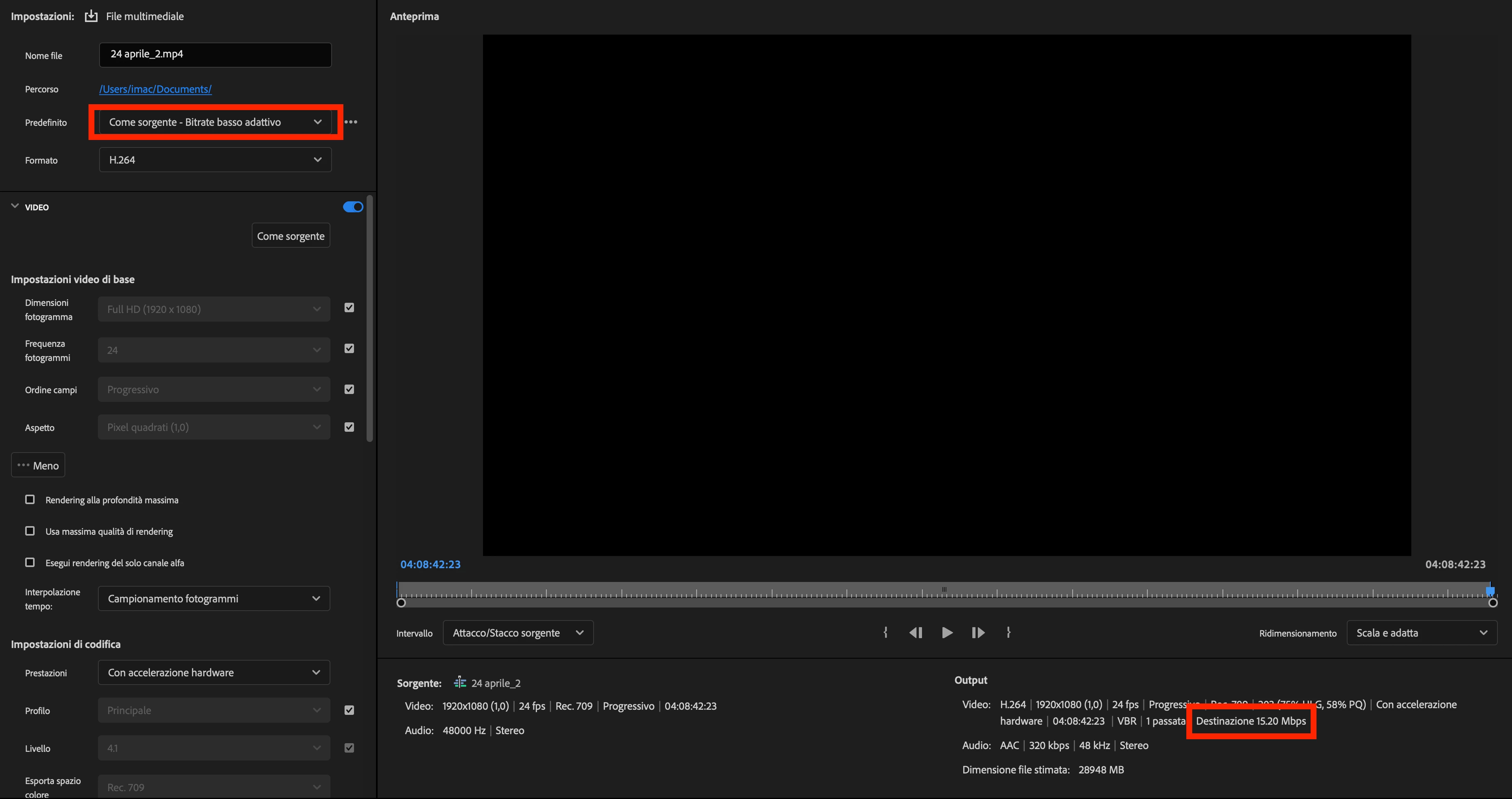
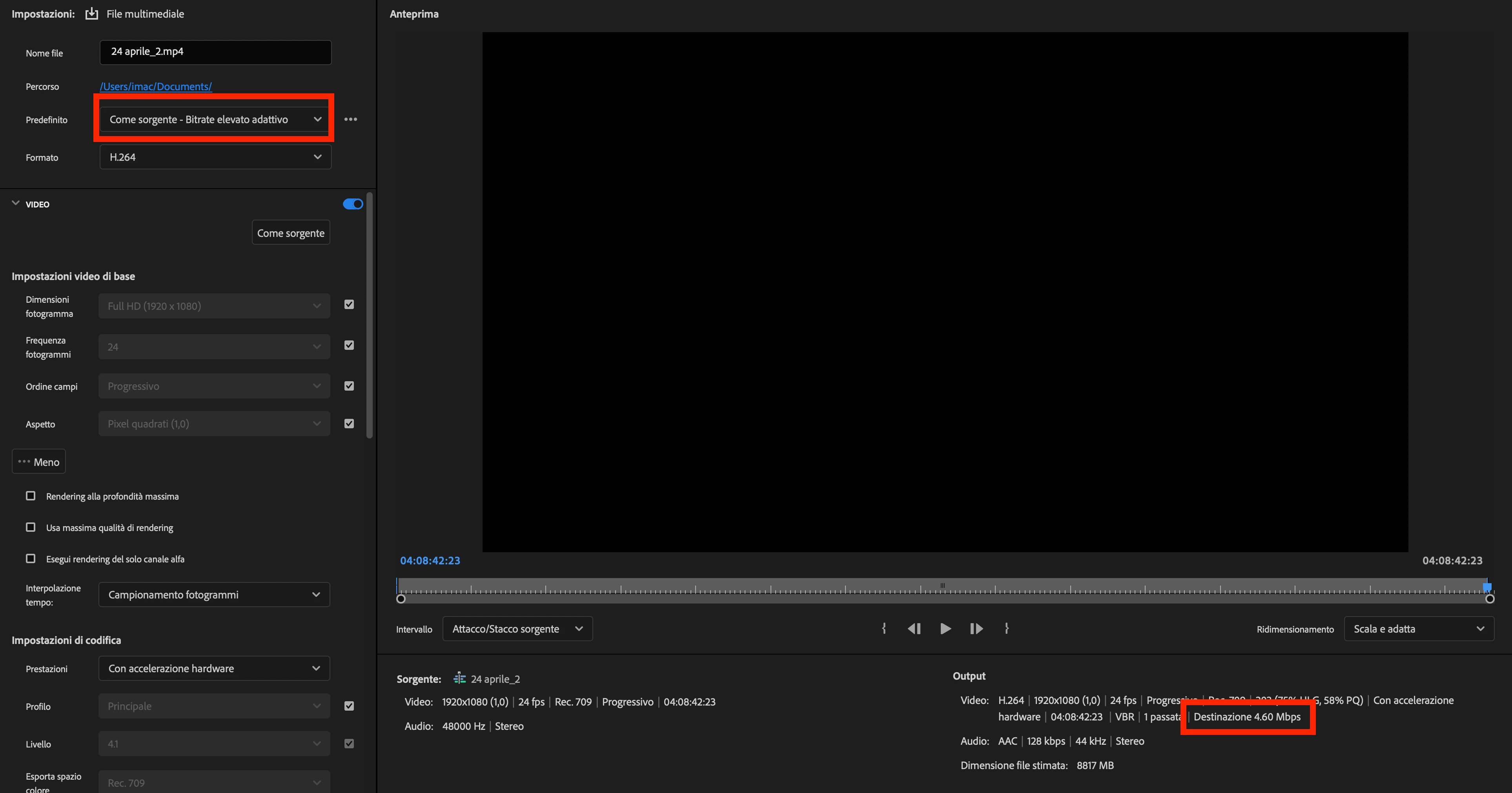
  1. "Come sorgente - Bitrate elevato adattivo" (Match Source - Adaptive High Bitrate)
  2. "Come sorgente - Bitrate basso adattivo" (Match Source - Adaptive Low Bitrate)

The two presets are swapped. When I select "High Bitrate," the system applies the "Low Bitrate" settings, and vice versa.

Language: Italian (it_IT)
Platform: MacOS


    1 reply

    IanB_360
    Community Manager
    Community Manager
    April 29, 2026

    Hi Damiano G.
    I am letting the team know, but if you could provide the details below, that would be helpful in addition to what you have already provided. 

    • Steps to Reproduce: A numbered list of the exact steps needed to replicate the issue.
    • Expected Result: What should happen after the final step?
    • Actual Result: What actually occurred?
    • Screen Recording: If possible, include a recording of your screen showing the issue.
    • Premiere Version: How to find the exact version of Premiere you're using.
    • Operating System: macOS version.
    • Video Format: If the issue relates to playback or export, please specify the format (and ideally share a sample video).
    • Helpful Context 

    Comparing when and where the issue occurs helps us narrow down the cause:

    • Does it affect all projects or only some?
    • Does it affect new, empty projects?
    • When did the problem first begin?

      Here to help.
      Ian
    Damiano G.
    Participant
    April 29, 2026

    Hi Ian, thank you for your response. Here are the additional details requested to help the team investigate this localization issue:

    Steps to Reproduce:

    1. Open Premiere Pro set to Italian language.

    2. Open any project and go to the Export tab.

    3. Under the "Preset" dropdown menu, select "Come sorgente - Bitrate elevato adattivo" (Match Source - Adaptive High Bitrate).

    4. Observe the resulting bitrate settings in the Video tab.

    5. Now, select "Come sorgente - Bitrate basso adattivo" (Match Source - Adaptive Low Bitrate).

    6. Observe the resulting bitrate settings again.

    Expected Result: Selecting "Bitrate elevato" (High Bitrate) should apply high bitrate settings, and "Bitrate basso" (Low Bitrate) should apply low bitrate settings.

    Actual Result: The presets are swapped. Selecting the "High Bitrate" label applies the Low Bitrate parameters, and selecting the "Low Bitrate" label applies the High Bitrate parameters.

    Premiere Version: 26.2.0 (build 65)

    Operating System: macOS Tahoe 26.4.1 (25E253)

    Video Format: H.264 (MP4), the issue relates to the export settings

    Helpful Context

    • Does it affect all projects or only some? It affects all projects as it is a UI/Localization string error.

    • Does it affect new, empty projects? Yes.

    • When did the problem first begin? I first noticed this issue about two months ago. I cannot pinpoint the exact version where it started, but it has been consistent since then.