
Losing last 3 days of Pr auto-saves after Mac crash
1. Editing in Premiere Pro with three-monitor setup.
2. Changed the workspace layout.
3. Saved the new workspace configuration.
4. Approximately 5 seconds later, the computer crashed.
5. Upon restart:
• No crash report from Premiere Pro.
• Recent projects were gone.
• Auto-saves for the last three days missing.
System Information
• Auto-Save Settings:
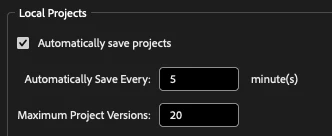
• Hardware: Apple M1 Max
• OS: macOS Sequoia 15.7.2
• Premiere Pro Version: v25.6.2
• Storage: SanDisk Desk SSD (project folder and auto-saves path)


 AdChoices