
Inspiring
May 14, 2025

Low-confidence words not showing up in transcription

  • May 14, 2025
  • 7 replies
  • 568 views

Use the template below to provide us with information: 

  • Issue - A short description of the problem. 

In Text panel settings, you can and toggle on/off the "Low-confidence words," which will underline words that the transciption is not so sure about, and makes it really easy to clean up the transcript. Right now, toggling them on/off doesn't do anything. I'm not able to see any underlines, and believe me, this audio should have a lot of low-confidence words underlined. Here is the settings panel:
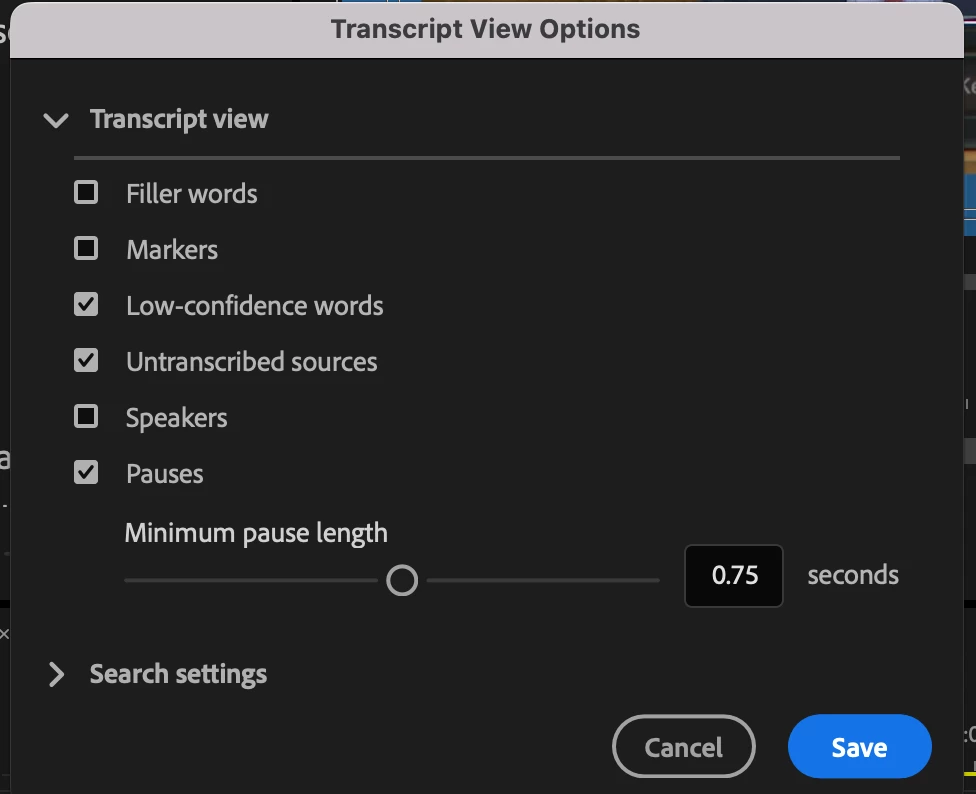
 

  • Steps to reproduce - A numbered list of the exact steps needed to reproduce the issue. 

1. Transcribe your sequence

2. Go to Text setting panel

3. Toggle "Low-confidence words" on and off

4. See that it doesn't underline any words


  • Expected result - What should happen after executing the last step.

Low-confidence words should be identified by being underlined


  • Actual result -  What actually occurred after the previous step 

No low-confidence words are underlined


Version 25.2.3 (Build 4)

  • Operating system - Specify Windows or macOS, along with the version

macOS Sequoia 15.4.1 on a MacBook Pro with Apple M2 Max

  • GPU driver version (Windows only) - If you're on Windows, please let us know what version of the video card (GPU) driver you are using.  

n/a

  • Video format - If your issue is related to video playback or export, please let us know what format the video is in. Ideally, share with us a sample video.

n/a

  • Comparative information helps us understand more about when the issue occurs: 
    • Does it affect all projects or only some projects? Yes 
      • Does it affect new projects?  Yes
      • When did the problem begin? Not sure. I installed the last long-term supported version, Version 24.6.5 (Build 3) and that is working fine. 

7 replies

Community Manager
May 21, 2025

Thanks, that is helpful.  I will add that to the bug report for the engineers.

CaSMITH22Author
Inspiring
May 20, 2025

Thanks Stan! I see. Looks like it works on Windows, but not on Mac (if that's any help for @Rach McIntire )


Appreciate it! 

Stan Jones
Community Expert
Community Expert
May 20, 2025

@CaSMITH22,


Here's what I see - just one word per segment. Your screenshot, relative size of the text vs the timecode, looks like you are using the maximum size text in that panel. So that is what I used here.


24.6.5:


25.2.3:


Stan


CaSMITH22Author
Inspiring
May 20, 2025

Stan - thanks for testing! Can you screenshot what the low confidence words look like for you? I'm interested to know what you mean by 'I realized I do see them' - what do they look like for you?


For me - this is what they usually look like - they're underlined: (Screenshot from 24.6.5 Build 3)


And this is what the same paragraph looks like in 25.2.3 Build 4 (the most recent update) - as you can see, no words are underlined.


What do you see?

Stan Jones
Community Expert
Community Expert
May 20, 2025

@CaSMITH22,


My testing took longer than I expected, and I never did post on this. I thought I was not seeing low confidence in 25.2.3, but once I went back to PR 24.6.5, I realized that I do see them. The underlining is not very strong, so they are easy to miss.


In any event, Win 10 PR 25.2.3, I do see low confidence words in a transcription.


Stan


CaSMITH22Author
Inspiring
May 19, 2025

Thank you. It is so useful and really cuts down on the time that it takes to clean up transcriptions. In the meantime, this feature does work in Version 24.6.5 (Build 3), which is the last long-term supported version. So, if anyone else is having issues, I suggest going back to that for now. Thanks for your prompt attention!

Community Manager
May 14, 2025

Hi @CaSMITH22,

Thank you for the amazing bug report.  I'm sorry that a very useful feature isn't working as expected.  I am able to reproduce this issue and will file a bug report with the team.  Thanks for reaching out.  I hope we can help you soon.