Participant
July 28, 2026

Making fails while using posterize time in premier pro 2026.

  • July 28, 2026
  • 1 resposta
  • 17 Visualizações

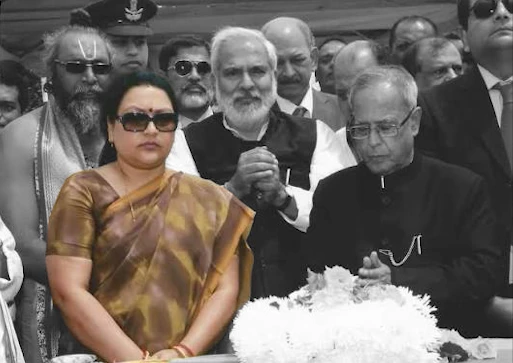
I took an image showing multiple characters in that image, duplicated the image applied making on the top layer selecting the person of interest. Applied Black & White effect on the lower layer. Next, I took an adjustments layer and applied an effect called Posterize time effect and as soon as I applied it the masking behaves unpredictive.

With Posterize time activated.
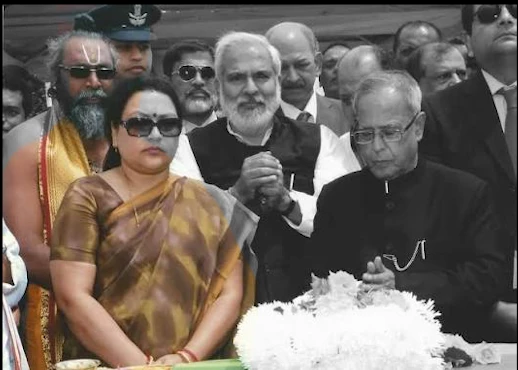
Posterize Time Activated


Posterize Time De-activated

Troubleshoot: 1. I tried to put this posterize effect on nested sequence of the two layers.
2. Without Nested sequence adding and adjustment layer on the top.​​​​​​

Nothing works.

    1 Resposta

    Community Manager
    July 28, 2026

    Hi ​@Dilsher_Maps,

    Welcome back to the Premiere forums. Thank you for reporting this occurrence and providing screenshots. To try to better assist you, could you please share more details about your environment:

    • What is the exact Premiere version you are using?
    • Are you working on a Windows or macOS? Please provide the version and chip information.
      • GPU Driver (Windows only): Please let us know your video card driver version. We recommend updating to the most recent version; for NVIDIA users, we strongly recommend the Studio version of the driver.
    • Is there a version of Premiere where this effect worked in the way you’re trying to use it?
    • Does adding the Posterize Time effect to an adjustment layer, over the nested sequence of your clips?
      • Does rendering the In/Out in the timeline panel help?

    I hope we can help you soon!

    Best,

    Jonathan