
Participant
January 27, 2024

Media Browser won't preview RED clips on Macbook Pro 14

  • January 27, 2024
  • 3 replies
  • 1234 views
Hi everyone! I recently switched from a PC laptop to the new Macbook Pro 14 inch and have been having an issue with the Media Browser in Premiere Pro.
 
Long story short, I shoot with a RED DSMC2 and on my old Dell PC laptop the media browser would automatically load the previews of my REDCODE Raw footage so I can sift through footage quickly (top image). Now that I've switched over to Mac, I've noticed that the previews no longer load unless I hover scrub over the clip which really hinders my workflow (bottom image). I've done a tremendous amount of research on this and have come up empty handed. Does anyone have a solution or know how to fix the previews on the Macbook to be like my old Dell? Thanks again!
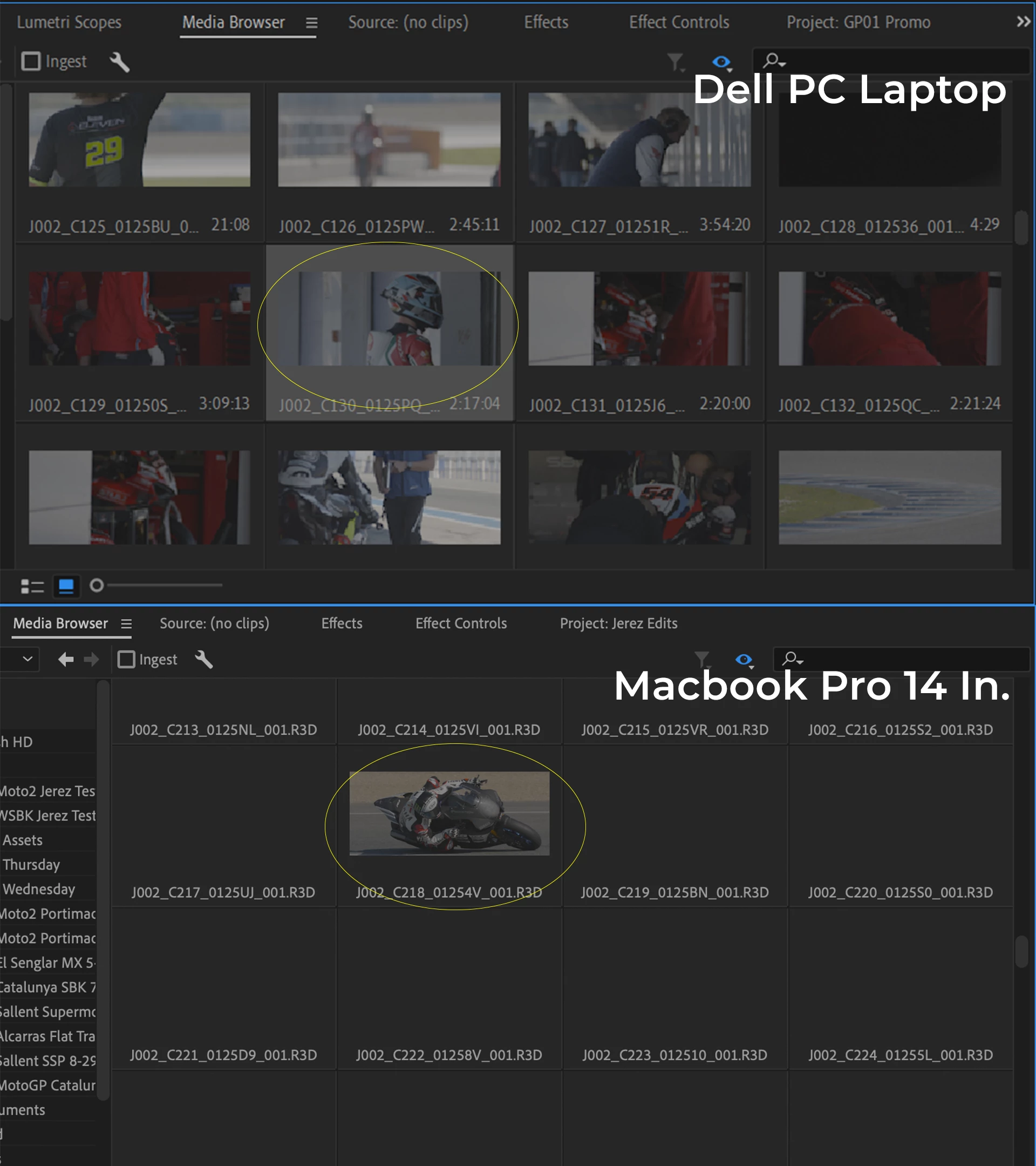
 

3 replies

Collin K
Participating Frequently
May 4, 2024

@GP241 Industries @Kevin-Monahan The workaround works, but I also see where GP241 is coming from; this is an annoying bug in Premiere where going through the 'File Directory' makes you see all of the segments of an R3D file which isn't helpful at all. I, too, am on a MacBook M2 Max Apple Silicon system. 

Collin K
Participating Frequently
May 4, 2024

Hi Kevin, just wanted to chime in that your workaround using "File Directory"/eyeball worked for me when I was encountering the same issue of the thumbnails not showing up on R3D files. I initially thought maybe it was because I was attaching an exFAT drive to a Macbook.

Kevin-Monahan
Community Manager
Community Manager
January 29, 2024

HI @GP241 Industries

Thanks for the message. I think I've seen this issue before. Try enabling the privacy and security preferences (System Settings > Privacy and Security) for the storage where the RED files are kept. Does that work for you? I hope the advice helps. Let us know if it works or not.


Thanks,
Kevin

Kevin Monahan - Sr. Community & Engagement Strategist – Pro Video and Audio
Participant
January 29, 2024

Hi Kevin,

Thank you so much for the response as I've been really struggling with this. Is there any chance you could provide me some further instruction after Privacy and Security as I am new to the Macbook file naviagtion?


I was able to access Privacy & Security under System Settings (I assume you meant the Macbook system settings and not premiere) and changed full disk access for premiere pro but cannot find the storage location under Privacy & Security. So far nothing has changed so I'd love some advice, thanks!

Kevin-Monahan
Community Manager
Community Manager
January 29, 2024

Hi @GP241 Industries,

I just tried browsing some .r3D files on my computer and had the same issue. I was able to get the thumbnails working once more by going to Media Browser and selecting "File Directory" from the Directory Viewers menu (The eyeball). Is that working for you?


Sorry for leading you down the wrong road. I find it odd that the automatic setting for Red didn't work as expected. I found that this is marked as a bug, but has been closed. It's only a problem on Macs with Apple Silicon. I'll try and reopen it for you because it's definitely not working correctly. Sorry for the hassle.


Thanks,
Kevin

Kevin Monahan - Sr. Community & Engagement Strategist – Pro Video and Audio