
JBrown321
Known Participant
August 7, 2025

Mercury Output shows up between 2 monitors

  • August 7, 2025
  • 4 replies
  • 214 views

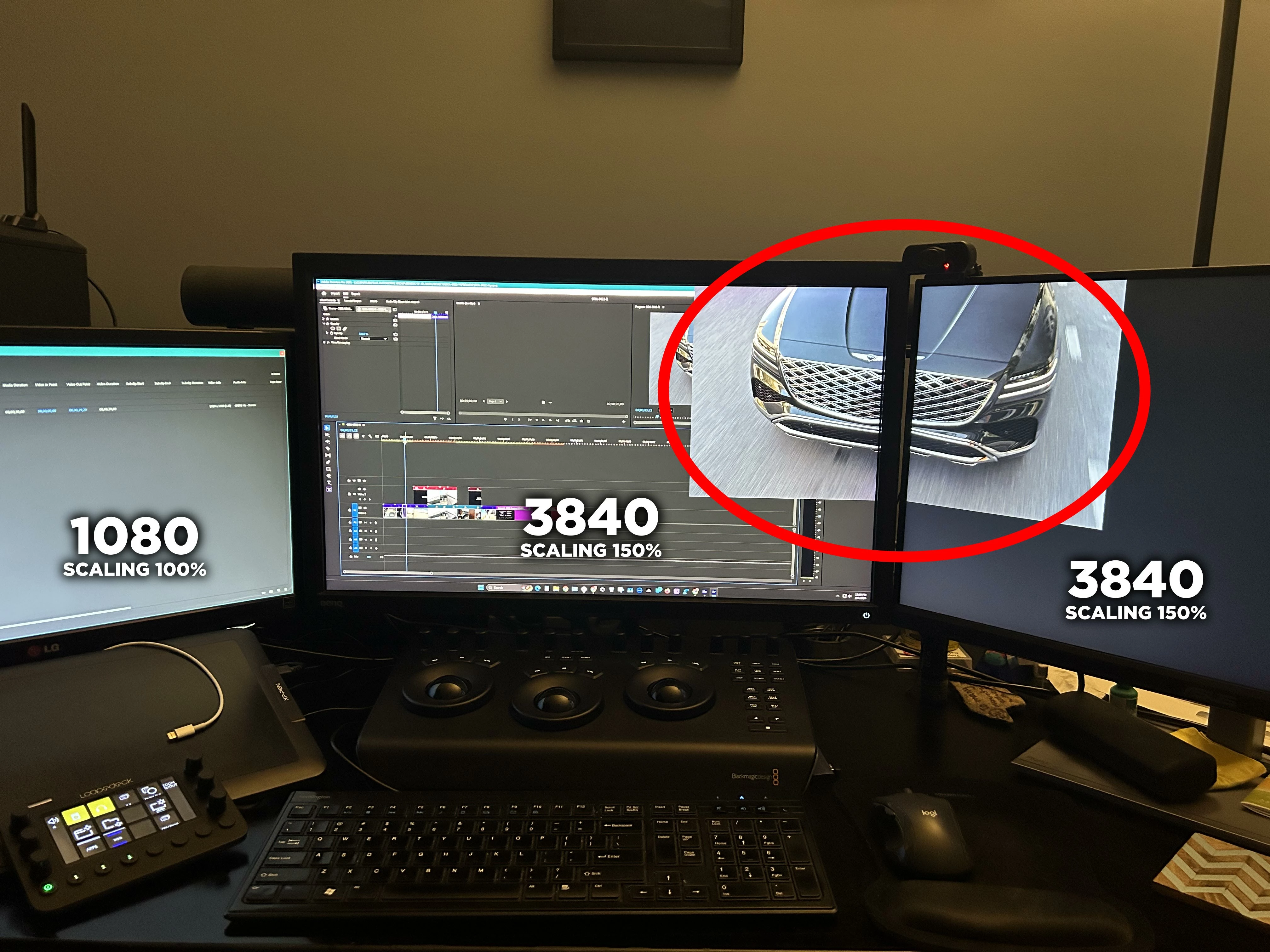
I have a 3 monitor setup (see attched image) all connected to my Nvidia GPU. The two on the right are 3840 res using Windows 11 scaling to 150%. However my left monitor is only 1080 so it needs to be set to 100% scaling. When using mercury playback for the far right monitor, it will merge with the center. I know the issue is my left screen and mismatch of scaling, BUT it's a 1080 screen that needs to stay in 100% scaling. If I remove any panels from that side and minimize/,maximize PP, the mercury playback outputs correctly to just the single screen like it should. I am hoping to bring awareness to this so that it can hopefully get resolved for us users who want to take advantage of the screen space and using different resolution monitors. 
4 replies

JBrown321
JBrown321Author
Known Participant
August 7, 2025

Thank you Mark for the screenshots.  I don't have GPU overlay on, but will check the Nvidia app settings like you. Thanks! 

JBrown321
JBrown321Author
Known Participant
August 7, 2025

Sure Matt, here ya go, hope that helps

Mark Morreau
Inspiring
August 7, 2025

I also have a three monitor setup, 2 x UHD monitors and a 1920 x 1080 monitor calibrated to REC709 that my Mercury Transmit goes to when I'm editing HD. I use the RH monitor when I'm editing UHD.
Setup looks just like yours.
All monitors attached via DP to a PNY RTX5080 (also worked fine with Zotac RTX4070Ti)
I am using Nvidia Studio Driver 577.00.


Like you, the two UHD monitors are scaled to 150% in Windows 11.
I don't have any issues transmitting to the far right monitor: I don't see what you see.

I have been editing like this for a very long time without issues. 
So it can work 🙂

Do you have any kind of Nvidia overlay turned on? 

Here are pics. Sadly I am incapable of keeping my workspace as tidy as yours 🙂


I don't have any customisations for Premiere in the NVidia control panel.

This is what my settings look like in the NVidia App.


Hope this is useful and helps resolve your problem.

mattchristensen
Legend
August 7, 2025

@JBrown321 that image is very helpful to understand the problem, thanks. Could you also share a screenshot of your Preferences > Playback window?