
MOGRTs are not properly importing to Premiere
I had to reinstall Windows due to a freak power outage that messed up my computer from booting. Luckily Windows made a backup of my old files, so after reinstalling Premiere Pro I copy-pasted my old MOGRTs into my new Adobe’s “Motion Graphics” folder. But some of the MOGRTs don’t show up in the “Graphics Templates” window in Premiere.
If I use the “Install Motion Graphics template” button to re-add the mogrt, Premiere says it’s a duplicate of a mogrt they already have. But if I delete it from the Template folder, then try to add it back through the same install button, I get a different error saying the mogrt is incompatible with Premiere and I need to update Premiere to it’s latest version.
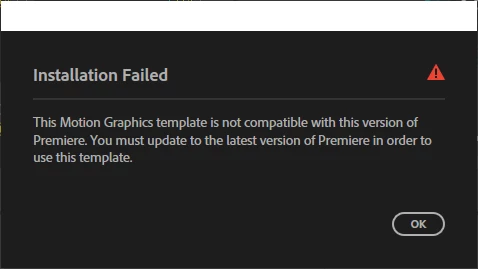
Just one problem: I’m already on the latest version of Premiere. And I originally made these templates years ago on older versions of Premiere so it doesn’t make sense that my current 2026 version isn’t current enough to import them.
I followed old forum posts advice and tried installing older versions of Premiere I had at the time of making those MOGRTs to try exporting them but I get the same “latest version” error above. And I tried emptying Premiere’s cache and reset preferences but they didn’t work either. Any other ideas on what I should do?


 AdChoices