
Participant
Nov 13, 2026 10:51 AM UTC
Needs More Info

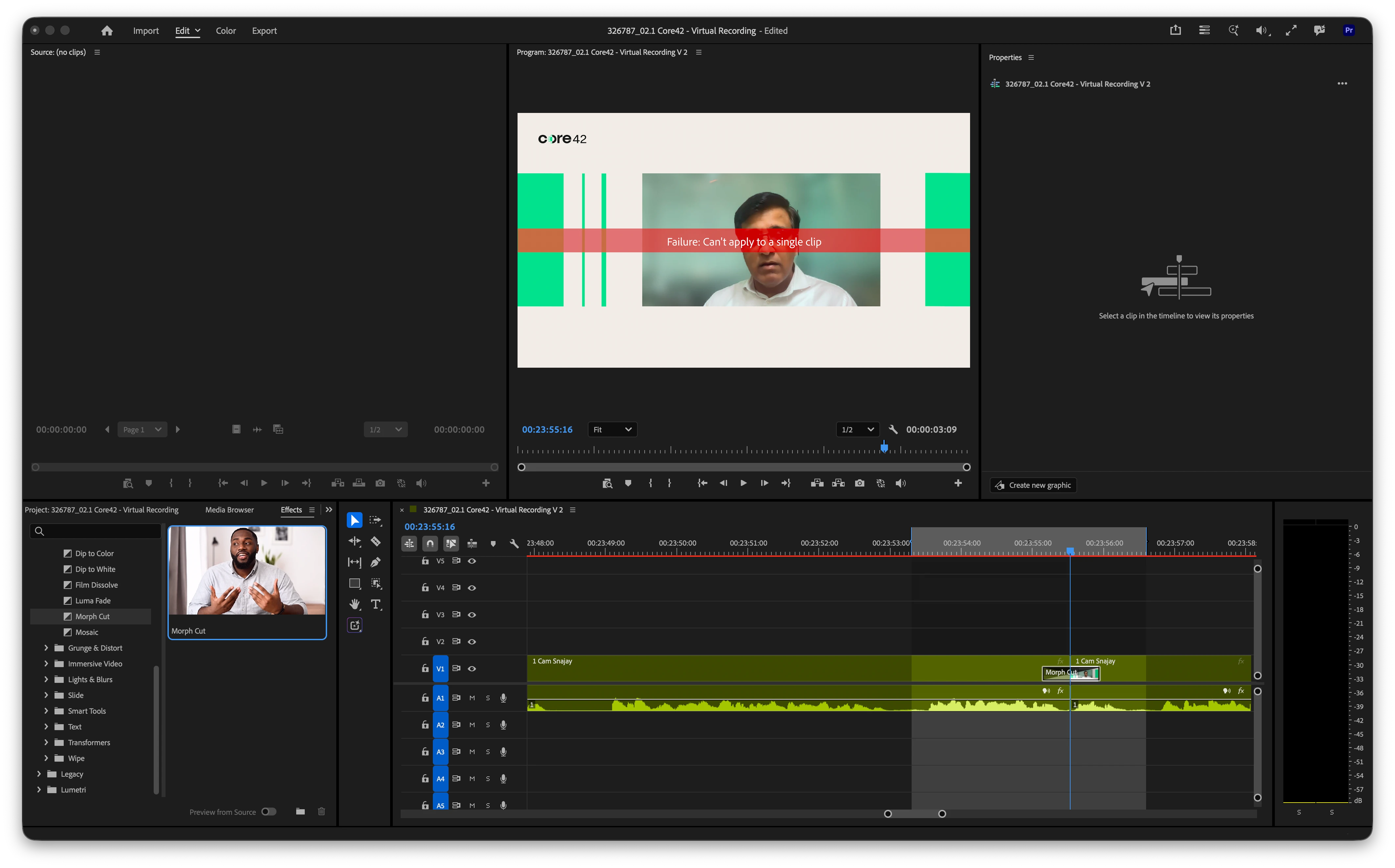
Morph Cut keeps showing the error cannot apply to single clip when there are 2 clips selected.

Since upgrading to Premiere 2027 morph cut no longer works, it keeps saying the it cannot be applied to a single clip when two clips are next to each other. This may be a Multicam bug in particular as although it never worked on live Multicam clips it used to work when clips were flattened, no flattening the clips in PP 2027 morph cut refuses to work and despite rendering, clearing caches etc. it still shows the error Failure: Can’t apply to a single clip!
 

    7 replies

    Amy the Stuv
    Community Manager
    Community Manager
    Nov 13, 2026 2:52 PM UTC

    Hi ​@Precious_guide0867 

    Welcome to the Premiere Forums. I was unable to reproduce this issue on Multicam Clips in a Production on my M4 Mac OS 27 Goldengate. Could we get some more information about your system and setup so we can reproduce this issue internally for a better look?

    • Operating System: Specify Windows or macOS, along with the version.
    • Chip (Mac Only): Specify which M-series Chip or CPU/GPU combo.
    • GPU and Driver (Windows only): Please let us know your video card and driver version. We recommend updating to the most recent version; for NVIDIA users, we strongly recommend the Studio version of the driver.
    • Video Format: If the issue relates to playback or export, please specify the format (and ideally share a sample video).
    • Project Size: About how big is your project file? Is it in a Production? Approximately how many clips are involved in a rough estimate?

    I can privately message you an upload link if you’re willing to share the project and files that reproduce this issue. If you want to sub out a testing sequence, you can also make a small project out of that using Project Manager.

    Hoping to help,

    Amy

    Translate
    Participant
    Nov 13, 2026 3:15 PM UTC

    Mac OS 26.7.3
    M4 Max
    Video format MP4 
    Project file size 774kb

    I’m not in a position to share the project file and media as it is an active project with a client. But this did not happen until I upgraded to PP2027, there have been numerous random bugs with this version so far.

    Translate
    Amy the Stuv
    Community Manager
    Community Manager
    Nov 17, 2026 6:45 PM UTC

    ​@Precious_guide0867 Screen shots of your Effects Control Panel with the shot prior to the Morph Cut and after the Morph Cut selected could help too. Sometimes scaling or other effects may trigger the issue and that will help us diagnose it properly.


    If you download 26.5.3 in parallel using the Creative Cloud (so that you have both 27 and 26.5.3 on your system), can you apply a morph cut to a sequence like this? If you export an XML of your version 27 sequence, you can import it into 26.5.3 but will have to redo any and all Effects. This could be both to test if Morph Cut works on the same clips in 26.5.3 and, if it does, it’s a starting point for rebuilding in the version working for you.


    Thank you for helping us figure this out.

    Translate
    Participant
    Nov 13, 2026 10:56 AM UTC

    Right further to this if you apply morph cut to any other clips that have not been flattened it seems to wake it up then it works on flattened Multicam clips again!


    Translate
    Participant
    Nov 13, 2026 12:17 PM UTC

    Even further I will say this is completely screwed on different footage I’m now getting Error reading node properly 20 times and Failure: Can’t access clips.

    Translate