
digitlman
Inspiring
November 20, 2024

MXF Multichannel mono export broken in latest Premiere version

  • November 20, 2024
  • 11 replies
  • 795 views

Running the latest Premiere Pro in windows 11 for Broadcast television station.


I can no longer check the box for discrete mono audio tracks when exporting standard MXF op1a files.


I have been doing this for many years and fully understand the process. I am currently trying to determine exactly when this bug happened and how many files i need to re-export. I went back 4 months ago and it was still working then.


The preset we have been using doesn't check the box anymore. I tried using my own 16ch multichannel sequence and it does not work. I tried using your new broadcast preset with 29.97i 8 ch mono discreet and then click export and I am unable to check the mono audio tracks box. I have tried everything i can think of and nothing will let me check the box anymore.
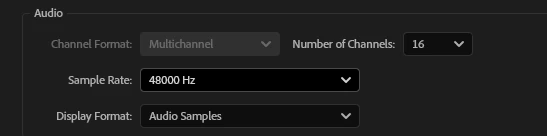
 

audio is setup correctly in the sequence
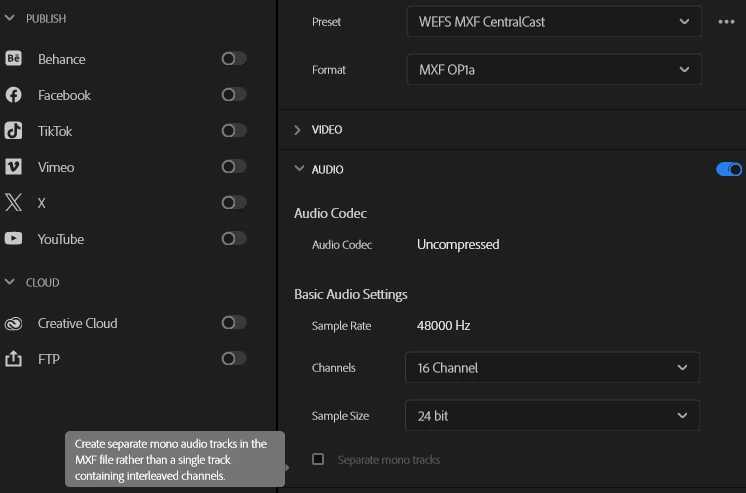
 In the export window i can't click the box.

I went back and found the last files i had that exported properly 4 months ago:
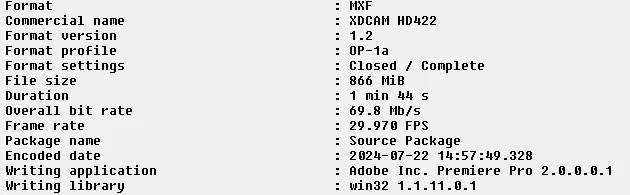
 this file worked and output 16 discrete tracks and used writing library 1.1.11.0.1
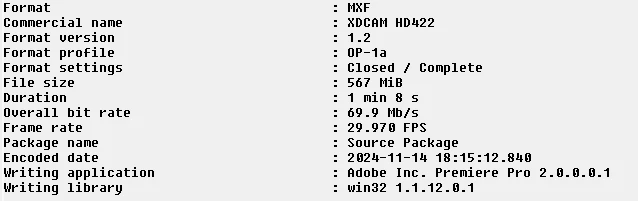
 

 This is the current file output that will not export mono tracks

writing library 1.1.12.0.1


Please try to fix this asap as our only workaround is to ditch all the extra audio tracks from our broadcast sources and just send a single stereo mix. This will lose any extra audio for SAP, AD, 5.1, and mono mixes that are standard for television broadcast stations.


Thanks

Chuck


This topic has been closed for replies.

11 replies

jamieclarke
Community Manager
Community Manager
November 20, 2024

Hi @digitlman - I'm glad that you are able to workaround it for now.  I'm sorry this is an issue.  I will let you know when I hear something from the team.  Thank you for your help and patience.

jamieclarke
Community Manager
Community Manager
November 20, 2024

Updating Status to Acknowledged

digitlman
digitlmanAuthor
Inspiring
November 20, 2024

It certainly has something to do with the current presets both custom and adobe generated. I was able to take my old preset and change the video codec to 35 and then back to 50 and the checkbox autofilled with the check. I then saved it as a new preset and was able to choose it again on another sequence and it seemed to work.

jamieclarke
Community Manager
Community Manager
November 20, 2024

HI @digitlman -  Let me know if you are able to workaround or need additional help.

Again,  sorry about this.  I will check with the developers and see if there is a quick fix.

digitlman
digitlmanAuthor
Inspiring
November 20, 2024

Thanks, I concur that it seems to be a quirk with the presets. If i change out the codec to something else and then swap it back then it has the box already checked. This will be a little tough as we process tons of files but we will work with this until there is a fix. I will try making a new preset and see if that does anything.

jamieclarke
Community Manager
Community Manager
November 20, 2024

HI @digitlman - I can repro this bug,  This is just bad and sorry for the frustration.  I have been trying to find you a workaround.  The issue seems to be everytime you select a custom preset the Separate Mono Tracks checkbox gets bonked.  

To get out of this loop can you try and choose a different export in the presets like h264 (it doesn't matter) and then manually change the format to MXF OP1a and manually set your video settings.  Let me know if that helps.  I'm currently looking to see where we store the export presets and if this doesn't work hopefully you can just delete a file and have it rebuild.

digitlman
digitlmanAuthor
Inspiring
November 20, 2024

I also just tried the beta version.


launched it, created new project, new sequence, chose your broadcast 1080i 8 discrete mono track preset.

imported a mono wav file. dropped it onto 3 different tracks, clicked export

clicked more presets, chose the xdcam50 ntsc 60i preset

twirled down the audio options and cant click the mono tracks box.


digitlman
digitlmanAuthor
Inspiring
November 20, 2024

 I tried picking that basic default one and it does not work for me.

jamieclarke
Community Manager
Community Manager
November 20, 2024

Hi @digitlman - I do not see a codec labeled "XDCAM 50 60i" within Premiere Pro.  The closest I have found is XDCAMHD 50 NTSC (4:2:2) and when I export with the separate mono tracks it does embed discrete tracks.  


Can you share a screenshot of your video codec settings?

digitlman
digitlmanAuthor
Inspiring
November 20, 2024

latest premiere, about says 25.0.0 build 61


export is standard XDCAM 50 60i we are sending to Evertz broadcast playout servers.


Audio is expected as such:


nothing has changed on our end, we are using the same sequence and export presets as before.


I tried from scratch also and nothing works. tried on other machines, made project from scratch and unable to check the box on the export.