Participating Frequently
June 7, 2024

Mysterious Overlay on footage in Premiere Pro and After Effects CC

  • June 7, 2024
  • 20 replies
  • 1621 views

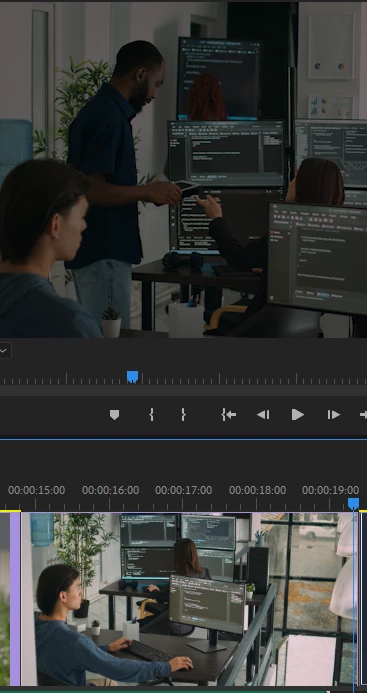
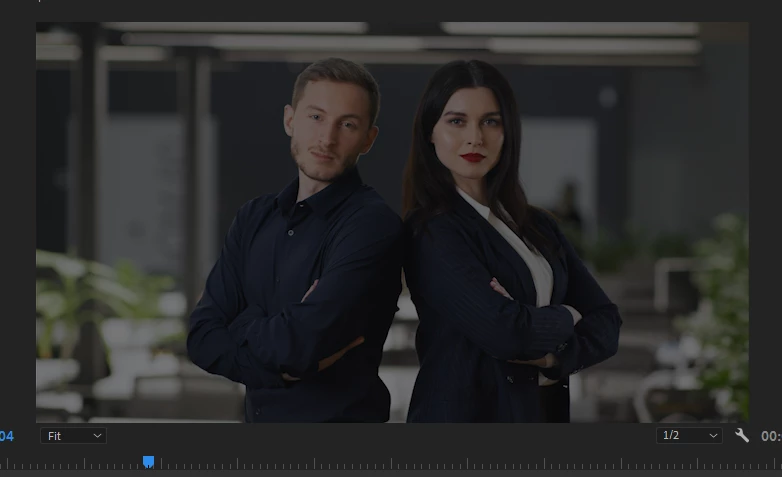
Hey everyone, I have been suffering from this issue that there are 2 footages i m placing in my timeline, they both have no overlays in original, but when i import them into premiere or After effects.. they both become darker, (both in source monitor and program view window... 
BUT...! interestingly, the thumbnail preview of same footage in timeline & project bin looks fine..!!!

and in After effects, the footage is darker for first few seconds and then becomes normal....
when i open the same project file in another PC, both having same versions of 23.6.5.. it works fine...

Please note that i have not applied any effects on it.. 

Adobe's support team is extreeemely slow on FB... they take hours to reply...
This topic has been closed for replies.

20 replies

jamieclarke
Community Manager
Community Manager
June 7, 2024

Can you send us one of the video files?  One more thing can you try running one of these files through Media Encoder with Quicktime ProRes as the settings and then see if that helps.

Participating Frequently
June 7, 2024

Hey @Kevin-Monahan 
I contacted the adobe video page on FB... they did help me out with another issue when i was stuck with prefrences freezing Video Apps (AE,PR,BR) it was due to user account permissions.. but this time they took a hell lot of time, cant wait much for support team to be that slow... they even took project file from me but nothing was beneficial at the end.

Participating Frequently
June 7, 2024

@jamieclarke No they are not. they are just simply downloaded and put on the timeline... nothing extra just drag and drop


Kevin J. Monahan Jr.
Community Manager
Community Manager
June 7, 2024

Hi @Osamah37824321cd36,

Thanks for providing the information required for the bug report. It is appreciated!


Please continue to work with the Adobe engineering team here on the thread.


As an aside, where on Facebook were you looking for support? We have Adobe Care monitoring there, but you can more easily reach Adobe Support.

The best way to do that is to click here: https://helpx.adobe.com/contact.html. The chat pod button is in the lower-right corner. Click that. After answering some preliminary questions, you will be given the option to get an agent to respond. Do that, but ask for an agent from the "video queue" (important). They can work one-on-one with you to solve such issues. Sorry for the frustration on this bug.


If they find a fix, please return with the solution if you have time so that others may benefit. We will appreciate it!


Thanks,
Kevin

Kevin Monahan - Sr. Community and Engagement Strategist – Adobe Pro Video and Audio
jamieclarke
Community Manager
Community Manager
June 7, 2024

Are these files transcodes from a different source, if so what is the source?  If transcoded what did you use?

Participating Frequently
June 7, 2024

@jamieclarke i just tried.. it didnt work... 


jamieclarke
Community Manager
Community Manager
June 7, 2024

Hi @Osamah37824321cd36 - Can you go into your preferences under the Color tab and check the box "Extended Dynamic Range Monitoring" let us know if that helps.

Participating Frequently
June 7, 2024

Participating Frequently
June 7, 2024

AE and PR 23.6.5
Windows 11 pro
HP Z820 workstation, Xeon E5-2640 processor, 64GB RAM, RTX 20270 card.

please note that its running fine on my 2nd PC... both PC have same versions, no plugins installed.


Ann Bens
Community Expert
Community Expert
June 7, 2024

Please post comp specs, Premiere version and build.
Also screenshots of MediaInfo info in Treeview on footage used, sequence settings

https://mediaarea.net/en/MediaInfo