

Nested Sequences split up after reopnening?
So I had a few videos split into clips, did the editing, turned them into nested sequences, saved the file, and closed it.
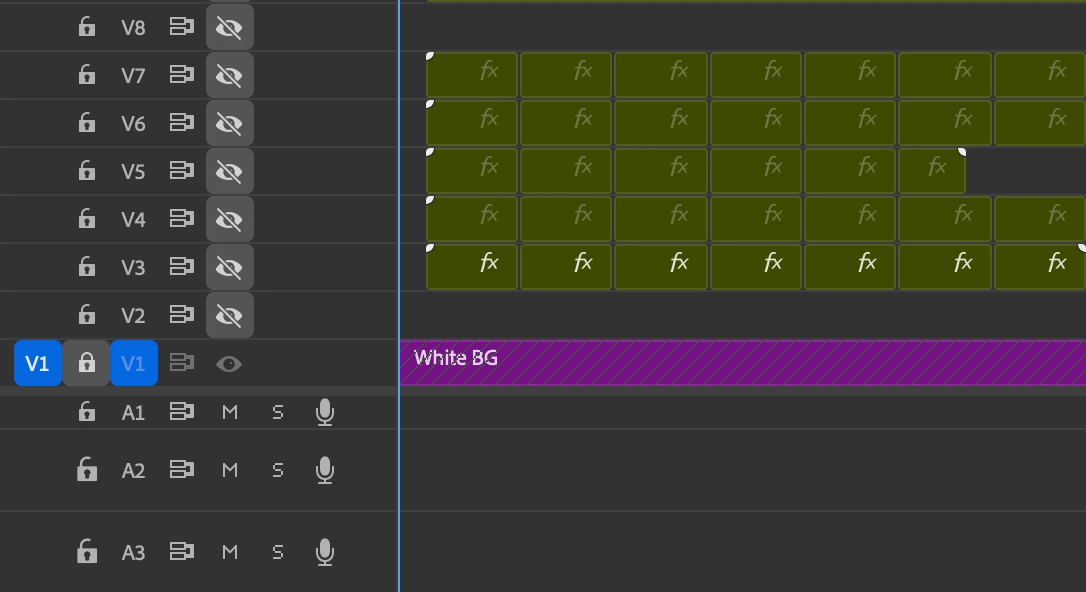
Now 2 days later I have reopned the file to continue the work, and find that most of my nested sequences have been split again (all except for 1), and I have no idea why/how, because I am 100% sure that's not how I saved it. I opened the last auto-save and it looks the same.
To further clarify, ever single video layer should only be having one nested sequence, instead it has many, but from the looks of it those clips are still all nested, so it's not like the file reverted back to before I made the nests, it looks more like the nested sequence got split again, evenly, at the same point for all video layers.
Also when I originally made the nested sequence, i changed the name, and now all those clips have that name. I also looked for the nested sequences that I originally made in the project panel, but could only find one, which I then dragged into the timeline to replace the one that got split up. But the other ones are missing.
It's like something screwed up the file?
I'm new to premier so apologies if this is something obvious.
I use the newest Pr version and haven't updated it between last time working on it and now.
Edit: Just noticed that the names of the sequences are also mixed up, they don't match with the video material. weird.


 AdChoices