
Participant
Nov 17, 2026 11:30 AM UTC
Needs More Info

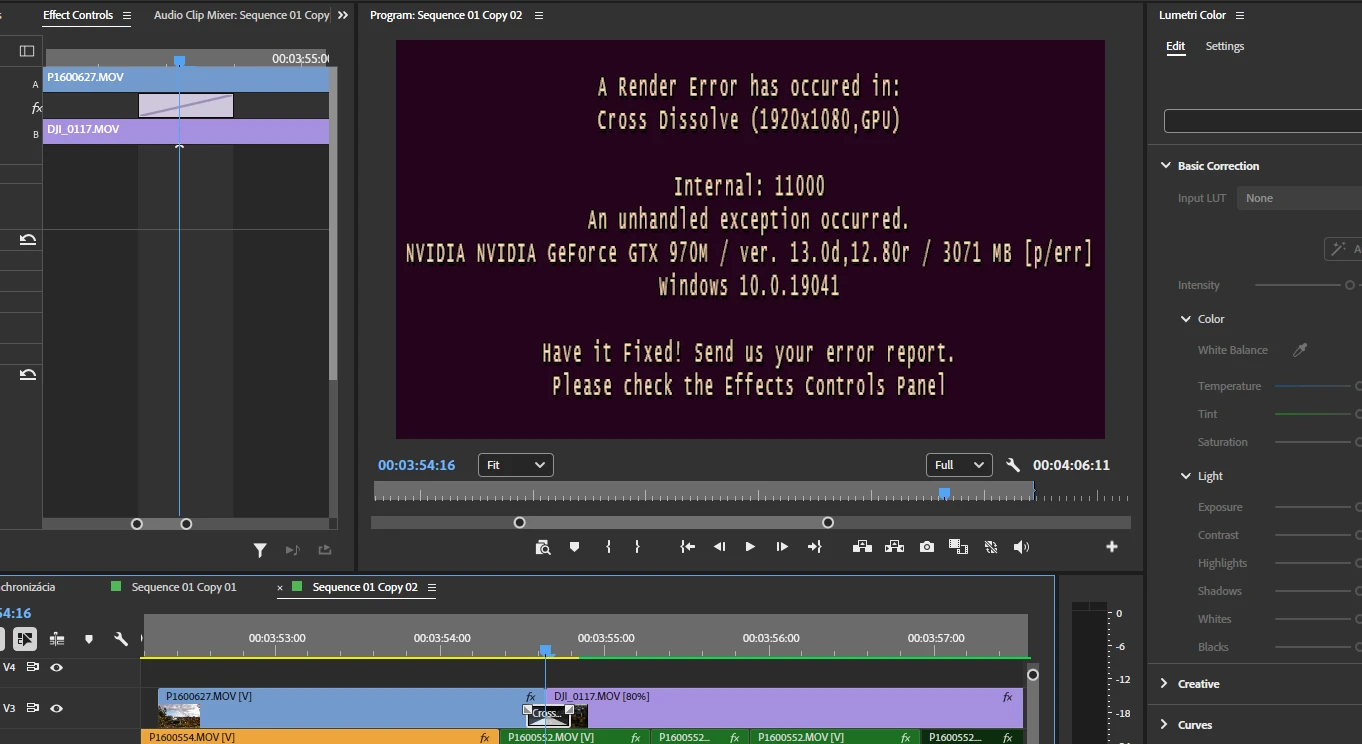
Not rendering dissolve or gaussian blur effect

Render Error, internal: 11000

Adobe Premiere 2026 does not render the cross dissolve (or any other fade effect). This also happens when gaussian blur is added to a shot. I have this problem since the beginning of 2026, it perfectly worked on this laptop earlier: Windows 10 6-4bit, Intel Core i7-6700HQ, 16 GB RAM, NVidia GeForce GTX 970M. Please, help me solve it.


    1 reply

    Amy the Stuv
    Community Manager
    Community Manager
    Nov 17, 2026 2:43 PM UTC

    Hello ​@Energetic_difference15A7 

    Welcome to the Premiere Community Forums. We could use a little more information to help us identify the issue.

    • Premiere Version: How to find the exact version of Premiere you're using.
    • GPU Driver (Windows only): Please let us know your video card driver version. We recommend updating to the most recent version; for NVIDIA users, we strongly recommend the Studio version of the driver.

    There were some reports of this in 26.3.2 but that was possibly the driver needing an update. I also wonder if you could share screenshots of the Effects Panel with the Clips Prior to and After the cross dissolved selected.


    Last thought is that a corrupted render file / Video preview may be the culprit. Look at where your Scratch Disks put Video Previews and move them from that folder. You may have to re-render any projects that stored renders there, but you can move them back and restart Premiere if need be. A Screen recording of the actions leading up to this error can also be very informative. 

    Hoping to help,

    Amy


    Translate