



Última+Toma
Participant
Jul 29, 2026 5:15 PM UTC
Released

Object Mask – Smooth creates pixelated edges after tracking and export

Issue:
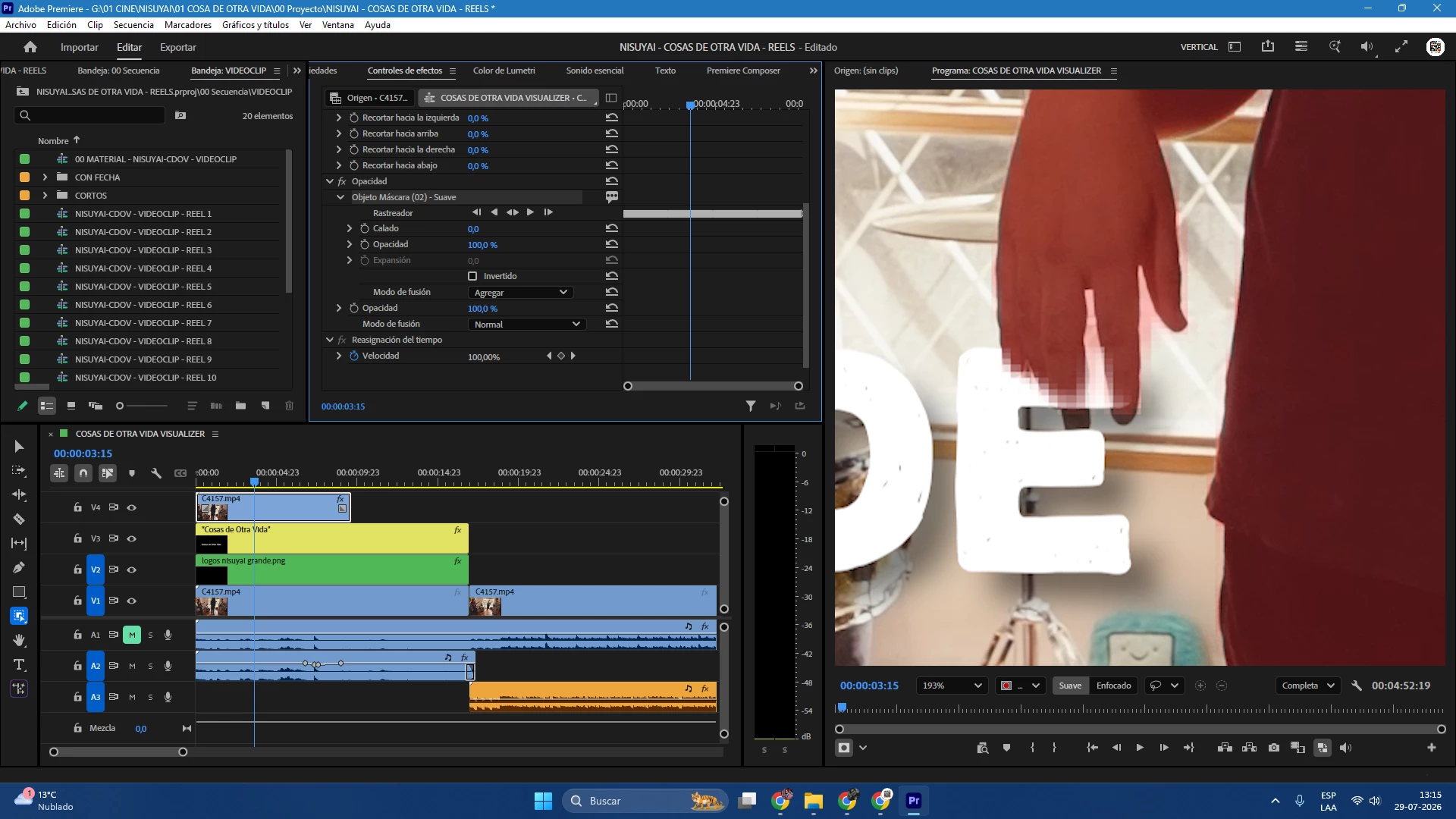
The automatic Object Mask generates low-resolution, pixelated and aliased edges around the subject. The problem is visible after tracking and remains in the exported video.

Steps to reproduce:
1. Import a video into Adobe Premiere Pro.
2. Place a graphic or text layer above the video.
3. Duplicate the original video and place it above the graphic.
4. Create an automatic Object Mask around the person.
5. Track the mask.
6. Export the sequence.

Expected result:
The Object Mask should preserve a clean and accurate edge around the person at the original video resolution.

Actual result:
The tracked mask creates visibly pixelated and blocky edges, especially around the hand and fingers. The pixelation is also present in the final export.

Additional information:
- Mask type: Object Mask – Smooth
- Feather: 0
- The problem is visible at full preview resolution and in the exported file.
- Increasing Feather only blurs the defective edge and does not improve the mask accuracy.


    Pinned Reply By KatieToo

    Hi all,
    Thanks for taking the time to report this. Good news is that the issue you reported here has been fixed, and the fix is available in the latest release of Premiere.

    If you update and still see the problem, please reply here with your exact version (Help > About Premiere Pro) and your OS, and we will take another look.

    Thanks again for flagging it - reports like yours are what get these fixed.
    Katie

    29 replies

    KatieToo
    Community Manager
    Community Manager
    Jul 29, 2026 5:32 PM UTC

    Hi ​@Última Toma 

    Thanks for stopping by the Premiere forums! Yes, this issue looks familiar to me, and our team’s investigating it currently. I’d like to add it onto the report. Appreciate you including a screenshot and all those details.

    Can we get a little details on your computer? I see it appears to be Windows.

    • Is it Win11/10?
    • What Win driver version and build do you have?
    • What version and build of Premiere (go to top menu Help > About Premiere to see)?

    Also, would it be alright if we merge this post? There’s been I think 2 other posts about that similar issue (that way users can easily find it and answers)


    Appreciate you taking the time to report and let us know about your specs and premiere version!
    Thanks,
    Katie

    Translate
    Última+Toma
    Participant
    Jul 29, 2026 6:16 PM UTC

    There's no problem merging this post with others. Whatever it takes to find a solution.


    Translate
    KatieToo
    Community Manager
    Community Manager
    Jul 30, 2026 2:12 PM UTC

    Much appreciated ​@Última+Toma and glad you saw the other reply from Vikas as well. 

    Thanks!
    Katie

    Translate