

ShockwaveWhisper
Participant
April 29, 2026

Object Mask Tool - Doesn't work with flipped footage

  • April 29, 2026
  • 3 replies
  • 49 views

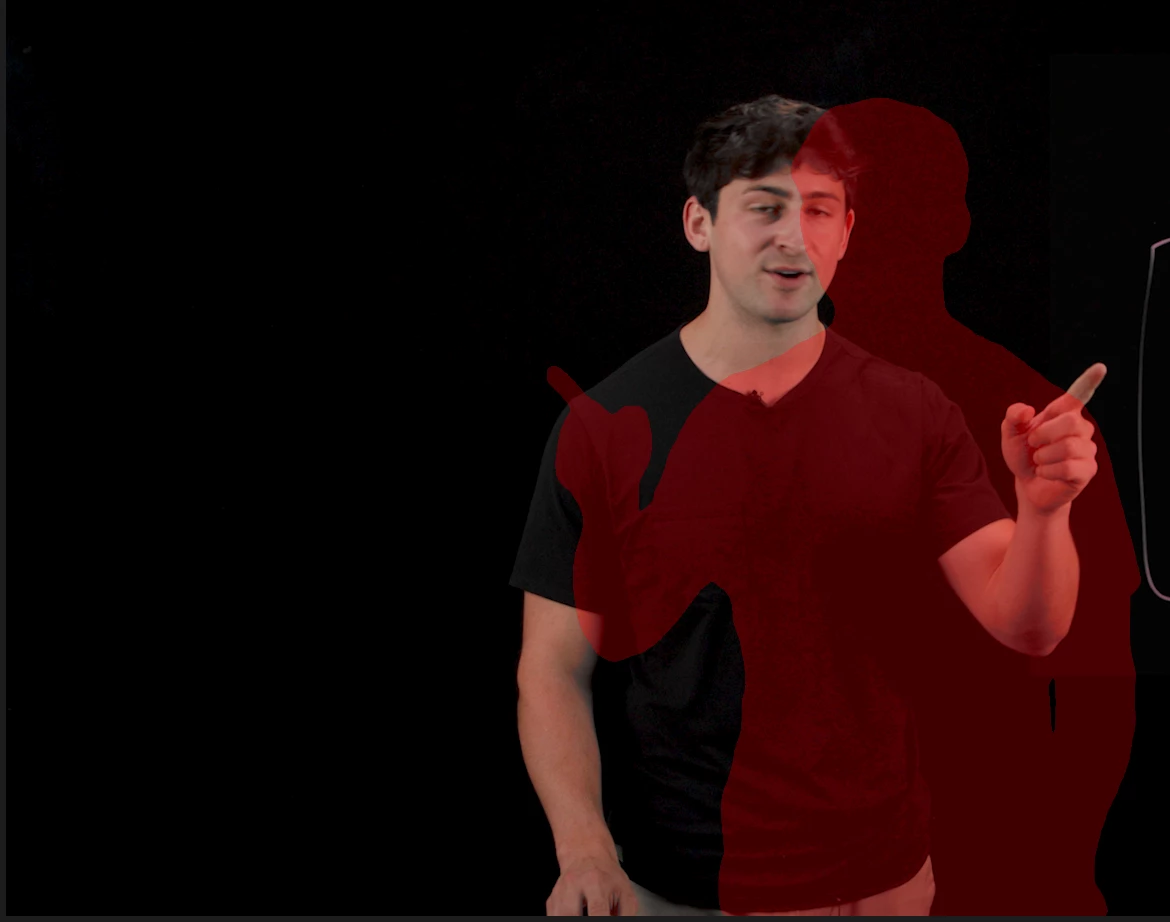
When using “flip horizontal” effect on a clip in a sequence, the object mask tool detects the object but masks it as if the clip has NOT been flipped. You can see in the image it’s masking correctly, but since the footage has been flipped, it’s showing the mask from the pre-flipped footage.
 

    3 replies

    IanB_360
    Community Manager
    Community Manager
    May 1, 2026

    Hi ShockwaveWhisper
    Currently, the best workaround is to use the steps Ann Bens has suggested. You'll first need to mask and track, nest the clip, and then apply the Horizontal Flip effect. Or you can Horizontal flip, then nest, and apply a mask. 
    This is the intended behavior, but we can try to make it a future request.
    Here to help.
    Ian

    Ann Bens
    Community Expert
    Community Expert
    April 29, 2026

    I believe masking only works on original orientated clips.

    Mask, nest, then flip.

    R Neil Haugen
    Legend
    April 29, 2026

    Woa ... not seen that, but I’ve not flipped something. I hope someone else test this out immediately!

    Everyone's mileage always varies ...