
DJP2014
Inspiring
August 21, 2025

P: Multicam Bug: Next/Previous edit doesn't work

  • August 21, 2025
  • 5 replies
  • 343 views

I've been dealing with this really annoying bug for years, and today it's driving me crazy -  so i thought i'd ask if anyone else has run into it?


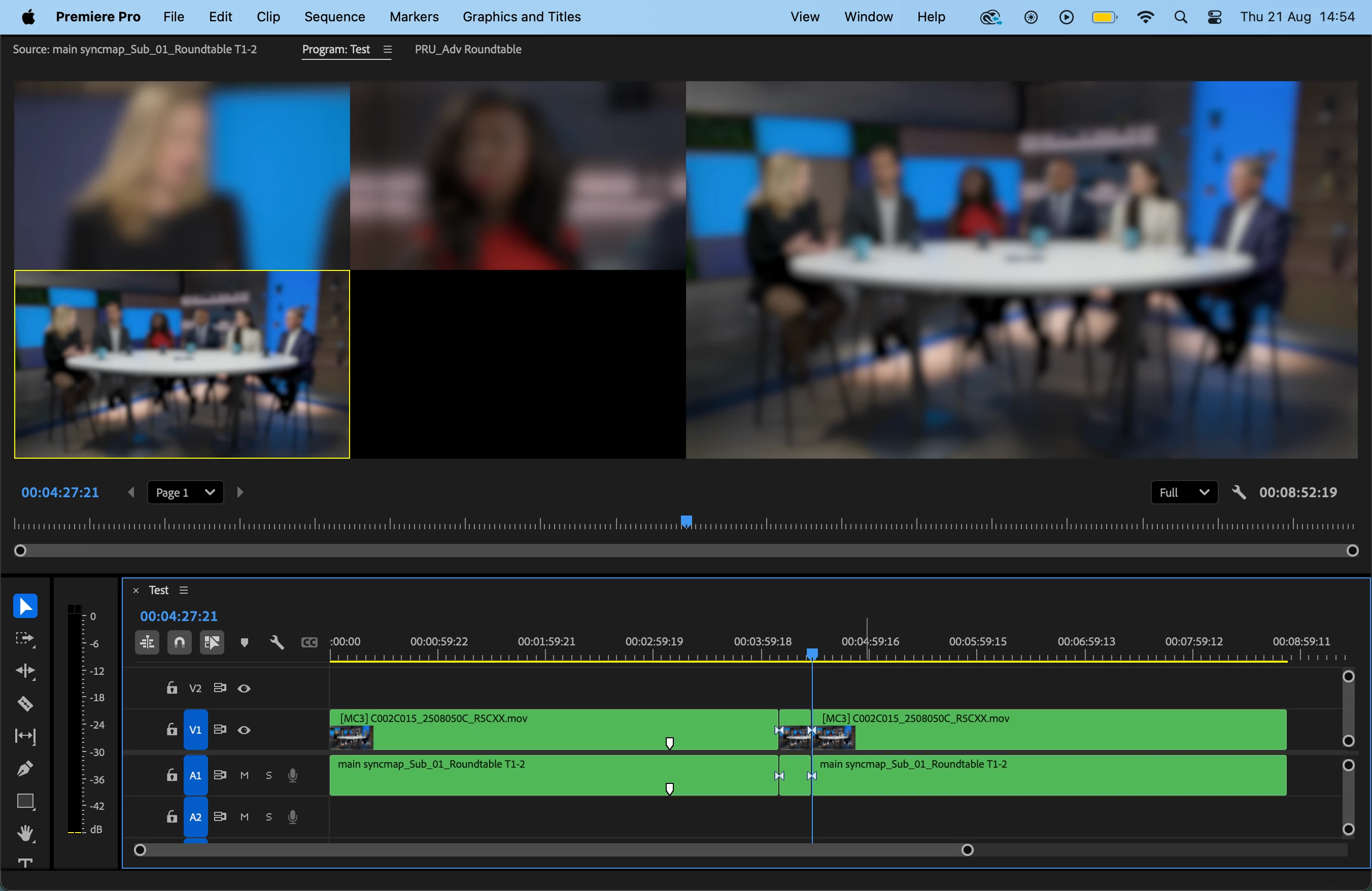
Issue: When editing Multicam footage if I make an edit while the CTI is playing (like a Cut, Insert, or Overwrite), the Go To Next/Previous Edit Point commands stop controlling the timeline and instead start switching camera angles in the Program Monitor?! 


I've discovered this only happens if the Multi-Cam View is turned on. Each time it happens I have to nudge the CTI to return control to the Timeline. Really annoying.


MacBook Pro M1 15.4.1 

Pr 25.4.0
5 replies

jamieclarke
Community Manager
Community Manager
September 17, 2025

Hi @DJP2014 @Tom_edit - Thank you for reporting this. I was able to reproduce the issue and have filed a bug report. We’ll update this thread as soon as we have more information to share. 

DJP2014
DJP2014Author
Inspiring
August 22, 2025

Yes, that's part of the same thing @Tom_edit. Thought I'd seen a post on this, just couldn't find it.


However, it happens to me with any action in the Timeline - like a cut/overwright/insert/ripple/extend edit - while the CTI is playing.

Inspiring
August 22, 2025

Are you by chance explaining this issue? because if so, yeah I really wish it would get fixed too 😞
there are so many random quirky bugs with multi-cams that the team have been made aware of but aren't on any roadmaps unfortunately

DJP2014
DJP2014Author
Inspiring
August 21, 2025

Correct, blur was just for NDA.


But that’s exactly it, @IanB_360  — I lose control of the Sequence panel and get stuck in the multicam view. It’s not actually switching angles. After experimenting a bit more, I realized that it's showing either the first frame of the clip at the playhead or the first frame of the next clip – depending on whether I'm pressing Previous or Next Edit. However, the CTI doesn’t move in either panel, and there’s no timecode change — just the picture changing. If i hit the right arrow to step forward a frame then the Playhead jumps to the first frame of the next clip and the timeline goes back to normal.

IanB_360
Community Manager
Community Manager
August 21, 2025

Hi @DJP2014 
I assume by timeline loses focus you do not mean it blurs the footage like the screengrab shows. That was just implemented on your part to share with us and still be NDA compliant.
So what you are describing, if I am correct, is that while playing in MultiCam and making edits, the CTI and Go to Next cut loses the control of the Sequence, and you are now in the multicam view, switching cameras instead of cuts?
Correct? This might be a known issue. I'll be sure to work on it and get back to you.
Here to help
Ian