


Participating Frequently
February 1, 2024

P: Unable to select text or add new text with Type Tool

  • February 1, 2024
  • 75 replies
  • 20539 views

Unable to select or edit the existing text using the Type Tool. The selection gets instantly reverted. This also happens while adding new texts. Restarting the app is the only workaround. Here's a screen recording of the issue:
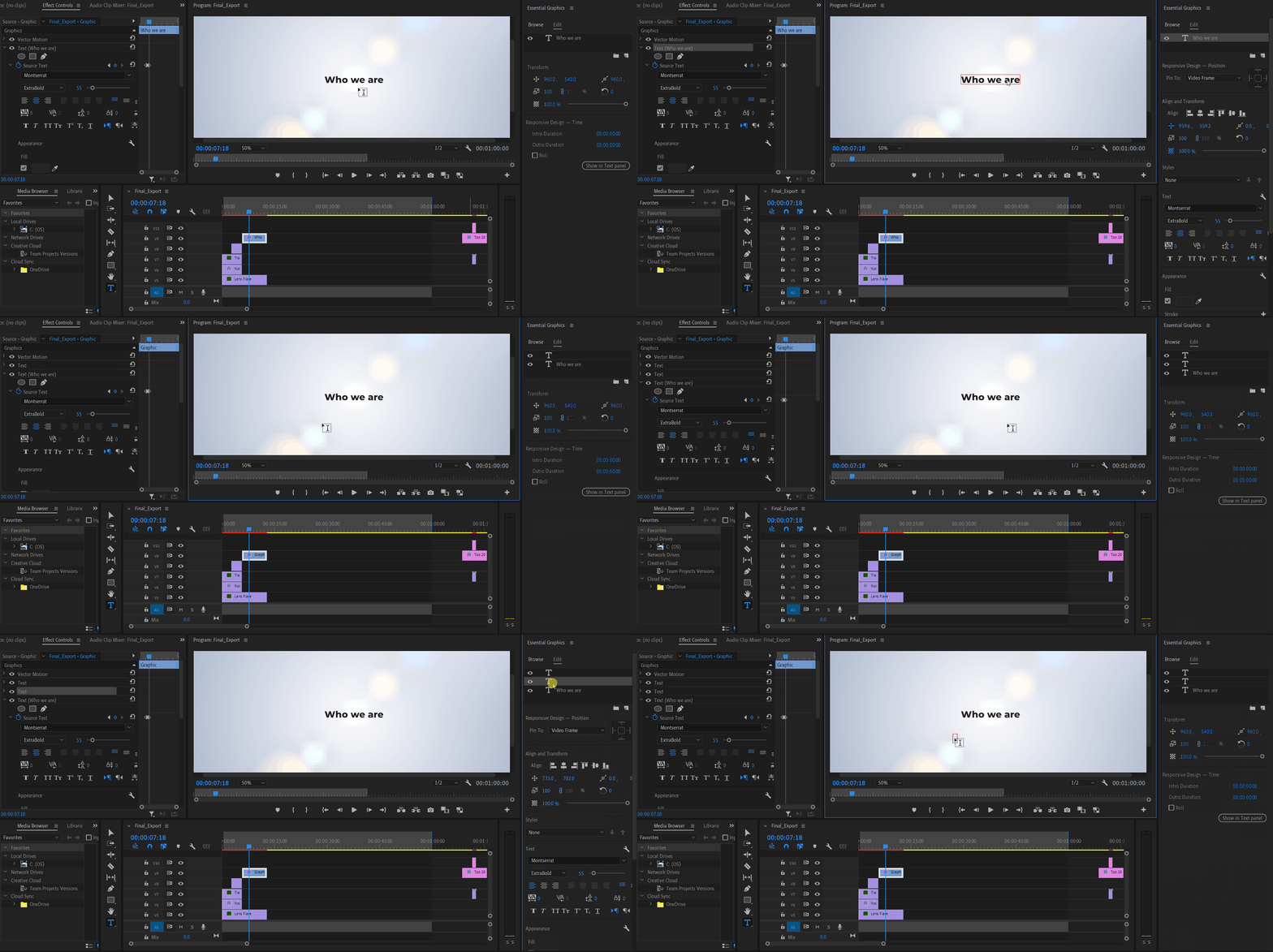


Premiere Pro Version: 24.2.1 (Build 2)

OS: Win 11 Home

Laptop: Asus Vivobook Pro 15

Processor: AMD Ryzen 5 5600H

Graphics Card: Nvidia RTX 3050

75 replies

WIGTV
Inspiring
March 22, 2024

It wasn't build 25. I think it was build 24.4.0 - the most recent version I saw on there but maybe I missed something...???? I will look again! Thanks!


Also I DID forget to clear the cache! I'll do that as well. Thanks for the heads up!


Stan Jones
Community Expert
Community Expert
March 22, 2024

WIGTV,


What Beta build did you install (help -> About). Working for me in Build 25. Was NOT working in Build 14.


Did you clear the cache when you installed?


Stan


WIGTV
Inspiring
March 22, 2024

Darn - I just download the Premiere Beta build 24.4.0 build and the issue is still NOT fixed! I'm stressing out because I have a HUGE project coming up where there is a bunch of "copy and paste." I can workaround but it's going to suck.

Matt Young14394008
Legend
March 22, 2024

@Kevin-Monahan- not sure how the mask bezier handle bug got merged with a text tool bug, but here we are!  Can you let me know if there's a way to import custom settings into the beta version?  You implied it was possible with your last reply, but the link took me to a page where I could find no information about how to do it.

Matt Young14394008
Legend
March 20, 2024

Thanks for the additional info,@Kevin-Monahan .  Apologies if I'm being dense, but I can't figure out from the link you provided what the workflow is for importing custom settings for use in PPro Beta.  How would I go about bringing in my saved workspaces and keyboard shortcuts into Beta?

Stan Jones
Community Expert
Community Expert
March 13, 2024

> making editing prohibitive


It's a problem, and they're working on it. But till fixed, 1) try to avoid deleting any of those effects while editing text and 2) if you do, use Annika's recommended workaround (click on motion or vector motion and then click away). You can also edit text in the Text panel, Graphics or Captions tab as appropriate.


Stan


Participant
March 13, 2024

Having the same issue, currently working on a video with a lot of text and it's basically making editing prohibitive. This needs to be resolved ASAP, I can't afford to work at this pace. 

Participant
March 12, 2024

I'm experiencing this as well.  I can't select text in within the program window or edit there at all.  It forces me to edit within the Text Window.  I'm using Premiere 24.2.1 working on a Mac running macOS Sonoma Version 14.3.1.


This was happening prior to the Mac update but seems to be an issue that's popped up with the most recent Premiere update.

Known Participant
March 12, 2024

On 24.2.1 (build) 2 the graphics tab of the text panel seems to be broken as well.


When i select the text of an element (by repeatedly clicking it until everything is highlighted), it SEEMS to be selected completely (visually). But when i copy it, the last few characters sometimes don't get copied. Or when i paste something to replace the highlighted text, sometimes the last few characters remain.


Premiere shows the complete text as selected but in fact sometimes ignores the last few characters.

Stan Jones
Community Expert
Community Expert
March 12, 2024

@4977934 Jaber,


I forgot that you can edit the source text for regular graphics text in the Text panel GRAPHICS tab, just like you can edit caption/subtitle text in the Captions tab. That is a great option. And I can confirm that it is working when this bug interrupts regular text editing in the Program Monitor.


And that is another good workaround for this issue to add to the one Annika describes.


I had Beta 24.4.0.14 open when testing, and can confirm that the bug is still present in that build.


Stan

Edited to correct workaround info.