

Peak File Regeneration for Previously Cached Media Across Projects
In Premiere Pro 2025 (25.5), once a media file has had its audio peak file generated, Premiere reuses that existing peak file whenever the same media is imported into another project. This avoids unnecessary cache generation and significantly improves workflows that reuse the same media across multiple projects.
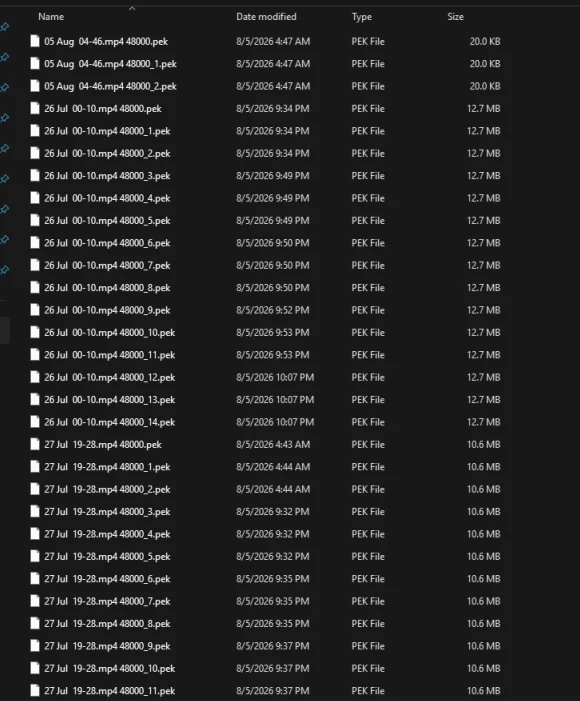
In the latest Premiere (26.3), this behavior appears to be broken. Premiere regenerates the audio peak file every time the same media is imported into a new project, even when a valid peak file already exists in the Media Cache.
As a result, identical media can end up with duplicate peak files, increasing cache generation time and slowing down workflows that frequently reuse the same assets.
(While testing use a longer media file so that peak generation takes long enough to clearly observe whether Premiere is reusing or regenerating the cache.)
Steps to Reproduce (Scenario 1 – Across Projects)
- Create a new project.
- Import a media file with audio. (or just a long audio)
- Wait for Premiere to finish generating the audio peak file.
- Close Premiere.
- Launch Premiere again.
- Create a new project.
- Import the exact same media file.
Expected Result
Premiere should detect that a valid audio peak file already exists for the media and reuse it without generating a new one, matching the behavior of Premiere Pro 2025.
Actual Result
Premiere generates a new audio peak file for the media instead of reusing the existing cached peak file.
If this process is repeated across multiple projects, duplicate peak files are created for the same media instead of using the existing cache.
Steps to Reproduce (Scenario 2 – Unsaved Project)
- Create a new project.
- Import a media file with audio.
- Wait for the audio peak file to finish generating.
- Close the project and choose Don't Save.
- Reopen Premiere.
- Open the same project.
- Import the same media file again.
Expected Result
The existing peak file should be reused since it has already been generated for that media.
Actual Result
Premiere generates the audio peak file again, despite an existing cached peak file already being available.
Impact
While this may seem like a minor issue for individual clips, it has a significant impact on workflows that repeatedly use the same assets across many projects.
For example, editors often maintain shared folders containing:
- Sound effects
- Music libraries
Instead of reusing the existing cached peak files for these assets, Premiere regenerates them for every project. This increases project loading times, wastes processing time, and creates unnecessary duplicate cache files.
This behavior does not occur in Premiere Pro 2025, where existing peak files are correctly reused.
System info
Application: Premiere Pro v26.3
OS: Windows v10.0.26200, RAM: 31.82 GB GB, CPUs (logical): 24
GPU: Rtx 3060 Ti Nvidia Studio Driver ver. 610.88


 AdChoices