


Participant
Apr 4, 2025 4:03 PM UTC
Released

PingFang font cannot be displayed in Premiere Pro version 25.2.0 macOS Sequoia 15.4
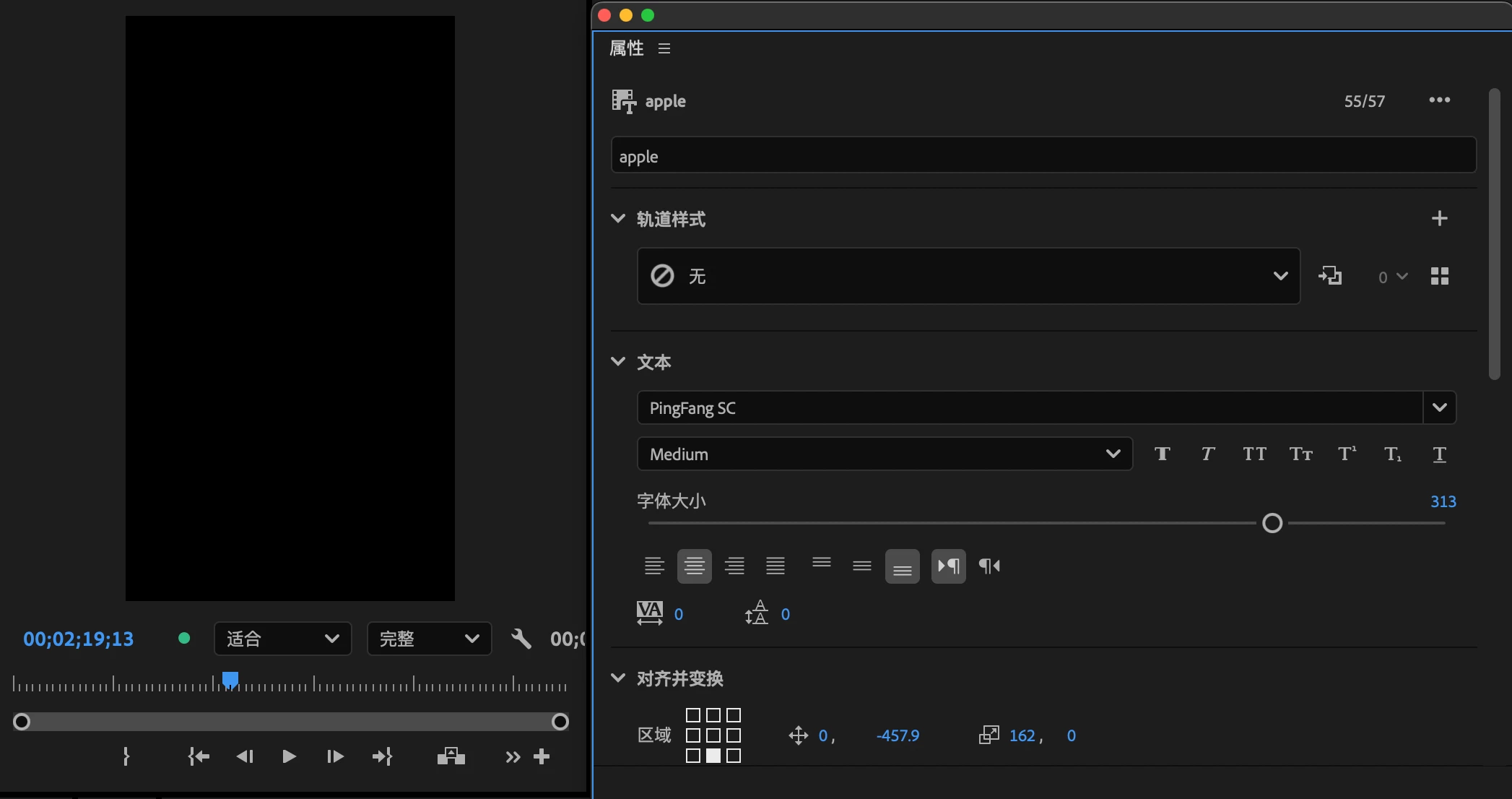
PingFang SC font is an original font of macOS system. Other fonts can be displayed in Premiere Pro, but Pingfang font cannot be displayed. I have tried to roll back to version 25.1, and this font(PingFang SC) can be displayed normally. I hope this issue can be fixed in the next version.

Pinned Reply By Annika Koenig

You should see PingFang fonts resolved starting with beta 27.0. Please do comment if you still see issues. Thanks!

15 replies

Adobe Employee
Oct 5, 2026 9:38 PM UTC

You should see PingFang fonts resolved starting with beta 27.0. Please do comment if you still see issues. Thanks!

Translate
Theresa Rostek
Community Manager
Community Manager
Feb 12, 2026 6:52 PM UTC

Hi everyone,

Thanks for your patience. A fix is available to try starting in Premiere beta 26.2 build 20. Please give it a try and let us know if it is working as you expect.
 

Thanks,
Theresa

Translate
Motion Graphics, Premiere Pro
Participant
Sep 11, 2026 7:51 AM UTC

The same font bug reappears in Premiere 26.5, please investigate. 

Translate
Theresa Rostek
Community Manager
Community Manager
Sep 11, 2026 3:54 PM UTC

Hi ​@Giddy_Dolphin8327,

The team is aware of this issue. Please subscribe to this thread for information:
 

Thanks,
Theresa

Translate
Motion Graphics, Premiere Pro
Theresa Rostek
Community Manager
Community Manager
Sep 23, 2025 10:26 PM UTC

Hi everyone,


Thank you for your patience on this, however there aren't any updates at this time. Please continue to workaround the issue by rolling back to 25.1 in the meantime. I apologize for the inconvenience.


Theresa

Translate
Motion Graphics, Premiere Pro
Participant
Sep 19, 2025 2:02 PM UTC

Are there any updates on this? I'm also facing this issue with the PingFang font. 

Translate
chi fatc74293733
Participant
Sep 18, 2025 4:10 PM UTC

ran into the exact problem with PingFang SC font on Premiere 25.5. Is adobe planning to do anything about this bug, which is affecting chinese-speaking editors daily for the past 5 months?

Translate
Participant
Sep 3, 2025 3:18 AM UTC

After updating to Premiere Pro 25.4.1 on macOS Sequoia 15.6.1 (24G90), the system font PingFang TC (Traditional Chinese) cannot be displayed in the Essential Graphics panel or text layers.

  • Other fonts (e.g., Noto Sans TC, Microsoft JhengHei) display correctly.

  • PingFang TC still works normally in other Adobe apps and system-wide.

  • The issue seems specific to Premiere Pro 25.x — PingFang TC was working fine in previous 24.x versions.

  • Clearing Adobe font caches (~/Library/Caches/Adobe/Fonts, ~/Library/Caches/Adobe/TypeSupport, AdobeFnt*.lst) and rebooting does not fix the problem.

  • Since macOS 14+, ATS is no longer supported, so atsutil cannot be used to reset font caches. The problem persists even after a clean cache reset.

Steps to Reproduce:

  1. Create a new text layer in Premiere Pro 25.4.1.

  2. Select PingFang TC as the font.

  3. Type Traditional Chinese text.

Expected Result:
Text should display properly using PingFang TC (system default Traditional Chinese font).

Actual Result:
Text box appears blank — no characters are rendered.

System Info:

  • macOS Sequoia 15.6.1 (24G90)

  • Premiere Pro 25.4.1

  • Apple Silicon Mac (M-series)

Notes:
This issue is blocking for editors who rely on PingFang TC as the default Traditional Chinese font in macOS. Other CJK fonts work fine, which suggests a compatibility bug specifically with PingFang TC in Premiere Pro 25.x.

Request:
Please confirm if this is a known issue and whether a fix is planned in future updates.

Translate
Theresa Rostek
Community Manager
Community Manager
Jun 23, 2025 3:42 PM UTC

Hi @Wong25451156dr4u,


Thanks for the check-in. This ticket is still under investigation, but there are unfortunately no updates at this time.


If you'd like to try out new features, I suggest downloading the Premiere Pro beta from the Creative Cloud app. You'll be able to have both the public release and the beta on your machine at the same time.


Cheers,

Theresa

Translate
Motion Graphics, Premiere Pro
Participant
Jun 23, 2025 8:29 AM UTC

Hi, thank you for taking attention, but when will the bug can be fixed? As the bug is brought into the latest version 25.3. I would really want to try new features, but the font is crucial to my projects, so I just can't update it. 

Translate
Participant
Apr 8, 2025 3:59 AM UTC

I have the same problem on 25.2, all PingFang font family is unable to use. I hope the fix can release soon. 

Translate
Participant
Apr 8, 2025 3:54 AM UTC

A specific Chinese font series named "PingFang" isn't able to display and render on the latest versions 25.2 and 25.2.1. The text box and captions is blanked when using the font. 


I was able to use "PingFang" on Premiere 25.1. It's a Mac pre-installed OpenType font series. However, after updated to 25.2 / 25.2.1, the text box and captions become blank when using the font. It can't be displayed or rendered to the video, even exported to Media Encoder 25.2. Also, the font family can't be read correctly, only "medium" size can be chosen, but usually I have all of its family able to use it in Premiere. 


And to clarify the problem, I have tested other pre-installed Chinese font "HanziPen" series which is also an OpenType, it can be displayed. Or even the font "Hei", is a TrueType, still be able to display.  


Screenshot is attached to see the problem, and also for the tech details of PingFang. I'm hoping for a fix soon. Thank you for your help.


System info:

Mac Studio (2022) - M1 Max , 64GB ram, macOS Sequoia 15.3.2

Premiere Pro 25.2 / 25.2.1

Font: PingFang

Translate