
Participant
July 15, 2026

Please preserve the original source timecode of 29.97 DF BWF WAV files

  • July 15, 2026
  • 2 replies
  • 16 views

These BWF WAV files were created and exported from Pro Tools with the following
exact source timecodes:

• 2997DF_1h00m.wav → 01:00:00;00
• 2997DF_1h10m.wav → 01:10:00;00
• 2997DF_1h20m.wav → 01:20:00;00
• 2997DF_1h30m.wav → 01:30:00;00

However, after importing them into Premiere Pro and setting the Time Display
Format to 29.97 fps Drop-Frame Timecode, Premiere displays:

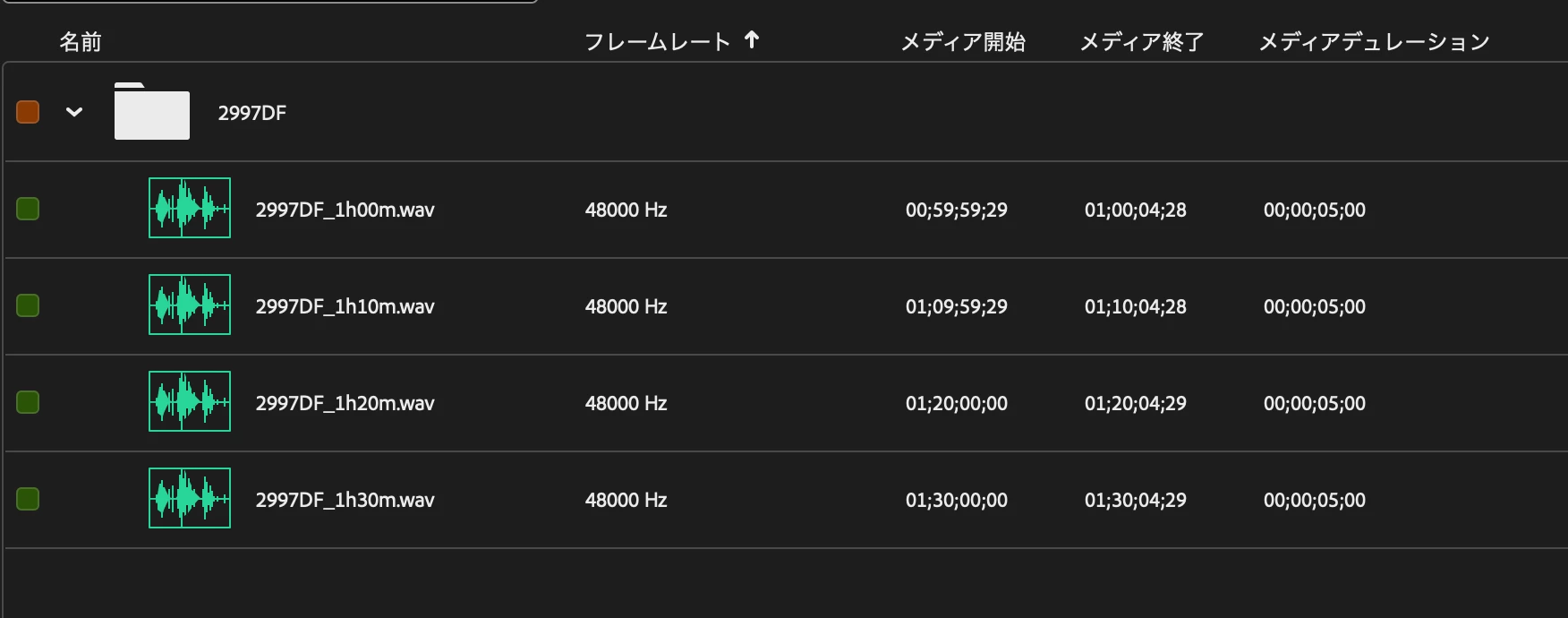
• 2997DF_1h00m.wav → 00:59:59;29
• 2997DF_1h10m.wav → 01:09:59;29
• 2997DF_1h20m.wav → 01:20:00;00
• 2997DF_1h30m.wav → 01:30:00;00

Requested behavior:

Please preserve and display the original source timecodes assigned when the
BWF WAV files were created:

• 2997DF_1h00m.wav → 01:00:00;00
• 2997DF_1h10m.wav → 01:10:00;00
• 2997DF_1h20m.wav → 01:20:00;00
• 2997DF_1h30m.wav → 01:30:00;00

The attached ZIP contains the original 1 kHz BWF WAV test files exported from
Pro Tools. A screenshot showing the Media Start values in Premiere Pro is also
attached.

Premiere Pro: 25.6.5 (Build 4)
Operating system: macOS Tahoe 26.5.2
Hardware: MacBook Pro 16-inch (2021), Apple M1 Max, 64 GB RAM
 

    2 replies

    Community Manager
    July 15, 2026

    Hi ​@Genba3266745503dq7,

    Welcome back to the Premiere forums and thank you for reporting this occurrence. We appreciate the information, screenshots, and sample files. As the team investigates this issue, we suggest to override source timecode by going to: Modify / Timecode


    Best,

    Jonathan

    Community Manager
    July 15, 2026

    Hi ​@Genba3266745503dq7,

    Following up to let you know that after further investigation, the team was able to reproduce this issue. We are filing a bug report into our internal system. Thank you for your patience as the team tries to resolve this soon.

    Best,

    Jonathan


    Participant
    July 15, 2026

    The attached BWF WAV test files were created with the following assigned
    source timecodes.

    23.976 fps files:

    • 2398_1h00m.wav → 01:00:00:00
    • 2398_1h10m.wav → 01:10:00:00
    • 2398_1h20m.wav → 01:20:00:00
    • 2398_1h30m.wav → 01:30:00:00

    29.97 fps Non-Drop-Frame files:

    • 2997NDF_1h00m.wav → 01:00:00:00
    • 2997NDF_1h10m.wav → 01:10:00:00
    • 2997NDF_1h20m.wav → 01:20:00:00
    • 2997NDF_1h30m.wav → 01:30:00:00

    After importing the files into Premiere Pro, Premiere displays the following
    Media Start values for both sets:

    • 1h00m files → 01;00;03;18
    • 1h10m files → 01;10;04;06
    • 1h20m files → 01;20;04;24
    • 1h30m files → 01;30;05;12

    After manually changing the Time Display Format using Modify > Timecode,
    the source timecodes are displayed correctly:

    • 2398 files: 23.976 fps Timecode
    • 2997NDF files: 29.97 fps Non-Drop-Frame Timecode

    Requested behavior:

    Please display the correct source timecodes immediately when these BWF WAV
    files are imported, without requiring the user to manually change the
    Time Display Format after import.

    The attached ZIP contains the original 1 kHz BWF WAV test files. A screenshot
    is also attached showing the incorrect Media Start values immediately after
    import.

    Premiere Pro: 25.6.5 (Build 4)
    Operating system: macOS Tahoe 26.5.2
    Hardware: MacBook Pro 16-inch (2021), Apple M1 Max, 64 GB RAM