

Posterize time does not work unless you nest
Hi. I’m totally sure that the native Posterize time effect used to work without any nesting, and I remember it because I used to edit a lot of vintage-stylized videos back in the past and I hate nesting.
Today I tried to make an animated mask with a shape, having applied the Wave Warp effect and Posterize time as a second effect and nothing happened - the framerate of the layer though set to 5 was a normal 25 after render. I rechecked it several times and yes, unless you nest anything you wanna posterize the effect won’t work. Why so, when did it start to act like that?
It’s quite a problem because I make these cartoony masks for children’s videos and I need them to work inside a graphics layer where this effect just freezes all the animation still (even if you put it a level above and no matter what FX order it is):
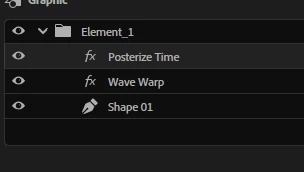
… and you cannot render and replace the graphics layer - Premiere just doesn’t let you. So the only way to make this effect work is nesting which also causes a lot of inconvenience because in a lot of cases I have to adjust the lenght, size, intensity of all the effects parameters and when they are inside the nest you cannot see them on the video, and I cannot nest the video because it’s also too much unnecessary actions that I’ll have to undo anyways later.
So please return the original behavior of the Posterize effect - make it work as is. Somehow I opened Davinci Resolve and there this effect (called Stop motion) works within nesting (compounding) just placed as an effect on any type of media.
PS: just imagine the fuss with nesting when you have to make several animated elements half of which are low framerate, the other half has framerates different from the sequence once, plus there are overlays some of which are also posterized and at some point of your work your client decides to change several elements and overlays even though they were approved before.


 AdChoices