

AndrewTheGreat
Known Participant
May 7, 2026

Pr 26.2.2 Folders and files duplicate on reimport

  • May 7, 2026
  • 1 reply
  • 52 views

I remember in the recent years when I drag-n-dropped a file or a folder into the same folder or subfolder in Premiere, if the folder name or the file name matched Premiere did not duplicate them but added the new files that missed. It was very convenient to update growing folders - when you are sent additional videos for the air and you don’t have to think where to import them to, you just drop them into the same folder the other similar vids are in and update the folder structure by simply dragging it on itself in the Project bin in Premiere thus getting the old files with the new, added ones.

It does not work anymore. Why? Was it broken? Now when you drop a file or a folder you get duplicates of everything even though the names match exactly:
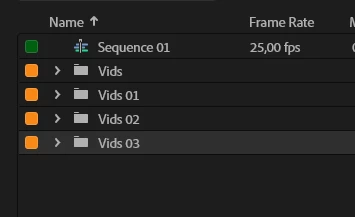
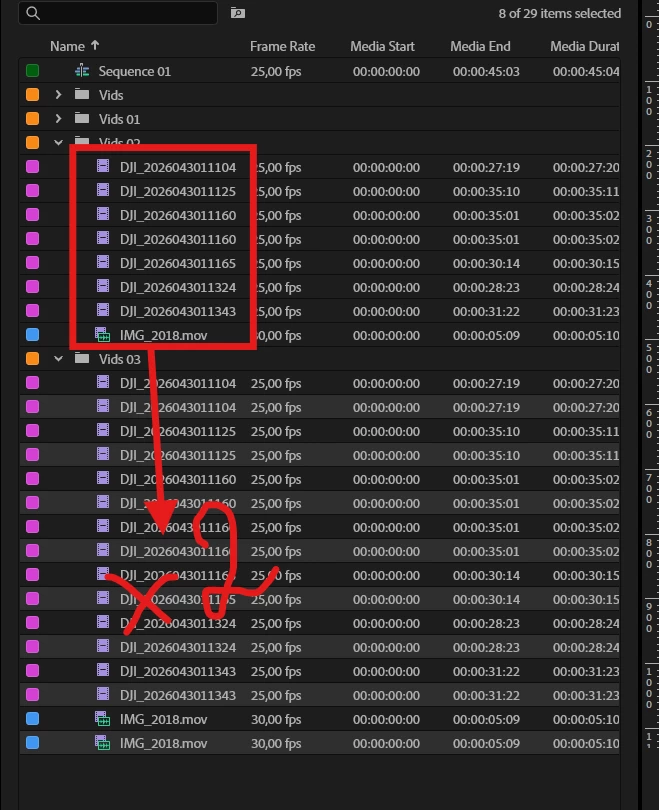


Can you guys fix it already, please. 

    1 reply

    IanB_360
    Community Manager
    Community Manager
    May 13, 2026

    Hi ​@AndrewTheGreat 
    I am not aware that this was an intentional change; I will have to check with the team. I have been testing with older versions going back to 25.0, 25.1, 25.2, and counting. In older versions, you have to check the Media preferences to allow duplicates on import. 


    Once we are done checking where the version break is, the team will have a good idea where to start on a fix. I will keep you posted as we log the bug and get feedback.
    Here to help.
    Ian

    AndrewTheGreat
    Known Participant
    May 14, 2026

    Hi, ​@IanB_360 It’s either the mods that are too slow, or the forum sends messages when it wants, because I replied yesterday and there’s no my reply still. 

    Ok, I’ll reply again. The setting you are referring to is a totally different thing - it’s duplicates on “PROJECT” import. I’m not importing any projects, I’m importing files. 

    Nonetheless I checked this setting even before posting here and naturally it did not help.

    Stop trying to edit and EDIT!
    IanB_360
    Community Manager
    Community Manager
    May 14, 2026

    That setting does have something to do with it, and it is a good clue to what may be going on. If you use version 25-25.6.1, even after a project has been created and the import stage is complete, I can see that checking and unchecking that box allows or disallows duplicate media at any stage of the project. If you check and uncheck that box in 25.6.1-26.2.2, it will not work because something is broken, as you pointed out, and it will still bring in duplicate media regardless of your choice. So it is most likely a bug. We are looking into it, and these details will help us develop a solution.
    Thank you for pointing this out.

    Here to help.

    Ian