

テロップデザインラボBOOTH
Inspiring
July 1, 2026

Premiere 2026でシャドウのグラデーション挙動が変更され、既存テロップのデザインが変わってしまいます

  • July 1, 2026
  • 2 replies
  • 66 views

Premiere Proのエッセンシャルグラフィックスにおけるシャドウのグラデーション挙動について、ご報告と要望があります。

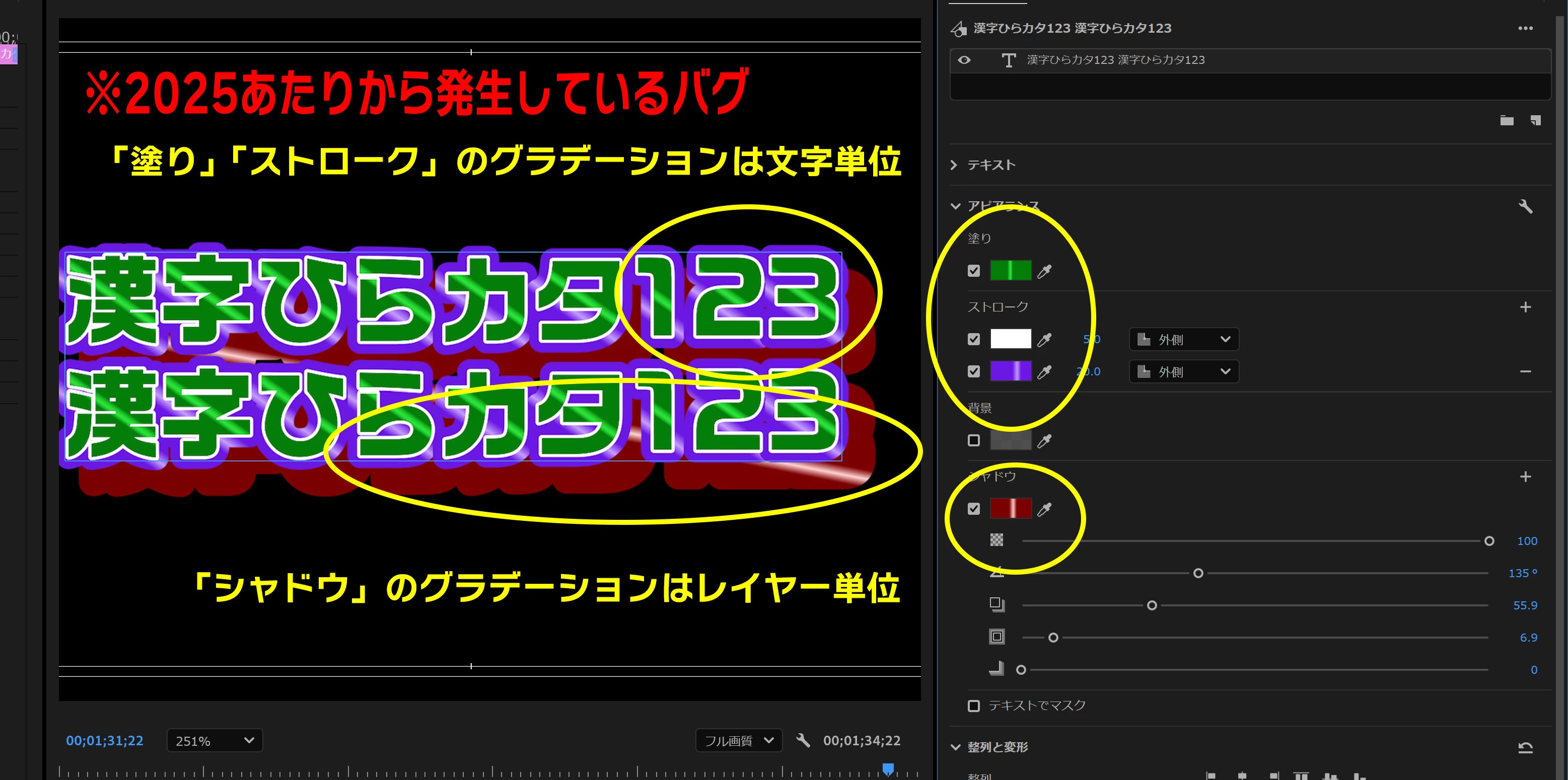
Premiere 2024から2025頃にかけて、シャドウのグラデーションが「文字ごと」ではなく「テキスト全体」を基準に計算されるようになりました。

Premiere 2025では、「塗り」をグラデーションに設定すると、シャドウのグラデーションが再び「文字ごと」に適用される挙動となり、この方法で従来のデザインを維持することができました。

ところがPremiere 2026では、この挙動が変更され、塗りの設定に関係なく、シャドウのグラデーションが常に「テキスト全体」で計算されるようになっています。

その結果、Premiere 2025までの挙動を前提に制作したテロップテンプレートやモーショングラフィックステンプレートで、デザインが変わってしまう問題が発生しています。

もし意図しない挙動であれば、修正をご検討いただけますと幸いです。

一方、仕様変更である場合は、既存テンプレートとの互換性を保ち、用途に応じて使い分けられるよう、

・文字ごと
・テキスト全体

を切り替えられるオプションを追加していただけると大変助かります。

ご検討のほど、よろしくお願いいたします。


I would like to report an issue and make a feature request regarding the shadow gradient behavior in Essential Graphics for Premiere Pro.

Around Premiere 2024–2025, the shadow gradient behavior changed from being calculated per character to being calculated across the entire text.

In Premiere 2025, setting the Fill to "Gradient" caused the shadow gradient to be applied per character again, allowing existing text designs to be preserved.

However, in Premiere 2026, this behavior changed. Regardless of the Fill setting, the shadow gradient is always calculated across the entire text.

As a result, text templates and Motion Graphics templates created based on the Premiere 2025 behavior no longer display as intended.

If this behavior is unintentional, I would appreciate it if you could investigate and consider fixing it.

If this change is intentional, I would like to request an option to choose how shadow gradients are applied:

  • Per Character

  • Across Entire Text

This would help maintain compatibility with existing templates while also providing greater flexibility for users.

Thank you for your consideration.
 

    2 replies

    Community Manager
    July 2, 2026

    Hi ​@テロップデザインラボBOOTH,

    Thank you for providing the sample project! We appreciate your patience as the team investigates further. 

    Best,

    Jonathan

    Community Manager
    July 1, 2026

    Hi ​@テロップデザインラボBOOTH,

    Welcome back to the Premiere Forums! Thank you for reporting this gradient behavior occurrence. While the team investigates, and to try to better assist you, could you please clarify some information:

    • What is the specific version of Premiere are you’re using?
    • Did you notice this graphic behavior happening in all versions of Premiere 2026?
    • Are you using a Windows or macOS?
      • Please provide with the version as well
    • GPU Driver (Windows only): Please let us know your video card driver version.
      • We recommend updating to the most recent version; for NVIDIA users, we strongly recommend the Studio version of the driver.

    Best,

    Jonathan


    テロップデザインラボBOOTH
    Inspiring
    July 1, 2026

    Hi Jonathan,

    Thank you for your reply.

    Here are my system details:

    • Premiere Pro version: 26.3.0

    • Issue reproduced in: Premiere Pro 2026 (I have confirmed the issue occurs in all 2026 versions I tested. Other users have also reported the same behavior.)

    • Operating System: Windows 11 Pro 25H2

    • GPU: NVIDIA GeForce RTX 3050 Laptop GPU (4 GB)

    • NVIDIA Driver Version: 610.62

    To clarify the issue:

    • In Premiere Pro 2025, when the Fill is set to "Gradient", the shadow gradient is applied per character.

    • In Premiere Pro 2026, regardless of the Fill setting, the shadow gradient is always applied across the entire text layer.

    This behavior does not appear to be specific to my environment, as other users have experienced the same issue.

    Please let me know if you need any additional information or sample project files.

    Thank you.

    Community Manager
    July 1, 2026

    Hi ​@テロップデザインラボBOOTH,

    Would you be able to send a sample project that includes the template you’re using? The team would like to conduct further tests.

    Best,

    Jonathan