
Acknowledged
Premiere 2027 get stuck on displaying panels and effects. Timeline freezes
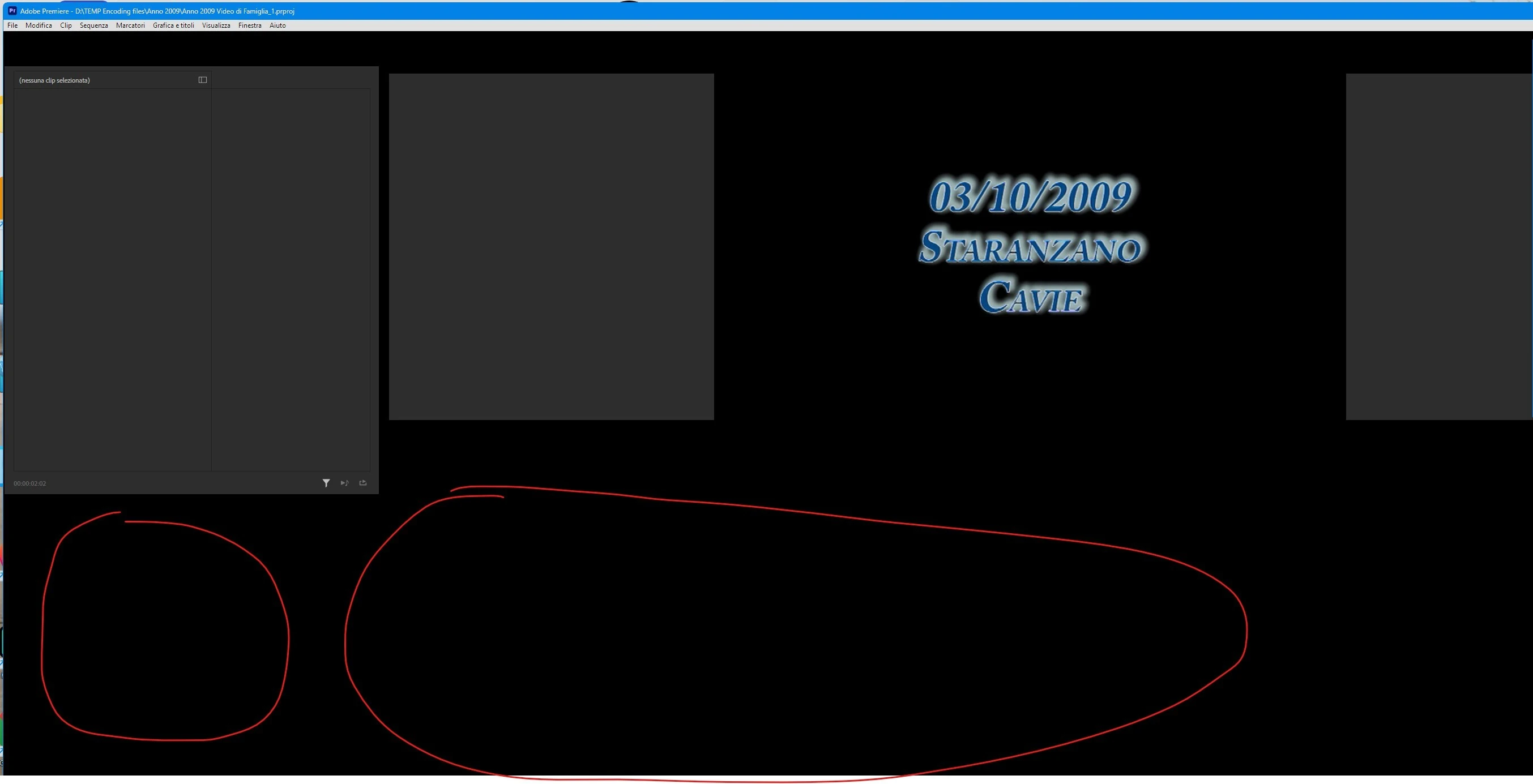
I just updated to version 2027 and when I open Premiere the panels on the screen are not fully visible. I have to click on the different panels to make them visible (timeline, effects, project, etc.).
- When I start working on the project, every now and then the app get stuck and nothing happens (i.e. Ctrl+D to apply a transition nothing happens until all of the sudden start to work again).
- When you click on a clip it’s not highlighted until you click somewhere else.
- When you scroll the timeline to the right or the left, the project is frozen until something is happening and resume to work.
This is terrible! I can’t work on my videos without knowing if what I’m doing is really applied or not.
I’m working on PC Desktop Intel Core i9 14900KF 32GB RAM 4GB NVIDIA GeForce GTX 1650, with Windows 11 version 26H2. C: Drive Kingstone SKC3000S512G 475GB D: Drive KINGSTONE SNV2S2000G 1.81TB
Everything was fine with Premiere 2026. Please fix it or give me a rollback procedure to ver. 2026.
 AdChoices