
Participating Frequently
February 5, 2024

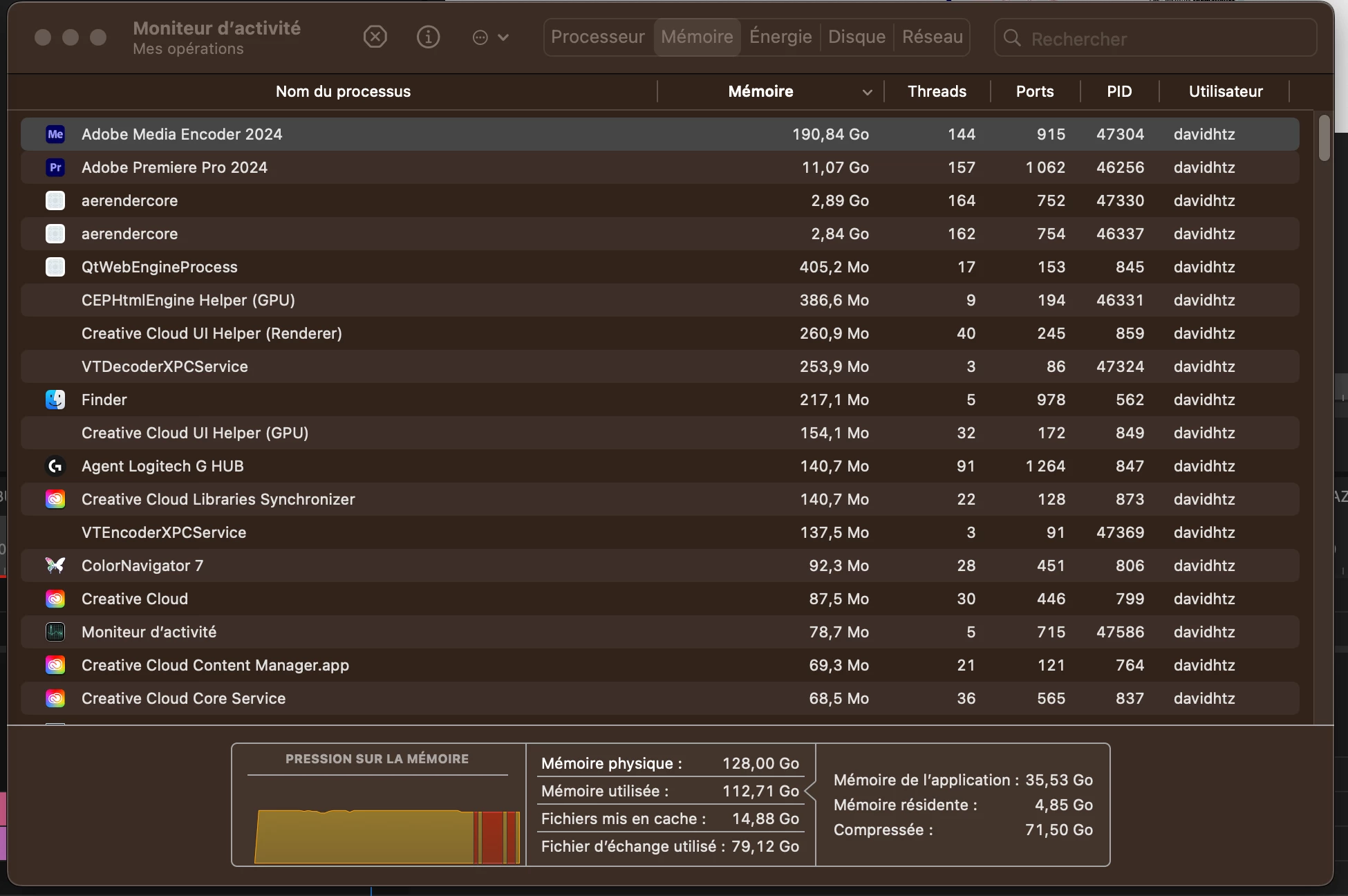
Premiere and media encoder fill the RAM while rendering

  • February 5, 2024
  • 3 replies
  • 514 views

Hi, I use Premiere since 15 years, and since 1 month I'm experiencing crashes while rendering. My mac says that all the memory has been used. So premiere 2024 and media encoder 2024 fill the ram. So i can't render videos longer than 10 min approx. or more than 5 short videos in a row with media encoder.  I'm rendering in H264 mp4. Same problem on premiere 2023.


My mac has 128Go Ram and I setup 104Go for Premiere in the memory settings of premiere but I noticed in my activity monitor that. media encoder goes up to 190Go which I do not understand (should it not be locked at 104go ? ) 

I also have 400Go freespace on my hard drive. 


Anyone has an idea ? 

Thank you 
My computer is :

Mac Studio M1 Ultra

128Go Ram

MAC Os Ventura


3 replies

Kevin J. Monahan Jr.
Community Manager
Community Manager
May 14, 2024

Hey @david.heitzmann,

Thanks for all the info. I hope I understand your problem correctly. It sounds like your project or sequence has some corruption, like a memory leak. This happens in certain circumstances, like updating a large project over major Premiere Pro versions. Could that be the case? If so, I have some troubleshooting steps for you to try.


Try copying and pasting the existing sequence into a new sequence. If that won't work, create a new project and import the old project into the new one.


See if one of those methods might help stop the memory leak from occurring.


I hope the advice helps. Let the community know if it does or not. I hope so! Sorry for the hassle.


Thank You,

Kevin

Kevin Monahan - Sr. Community and Engagement Strategist – Adobe Pro Video and Audio
Participating Frequently
April 2, 2024

Still nobody ? 

Participating Frequently
February 8, 2024

Please, nobody ?