

Premiere messing up timecodes when clip is dragged between timelines
A new bug here. Pr 26.2.2 (26.3.2 too) gives a different place of the clip when it’s dragged from one timeline to another.
Steps to reproduce:
- Create 2 timelines - 1080p, 25 fps both
- Drag a clip from the project bin to timeline A, cut a portion of it you need to use
- Drag the cut part from timeline A to timeline B, see a completely different part from what you cut out.
NB: both timeline are identical. You can create one and duplicate it if you want. The media is CFR.
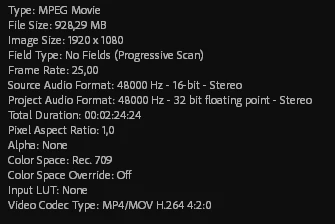
Here’s the source media info:
Here’s how it looks:
Win11 26h1, i7 14700K, RTX 4080, 64 Gb of ram, internal SSDs.
I know how I can fix it, but Adobe should investigate this bug because it happens quite often


 AdChoices