teudagaf
Participant
June 18, 2026

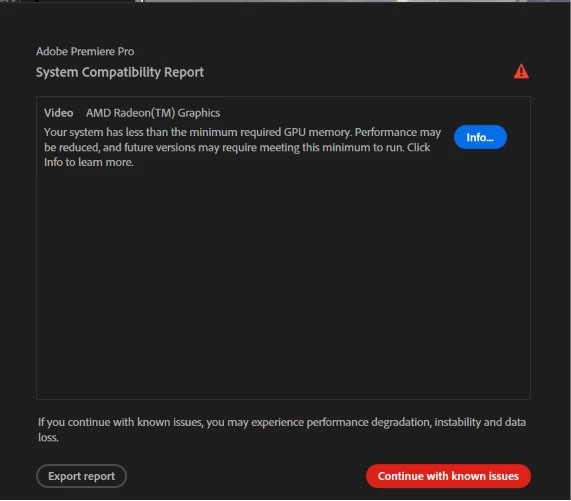
Premiere Pro 2026 displays a false "insufficient GPU memory" warning on a system with an AMD RX 7900 XTX (24GB VRAM). GPU acceleration is enabled and Premiere functions normally. The warning appears to be incorrect.

  • June 18, 2026
  • 5 replies
  • 308 views

Premiere Pro 2026 displays a false "insufficient GPU memory" warning in the System Compatibility Report.

System specifications:

Premiere Pro 26.3.0 (Build 93)

AMD Ryzen 9 7950X

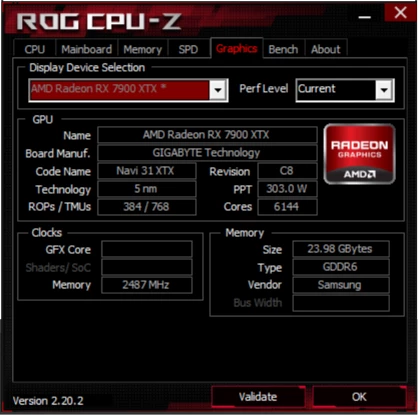
AMD Radeon RX 7900 XTX (24GB VRAM)

64GB DDR5 RAM

Windows 11

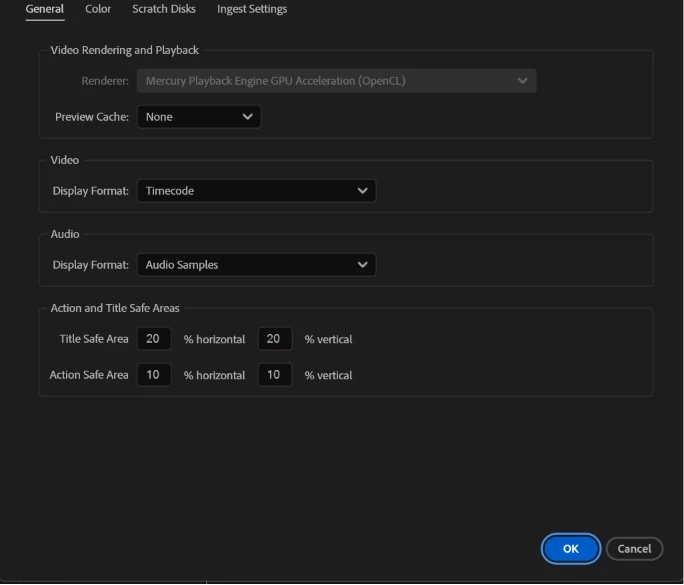
GPU acceleration is enabled and set to Mercury Playback Engine GPU Acceleration (OpenCL).

Steps to reproduce:

  1. Launch Premiere Pro 2026.

  2. Open any project.

  3. Open the System Compatibility Report.

  4. Premiere displays a warning stating that the system has less than the minimum required GPU memory.

Expected result:

No GPU memory warning should be displayed, as the system exceeds Premiere Pro's GPU memory requirements.

Actual result:

Premiere reports insufficient GPU memory despite detecting and using the RX 7900 XTX correctly. Playback, rendering, and exporting function normally, and GPU acceleration remains active.

Additional information:

The issue appears to be limited to the compatibility checker. No performance issues, crashes, rendering failures, or GPU detection problems have been observed.

Screenshot attached.
 

    5 replies

    teudagaf
    teudagafAuthor
    Participant
    June 22, 2026

    Additional finding after further investigation:

    While troubleshooting a separate Lightroom Classic issue, I discovered something that may be relevant to this report.

    My system was running both the integrated AMD Radeon Graphics from the Ryzen 9 7950X and the dedicated Radeon RX 7900 XTX simultaneously.

    Over the past few weeks, Lightroom Classic AI Denoise had become extremely slow. During testing, I noticed that Windows was heavily utilizing the integrated Radeon Graphics instead of the RX 7900 XTX for certain GPU accelerated tasks.

    After disabling the integrated Radeon Graphics (first in Device Manager and later in BIOS), Lightroom AI Denoise immediately returned to normal performance.

    Interestingly, the Premiere Pro "Insufficient GPU Memory" warning also disappeared completely and has not returned since.

    I understand that Adobe has already confirmed this warning as a known issue in Premiere Pro 26.3.0, so I am not suggesting this is necessarily the root cause. However, given that another user in this thread mentioned possible interaction between Ryzen integrated graphics and Radeon RX 7900 series GPUs, I thought this observation might be useful for engineering.

    At minimum, there appears to be some scenario where having both the integrated Radeon Graphics and a dedicated Radeon GPU active at the same time can lead to unexpected GPU related behavior across Adobe applications.

    Hopefully this helps with the investigation and may help other users with a similar configuration.

    MyerPj
    Community Expert
    Community Expert
    June 22, 2026

    Nice, I like that clue! 👍🏼

    MyerPj
    Community Expert
    Community Expert
    June 20, 2026

    FWIW: There is a reply below (currently at the bottom of this thread) from ​@Amy the Stuv . Adobe has put this down as a (now) know issue. 

    Here’s the link


    Seth+Albarado
    Participant
    June 19, 2026

    Having the same issues.

    CPU: AMD Ryzen 7 7800X3d
    GPU AMD Radeon RX 7900xtx 24GB
    64GB DDR5 RAM

    Windows 11
    All drivers are up to date.  
    Premiere is up to date.
     

    “Your system has less than the minimum required GPU memory. Performance may be reduced, and future versions may require meeting this minimum to run. Click Info to learn more.”

    Thank you for your help.

    AtiusDade
    Participant
    June 18, 2026

    I am experiencing the same issue after updating to Premiere Pro v26.3.0.

    System configuration:

    CPU: AMD Ryzen 9 7900X
    GPU: AMD Radeon RX 7900 XT with 20GB VRAM
    GPU drivers: Fully up to date
    Operating system: Windows 11 Pro
    Issue started after updating to Premiere Pro v26.3.0

    This issue did not occur before the Premiere Pro v26.3.0 update.

    Based on the Premiere Pro logs, the application appears to be misreading the available GPU memory. Premiere Pro is reporting approximately 495MB of VRAM, despite the installed discrete GPU being a Radeon RX 7900 XT with 20GB of VRAM.

    My system also has integrated graphics through the Ryzen 9 7900X. My concern is that Premiere Pro may be incorrectly detecting or cross-referencing the integrated GPU memory while labeling the device as the discrete Radeon RX 7900 XT. In other words, the software appears to be associating the VRAM value from the onboard graphics with the dedicated GPU.

    Troubleshooting already performed:

    I confirmed that AMD GPU drivers are up to date.
    I manually assigned Premiere Pro to use the Radeon RX 7900 XT through Windows Graphics settings.
    I restarted Premiere Pro after making the change.
    The issue persists.

    At this time, the problem does not appear to be causing noticeable performance degradation, but Premiere Pro continues to display a GPU-related warning/red triangle despite the system hardware being fully capable of running the software.

    Expected behavior:

    Premiere Pro should correctly detect the Radeon RX 7900 XT as the active GPU and report the correct available VRAM amount of 20GB.

    Actual behavior:

    Premiere Pro appears to detect the Radeon RX 7900 XT by name but reports only approximately 495MB of VRAM, which is incorrect and may be coming from the integrated graphics memory allocation.

    Please investigate GPU detection and VRAM reporting behavior in Premiere Pro v26.3.0, specifically on systems using AMD Ryzen CPUs with integrated graphics alongside a dedicated Radeon GPU.

    This appears to be a software-side hardware detection issue introduced in the latest update, not a driver or hardware limitation.

    teudagaf
    teudagafAuthor
    Participant
    June 18, 2026

    Hi Atius,

    Thank you for sharing your findings.

    I can confirm very similar behavior on my system after updating to Premiere Pro 26.3.0.

    My configuration:

    • Windows 11 Pro
    • AMD Ryzen 9 7950X
    • AMD Radeon RX 7900 XTX (24GB VRAM)
    • 64GB RAM
    • AMD Adrenalin 26.6.1
    • Premiere Pro 26.3.0 (Build 93)

    Like you, I have fully updated drivers and no observable performance issues.

    What stands out in my case is that Premiere's own System Compatibility Report correctly identifies the discrete GPU and reports 24,517 MB of VRAM, yet still generates the warning that the system has less than the minimum required GPU memory.

    Playback, rendering, exports, and GPU acceleration continue to function normally.

    @Amy the Stuv 

    I have attached the full System Compatibility Report from my system.

    At this point, there appear to be at least two independent reports involving Premiere Pro 26.3.0 on Ryzen 7000 platforms paired with Radeon RX 7900 series GPUs.

    The common observations are:

    • The issue appeared after updating to Premiere Pro 26.3.0
    • GPU drivers are current
    • GPU acceleration is functioning correctly
    • No performance degradation has been observed
    • The compatibility warning is still generated

    Since the report correctly identifies the GPU model and available VRAM, this may point to an issue within the compatibility validation process rather than an actual hardware limitation.

    Hopefully this additional data helps the engineering team investigate further.

    Thank you.

    Amy the Stuv
    Community Manager
    Community Manager
    June 18, 2026

    Hello ​@teudagaf ,

    Welcome to the Premiere Pro Community Boards and thank you for all the information and screenshots in filing out your bug report. They are helpful. I’m glad you’re not having any performance issues. I am curious if the drivers for your GPU are up to date, as that could cause this type of misidentification. 


    This Helpx page links directly to the AMD website so you can check it out.

    https://helpx.adobe.com/premiere/desktop/get-started/technical-requirements/gpu-and-gpu-driver-requirements.html


    Let me know if this helps.


    Happy editing,

    Amy

    teudagaf
    teudagafAuthor
    Participant
    June 18, 2026

    Hello Amy,

    Thank you for your reply.

    I checked the AMD drivers and they are fully up to date.

    Current configuration:

    • Premiere Pro 26.3.0 (Build 93)
    • AMD Software: Adrenalin Edition 26.6.1 (Status: Up To Date)
    • AMD Radeon RX 7900 XTX with 24GB VRAM
    • AMD Ryzen 9 7950X
    • 64GB DDR5 RAM
    • Windows 11

    I also reviewed the generated System Compatibility Report and noticed something interesting.

    The report correctly identifies the GPU and available VRAM:

    AMD Radeon RX 7900 XTX
    VRAM: 24,517 MB

    However, the same report immediately generates the warning:

    "Your system has less than the minimum required GPU memory."

    Since Premiere is correctly detecting both the GPU model and the available VRAM, and GPU Acceleration (OpenCL) is active with normal playback, rendering, and export performance, this appears to be a false positive generated by the compatibility checker itself.

    I've attached the relevant screenshots and can also provide the full System Compatibility Report if that would be helpful.

    Could you please check whether this might be related to bug ID DVAAP 3276 referenced in the report?

    Thank you for taking a look.

    Best regards,
    Oshri

    Amy the Stuv
    Community Manager
    Community Manager
    June 19, 2026

    Thank you ​@teudagaf ,

    This is now a known bug on our end. The warning should not have appeared on your system. If a system has at least one GPU that meets our minimum requirements, Premiere will almost always use it automatically. There will be no performance impact and no action needed on your part. We have identified that the warning coming up is an issue and a fix is in progress. You should stop seeing this warning in the coming weeks.

    Best,

    Amy