
Inspiring
Nov 17, 2026 8:49 PM UTC
Acknowledged

Premiere Pro 2027 - Clip speed is capped depending on clip length if clip is a sequence

In the latest Premiere Pro 2027 if you want to setup a faster clip speed to do e.g. speed ramps /zooms that go beyond the 3600% you run into an issue if you do this on a sequence.

With the old UI in Premiere Pro 2026 it would just let you set it to a max of 10000% no matter is it was a sequence or footage.

The new UI just refuses to apply anything bigger than 3600% - but just for sequences.


The UI does not state why this is not allowed in this version, it just grays out the button.
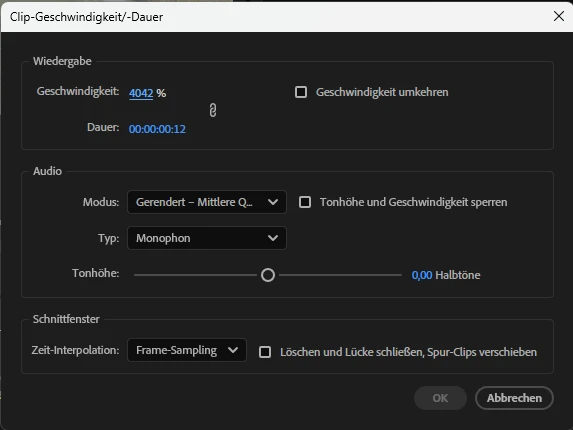
It’s just great. Only took 15 min of using Premiere Pro 27.0.0 to run into a road block so big, I’ll probably never touch it again and stay with 26.5.3 - since I know even if this will be fixed will take at least a year or more.

5 replies

Adobe Employee
Nov 18, 2026 11:05 PM UTC

The 10000% limit was not removed, but in order to go above 3600% you need to use the legacy audio scaler and choose “Lock pitch and speed”. Or use a video-only clip.


Translate
Inspiring
Nov 18, 2026 11:15 PM UTC

Thanks for your reply. I actually tested with the legacy audio scaling setting - but didn’t click the “Lock pitch and speed”. 
I would suggest either hinting this in the UI and also updating your help page, since this is mentioned nowhere.


I understand why this is done, but the UI communicates this poorly at the moment.

Translate
Inspiring
Nov 17, 2026 9:57 PM UTC

Hey Katie, thanks for getting get to me to quickly. I honestly didn’t except this. 
And yes I was refering to nested clips.


Setup: Win 11 26H2 with the NVIDIA 621.24 Studio Driver

Media Files: Nested 10bit H265 in mov containers

Project size: 1543kiB, contains multicam, but nested clip wasn’t multicam enabled

Media storage: Project & previews live next to the footage, the cache is a seperate drive and it also dumps some stuff to the system drive


Thanks!

Translate
KatieToo
Community Manager
Community Manager
Nov 17, 2026 10:06 PM UTC

​@Agrarvolution Appreciate those specs, I’ll add them to the report, so stay tuned. In the meantime, it seems like a temporary workaround is using v26.5.3, and hoping that won’t cause too much interruption or frustration.

Thank you again and we appreciate your patience while our engineering team investigates this!
Katie

Translate
KatieToo
Community Manager
Community Manager
Nov 17, 2026 9:41 PM UTC

Hi ​@Agrarvolution 

Thanks for stopping by the Premiere forums and letting us know about this speed capping issue in Premiere v27. The screenshot is also helpful. We were able to reproduce this issue, so I will be filing on this and alerting the engineering team about that speed change regression.

I ran a quick test on my mac m3 max for Premiere v27 and v26.5.3, and even the v27.1 latest Beta, and you’re correct. I believe by ‘clip being a sequence’ you might have been referring to a nested clip, so that’s what I tried.

In v27, it was not allowing me to go over 3600%, not even 3601% let alone 4200 or 10k%.
v27 test


In v26.5.3, I was able to make it any speed range including 10,000%.
v26.5.3 test


In Beta v27.1 Build 49 had the same results as v27 and OK was grayed out.
v27.1 Beta test


If you could, please let us know more about your setup, as that will be helpful for engineers on our report:

  • Setup/OS: Please specify Windows 11/10 or Mac, plus what macOS, along with driver version/build.
    • GPU Driver version/build(Windows only): We recommend updating to the most recent version; for NVIDIA users, we strongly recommend the Studio version of the driver.
    • Mac Chip (Mac Only): what M-series chip? If Intel, please include GPU.
  • Media Files: video, images, etc. and what types (can check under Media Properties)
  • Project Size: About how big is your project file? Is it in a Production or Multicam? Approximately how many clips are involved in a rough estimate
  • Media Storage: Are your Scratch Disks set to your Documents folder or the same as project, and is this the same as the Media drive?


Sorry for any frustrations you’ve had with this so far, and I do appreciate you taking the time to report on it and for helping others by that. 

We will return to this post to update with any possible fixes when that becomes available, or if they have any additional questions. 

Much appreciated,
Katie

Translate