
Participating Frequently
nov. 16, 2026 7:58 PM UTC
Acknowledged

Premiere Pro 27 “Fewer Audio Channels” Error When Relinking Projects from Version 26.2.2 — Workaround Found

I regularly receive client projects created in Premiere Pro 26.2.2 and import them into my editing template. This workflow worked flawlessly in Premiere 26.5.3.

After upgrading to Premiere 27, relinking the client's media (a mixture of MXF and ProRes files) produced a “Fewer Audio Channels” warning indicating that the selected file contained one audio-channel group instead of two, potentially deleting audio track items.
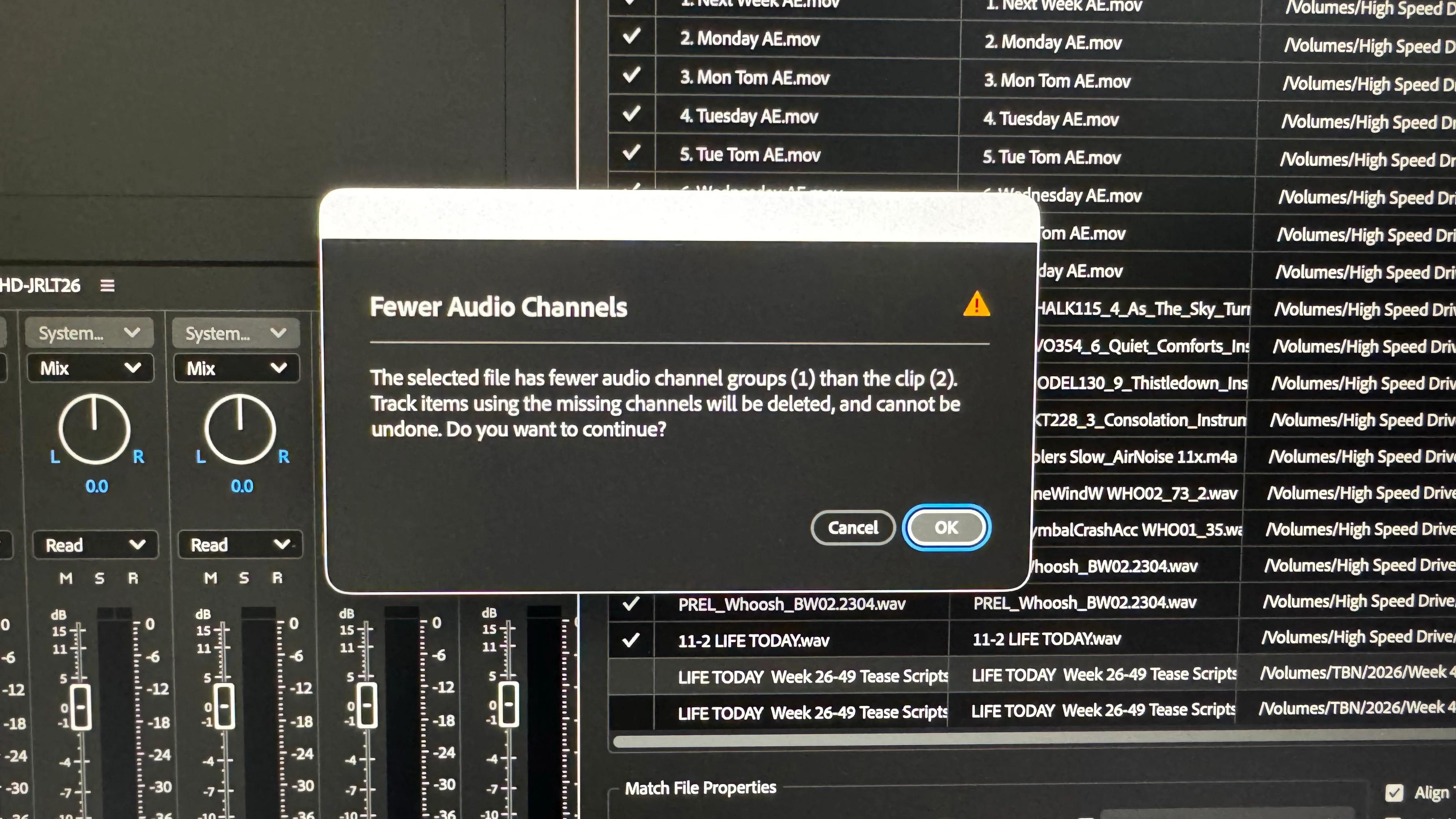
 

Confirmed workaround:

  1. Open the client's original 26.2.2 project in Premiere 26.5.3.

  2. Relink the media and save the project.

  3. Open the newly saved project in Premiere 27.

All media now links correctly. I also successfully imported the converted project into my existing Premiere 27 template without errors.

Conclusion: This suggests a compatibility issue between projects saved in 26.2.2 and Premiere 27. Saving through 26.5.3 appears to resolve the problem.

I'm sharing this workaround for editors encountering similar audio-channel warnings when migrating projects between Premiere versions. Hopefully Adobe can investigate the underlying cause.

    11 Respostas

    Amy the Stuv
    Community Manager
    Community Manager
    nov. 18, 2026 3:04 PM UTC

    Hi ​@LOI Jeff I filed based on these findings and have updated the post status. I could still use a version of one of these projects trimmed down in 26.2.2 if you’re willing to temporarily bring your Version 26.5.3 down to 26.2.2 to use Project Manager on one of the affected projects and provide us with a project for testing.

    Thank you,

    Amy

    Traduzir
    Participating Frequently
    nov. 17, 2026 6:16 PM UTC

    I referenced 26.2.2 in response to you asking if I could share the original project and some of the files that recreate the issue; not because I need it for my workflow.

    Traduzir
    Participating Frequently
    nov. 17, 2026 6:05 PM UTC

    Amy, I would be interested in learning if this is an issue that your engineers encountered when testing. I am the first of 9 editors in my company to upgrade to 27. Team upgrades are now on hold until we learn that it’s safe to move to 27 for the whole production team. 

    Thanks.

    Traduzir
    Amy the Stuv
    Community Manager
    Community Manager
    nov. 17, 2026 6:15 PM UTC

    Hi ​@LOI Jeff 

    I am not aware of this issue coming up in testing. It’s very likely specific to the formats of the media and how the proxies were made if you also have proxy files. It’s possible not every project will experience this even within your company. I mentioned you can still install 26.2.2 in parallel with version 27.0 using the Creative Cloud so you can keep working on the older version with the other editors while we investigate your specific issue. When upgrading projects it should create a new Version of the project file and I always label mine with a little “_27” when doing so. 


    If you download the 26.2.2 version to create a trimmed project with some of the files copied / consolidated, that would be most helpful. 

    Traduzir
    Participating Frequently
    nov. 17, 2026 7:44 PM UTC

    I think I’m not communicating with you effectively. The issue happened when I tried importing a project that was created in 26.2.2 into Premiere 27. I edit content for a client that is still using 26.2.2. Before upgrading to 27, I had been using 26.5.3 to import their 26.2.2 files into my project template without issue. 

    In trouble shooting, I tried importing the same client project in 26.5.3 to determine if maybe the project was corrupted in some way. It imported without issue. 

    I then tried another test. I Saved the project imported into 26.5.3 and tried to import that project file into 27 and it worked perfectly.

    Looked back at old posts and learned that 26-26.2.2 had reported audio mapping issues that were fixed in subsequent updates.

    Conclusion (not because of expert understanding): 26.5.3 seems to correct the issues found in 26.2.2 but 27 doesn’t. 

    I have kept 27 on my machine to use for projects from other clients; using 27 for its new features on the project that I originate. And additionally, keeping 26.5.3 on my computer to use with the 26.2.2 projects that I edit until my client updates their Premiere version. Have alerted them of my issue and cautioned them about remaining on 26.2.2 for their projects. The reason for my caution is because they plan on upgrading in 2027 to Premiere 27;  because they archive projects that they periodically reuse, I wanted to know that they might not be able open them properly based upon my experience.

    Here’s a video of my relinking experience: tried with five  past projects.


    Thoughts?

    Traduzir
    Amy the Stuv
    Community Manager
    Community Manager
    nov. 16, 2026 8:49 PM UTC

    Hello ​@LOI Jeff 

    Welcome to the Premiere Community Forums. Thanks for documenting the steps and workaround.

    Could you share your operating system, and GPU / CPU information? If you’re able to, could you share the original project and some of the files that recreate this issue? I’ll privately message you an upload link. This would be used for diagnostics only.

    Thank you,

    Amy

    Traduzir
    Participating Frequently
    nov. 16, 2026 10:04 PM UTC

    Hi Amy, I would like to help but don’t know what the best method would be. I was trying to open a 26.2.2 project using 27. The media files are about 1.6T. I don’t have 26.2.2 on my machine so I can’t trim the original project to a manageable size. Thought?l

    Traduzir
    Participating Frequently
    nov. 16, 2026 10:05 PM UTC


    Traduzir