
Participating Frequently
June 11, 2025

Premiere Pro CONSTANTLY Freezing with Sufficient Specs (Upgraded to RTX 5090)

  • June 11, 2025
  • 44 replies
  • 4721 views

I recently upgrade my computer to a RTX 5090 and have been experiencing a lot of playback and rendering issues within Premiere pro specifically. I've already done a lot of trouble shooting to make sure i do not have overlapping drivers (removing drivers with DDU while in safemode) and I made sure all of my drivers are up to date, even installing the newest available studio drivers that Nvidia offers. I'll put a full spec list down below.

Problem:
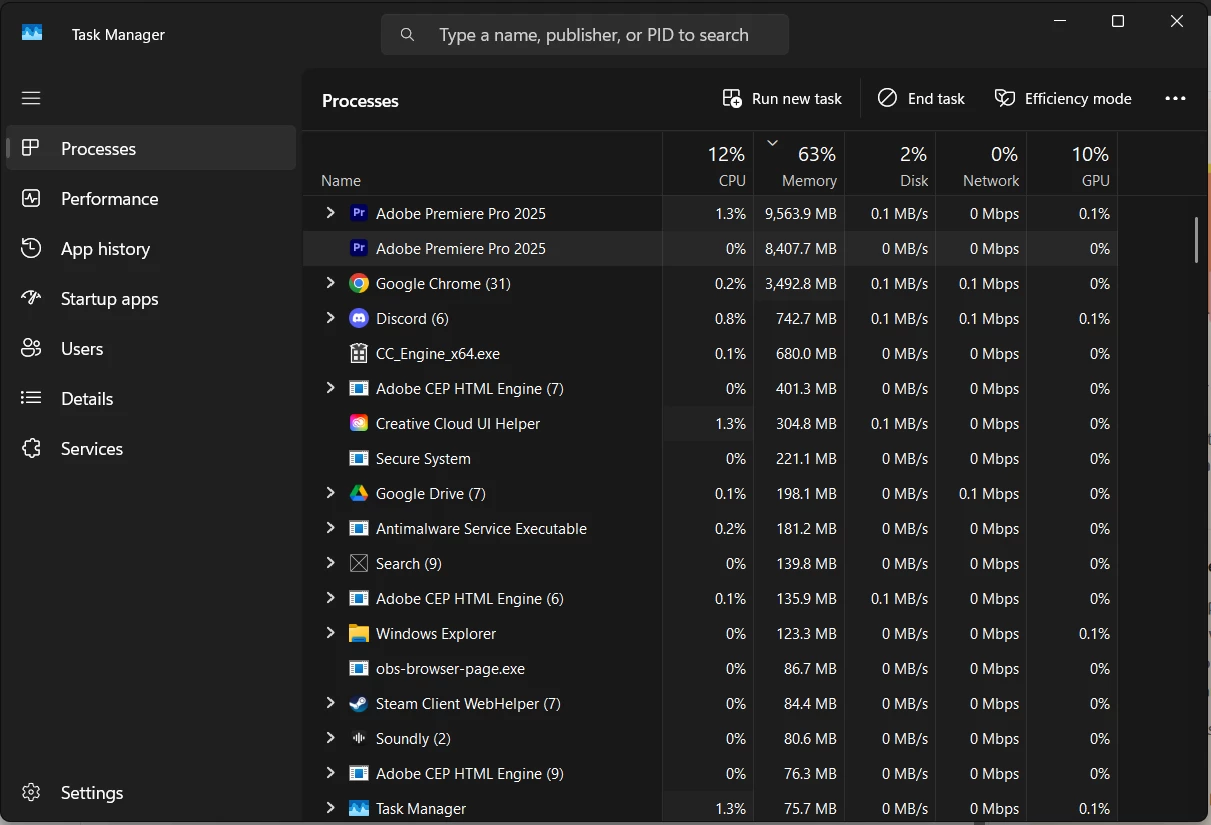
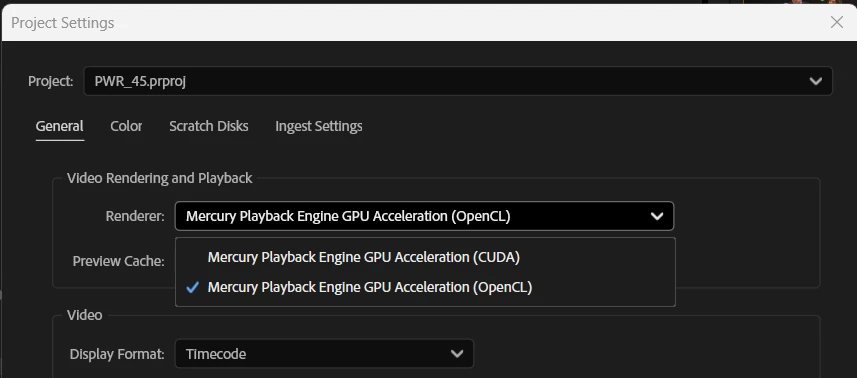
I have been editing for years without these major issues, so I'm assuming my issue is related to my recent GPU upgrade or it's drivers. Whenever I'm editing a video and watching it back on the timeline, it will randomly freeze on one of the frames I was on and stay like that for upwards of 2 minutes until it catches up or I get impatient and try to restart the program. It feels as if my computer is hitching or trying to catch up. I read online that if I switched the video renderer to OpenCL instead of CUDA, it may help and would indicate there is a driver issue. While this is a work around, this makes my playback extremely skippy/laggy due to it not using the GPU. I then go to try to render the video and it will start the render, but somewhere in the middle of the render, it will get completely stuck and stop rendering, although the footage it's rendering is not hardware intensive at all. The way I'm currently working around this is to transfer all my files to a different computer via google drive desktop and then render it there, where render times are fine, and no freezes happen. Also, one last issue i'm constantly running into is that whenever the program is in this "hitching/freezing" state, it is IMPOSSIBLE to fully close out of the program. I will open task manager and force close it and it will still not close. I have to click the power button on my pc and then cancel the shutdown in order for it to close and then it will still be open in the background, stuck at whatever the memory bandwidth was at when it was first shutdown, until the computer is fully restarted. This makes it extremely difficult to relaunch the program normally cause my computer is thinking it's still active I guess(50/50 chance it will launch). please help me. I'm on the latest version of drivers, and adobe software as well.

I do use a decent amount of extensions, which I will list here: (I don't think extension effect anything, but I could be wrong)
- Film Impacts
- Excalibur
- VideoVault3

Full specs list:
CPU: AMD Ryzen 7 7800X3D
GPU: NVIDIA GeForce RTX 5090
Memory: Corsair CMH32GX5M2B6000Z30 (64gb @ 6000MHz)
Storage: Samsung SSD 980 PRO 2TB
Motherboard: B650 GAMING PLUS WIFI (MS-7E26)
BIOS Version/Date: American Megatrends International, LLC. 1.30, 8/10/2023
44 replies

R Neil Haugen
Legend
September 27, 2025

The Nvidia rep on this forum did say they didn't expect to have a full fix until the driver to be released on the 30th. Sigh.

Everyone's mileage always varies ...
Participating Frequently
September 27, 2025

Just a quick update. This bug is still reoccuring, even after the latest studio driver 581.29 update. I guess i will just be waiting for the next driver update to hopefully fix it? This screenshot shows me attempting to render the same file 7 times and finally randomly having success after restarting my pc 3 times. 

please save me nvidia

Participating Frequently
September 12, 2025

I actually just had ther bug happen to me for the first time right after making this post. So I'm not sure if it's fixed yet on studio drivers

Participating Frequently
September 12, 2025

I've been using the newest Studio driver 581.29 for the last two days with no rendering issues so far. So it looks like it's been fixed with the studio drivers, but not the game ready ones from what I tested. I appreciate all the help on this.

jamieclarke
Community Manager
Community Manager
September 10, 2025

HI @Albo Gravity - Can you please install Studio driver 581.29 and let us know if it helps your issue.

Participating Frequently
September 10, 2025

@R Neil Haugen I was not aware this is accross all video apps, good to know, thank you!
@Elmasguapo I also saw that a new version of game ready drivers was available today so I also downloaded it in hopes it would fix my issue, but it didn't. However, I did the express install instead of a clean install. I'm currently on Version 581.29 Game ready drivers and still experiencing the issue.

@robatst This is awesome to see that it has been acknowledged and we'll hopefully see some solutions soon.

FlyingFourFun
Inspiring
September 10, 2025

@robatst arg...  I forgot to check the known issues - good catch.... 

Participant
September 10, 2025

The 581.29 release notes describe that freezing during export is an unsolved issue for some system configurations.


FlyingFourFun
Inspiring
September 10, 2025

@Elmasguapo can you please include the driver versions when posting - it makes it easier to compare ones installed version with what you seeing.  

FlyingFourFun
Inspiring
September 10, 2025

there is also a new studio driver out today,  if the latest game driver corrected this, there is a good chance the studio driver has the included fix too....   There is a specific all out for memory leak fix when using nvenc hardware encoding;


Latest version is:


I have a Nvdia RTX 5090FE enroute, hope its here this week, and I should be able to jump into this testing pool as soon as it arrives.  Hopefully this latest driver actualy fixes it!  Not sure why I am going to suffer this pain but jumping in anyways....