


Participant
October 14, 2026
Investigating

Premiere Pro Desktop – Mobile project import disabled across multiple enterprise accounts since September 2026

Hi everyone,

I'm reposting this issue here, as it seems more relevant to Premiere Pro Desktop than Premiere Mobile.

The issue

We're experiencing a persistent problem with the integration between Premiere Mobile and Premiere Pro Desktop.

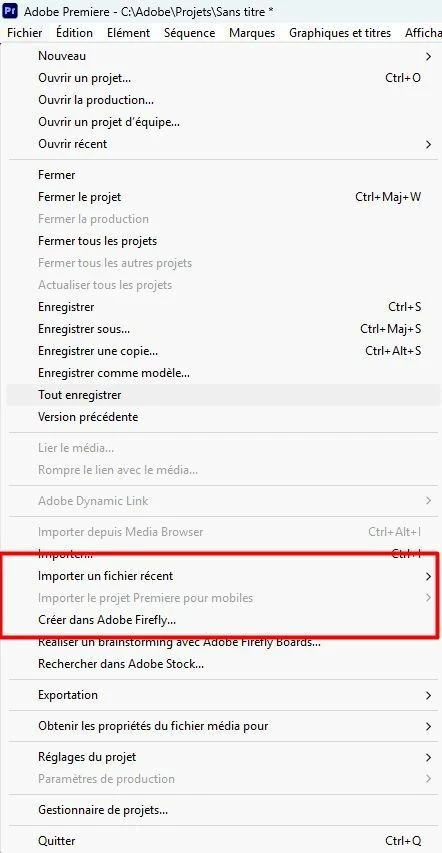
The "File > Import Premiere Mobile Project" option is completely greyed out and cannot be selected.

This feature had been working correctly for several months, but suddenly stopped working around late September 2026, without any obvious changes to our setup.

Projects are still successfully uploaded from Premiere Mobile to Creative Cloud. We can see and download both the projects and their associated media through the Creative Cloud website.

However, in Premiere Pro Desktop, the import option itself is disabled. We cannot even open the window to browse or select mobile projects.

This is not an issue with a particular project failing to import. The entire import functionality has become unavailable.

Troubleshooting already performed

We've spent considerable time investigating the problem:

  • Tested four different versions of Premiere Pro, including Beta.

  • Updated Adobe applications.

  • Tested different internet connections.

  • Tested without antivirus interference.

  • Tested three different enterprise-managed Adobe accounts.

  • Confirmed that the same Adobe account and enterprise profile are used for the mobile and desktop workflow.

The issue persists regardless of the Premiere Pro version tested.

One particularly interesting observation

We tested a third enterprise account that had never used the Premiere Mobile import functionality before.

The feature worked successfully on the first attempt. However, shortly afterwards, the import option became greyed out on this account as well.

We can therefore reproduce the problem even on an account where the functionality was initially available.

This makes us suspect an issue related to Adobe's cloud services, account permissions, or the mechanism that controls the availability of this feature, rather than a local installation problem.

Manual download workaround doesn't work properly

Since the integrated import functionality is unavailable, we also attempted to recover our projects manually through Creative Cloud Web.

We can download ZIP packages containing the OTIO project files and associated media.

Unfortunately:

  • Importing the OTIO file restores the edited timeline, but the media appears offline.

  • Importing the downloaded media separately works, but does not reconstruct the edited timeline.

  • The media references in the OTIO project don't seem to match the downloaded files correctly, preventing straightforward relinking.

As a result, we haven't found a reliable way to continue editing our mobile projects in Premiere Pro Desktop.

Another unusual observation: Creative Cloud storage

Creative Cloud reports approximately 9 MB used out of 1 TB, despite multiple Premiere Mobile projects being stored in the cloud.

One downloaded project package alone is nearly 1 GB.

We don't know whether Premiere Mobile projects are supposed to count towards the displayed Creative Cloud storage usage, but this discrepancy seems worth mentioning in case it is related.

Questions for Adobe

We would really appreciate some clarification:

  1. What determines whether the "Import Premiere Mobile Project" option is enabled or greyed out? Does Premiere Pro check account permissions, licensing, or cloud service availability?

  2. Can an enterprise administrator disable this functionality through Adobe Admin Console, a product profile, or an organizational policy?

  3. Could enterprise-managed Adobe accounts be affected by restrictions or changes in service availability?

  4. Is this a known issue affecting other users, including personal Adobe accounts?

  5. Is there any diagnostic procedure or log we can provide to help identify why the feature is disabled?

Production impact

We use Adobe applications in a professional broadcast production environment, and the ability to start editing on mobile and continue in Premiere Pro Desktop is an important part of our workflow.

At the moment, the feature is completely unusable across our tested accounts, despite projects continuing to upload successfully.

We would appreciate it if the Premiere engineering team could investigate why this menu option becomes disabled, especially given that we reproduced the issue shortly after a successful first import on a previously unused account.

We're happy to provide screenshots, exact application versions, logs, or perform additional tests if needed.
 

Thanks for your help!

    3 replies

    Amy the Stuv
    Community Manager
    Community Manager
    October 14, 2026

    Hello ​@talented_Smile5ddd 

    Thanks for the detailed report. Since the projects upload and are visible in Creative Cloud, could you share a few details to help distinguish a Premiere desktop menu/eligibility issue from a device compatibility problem?

    • Mobile device models, OS version on Mobile devices, and Premiere Mobile app version/build.
    • Desktop OS and exact Premiere Pro version/build; please note if it’s Stable or Beta.
    • Whether Creative Cloud Desktop and Premiere Pro show the same Adobe account and enterprise profile as the mobile app.
    • Whether that profile has an active Premiere subscription/entitlement and cloud storage enabled. If possible, please ask your Adobe admin to confirm the profile’s access.
    • When sending a new project, was Premiere Pro already open and signed in? Did a desktop notification appear, and does restarting Premiere change the menu state?
    • Does the import option remain greyed out after a fresh mobile send and desktop restart?

    The phone and OS details are useful for completeness, but the desktop account/profile and menu state seem the higher-priority checks here. Please avoid posting Adobe IDs or other account-identifying details publicly; feel free to DM me with those privately or reach out to your admin.


    As for your questions, I’m not as familiar with Mobile desktop personally, but I will find a team member who is. Here’s what I can confirm, and what still needs investigation:

    • Adobe’s published handoff guidance requires cloud storage, a Premiere subscription, and signing into Premiere on desktop with the same Adobe account used on mobile. It does not document every condition that controls whether the import menu is enabled.
    • I’m not aware of a confirmed, feature-specific Admin Console switch that disables “Import Premiere Mobile Project.” Your admin could still verify the user’s Premiere entitlement, cloud-storage access, and assigned profile.
    • There have been similar reports of the desktop import menu not populating, and a possible education/enterprise account restriction has been raised internally. Neither establishes that enterprise accounts are intentionally blocked or that this is the cause here.
    • Similar menu behavior was tracked in the past and later marked as working in a desktop build. I can’t confirm whether the current report is the same issue, whether it is widespread now, or whether personal accounts are affected.
    • Have you tried signing out of Creative Cloud and back in on all devices to re-authenticate? 

    I will also reach out internally about this issue.

    Hoping to help,

    Amy

    Translate
    Participant
    October 15, 2026

    Hi Amy,

    Thanks for your response and for reaching out internally!

    Just to clarify, we've already tested:

    • Premiere Pro 26.5.2 (latest stable release).

    • Premiere Pro 26.5.1 (previous stable release).

    • Premiere Pro 27.0 Beta.

    • An older Premiere Pro release, following the reports from October 2025 about the same issue, which Adobe indicated was fixed in build 25.6.0x96.

    We've also tested three different enterprise accounts, different internet connections, restarts, and complete sign-out/sign-in on both mobile and desktop.

    We've been using this workflow successfully for months.

    The issue is that the import menu itself is greyed out, even after sending new projects. We cannot even check which mobile projects are available.

    Most importantly, a previously unused enterprise account successfully imported a project once, then shortly afterwards the option became greyed out on that account too.

    One additional clue might be worth investigating: Creative Cloud reports only 9 MB used out of 1 TB, despite several Premiere Mobile projects being stored there, including one nearly 1 GB when downloaded.

    We understand that enterprise projects may use organization-owned storage rather than individual user storage. Could this explain the discrepancy? More importantly, could a project ownership or cloud permissions issue cause Premiere Pro to disable the import menu?

    Your mention of a possible Enterprise/Education restriction raised internally is particularly interesting.

    Could your team clarify what actually controls the availability of this menu, and whether enterprise cloud storage or account permissions could be involved?

    Thanks again for your help!

    Translate
    Peter Garaway
    Adobe Employee
    Adobe Employee
    October 15, 2026

    Hi ​@talented_Smile5ddd 

    I’m Peter from the Premiere Mobile team. Thank you for the detailed info and the thorough troubleshooting you’ve done. It’s very helpful.

    Could you email me directly at pgaraway@adobe.com? I’d like to work with you to get this resolved.

    Thanks! 
    Peter

    Translate
    Peter Premiere engineering team