
Premiere Pro does not remove pauses near Ignore Transcription clips
Premiere Pro doesn't remove clips without dialogue between clips marked "Ignore Transcription"
Hello, I'm having a problem with automatic pause removal in Premiere Pro. I've been trying to fix it for several days, but nothing seems to work.
I'm editing a movie reaction video. I have four source recordings, and I use Text-Based Editing to automatically remove pauses. Before doing that, I manually cut out important action scenes, usually 3–6 seconds long, and mark them with "Ignore Transcription" because I want to keep those moments.
The problem is that Premiere keeps leaving clips with absolutely no dialogue, even though I haven't marked those clips with "Ignore Transcription".
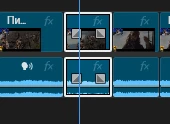
I've noticed a very specific pattern. Whenever there's a normal clip between two clips marked "Ignore Transcription", Premiere often doesn't remove that middle clip, even if nobody speaks in it and it lasts longer than my pause threshold.
This happens repeatedly throughout my timeline. I've checked many examples, and it's almost always the same situation.
I've tried setting the pause threshold to both 1 second and 0.5 seconds, but it makes no difference.
I also tried Premiere Pro 25.6.6 and 26.0, retranscribed my source files, and even started a completely new project. I imported the original recordings, transcribed them first, and then started editing. After just 10 minutes of editing, the exact same problem appeared again.
I also tried nesting one of these problematic clips and detecting pauses inside it, but Premiere just says "No dialogue found" and doesn't detect anything.
One more thing I noticed: when I tested approximately 3.5 hours of the same source material without any "Ignore Transcription" markings, Premiere reduced it to 1 hour and 37 minutes. But in my edited 2-hour-38-minute sequence with those markings, it only reduced the footage to 1 hour and 56 minutes.
I understand that these two sequences are not exactly the same length, but the problem with the untouched clips between ignored sections is clearly reproducible.
Is this a bug in Premiere Pro, or am I misunderstanding how "Ignore Transcription" is supposed to work?
Is there any way to make Premiere automatically remove these unwanted clips without deleting the important moments I've already marked?
I have a lot of these clips, so removing them all manually would take an extremely long time.
I can provide screenshots or a screen recording if needed.
Thanks in advance!
 AdChoices