
Premiere Pro Export Glitch
Please help I am having a very frustrating issue where I have the same couple of frames display as super glitchy when I export from PP. See screenshot below. Look at his face and around his hands.
This is not present in the original footage, and does not display in my timeline. I have exported about 10 times now, below are some of the things I've changed, and each time this glitch happens at the same exact spot. Client is expecting video so appreciate any help!!

Editing on PP 24.5.0 (Build 57).
I have cleared the media cache.
I have restarted the system.
I have started a clean project and copied/pasted just the media from my timeline into the new project.
I have used PP and ME to export, using both CUDA and Software Only settings.
I am exporting H.264 and have tried 40mbps and 20mbps, using Max Quality checked AND unchecked.
Footage is from Sony FX6 as 23.976fps XAVC-L 4K. Timeline is 23.976 1080p.
GPU is GeForce RTX 3080 running 560.70 driver.
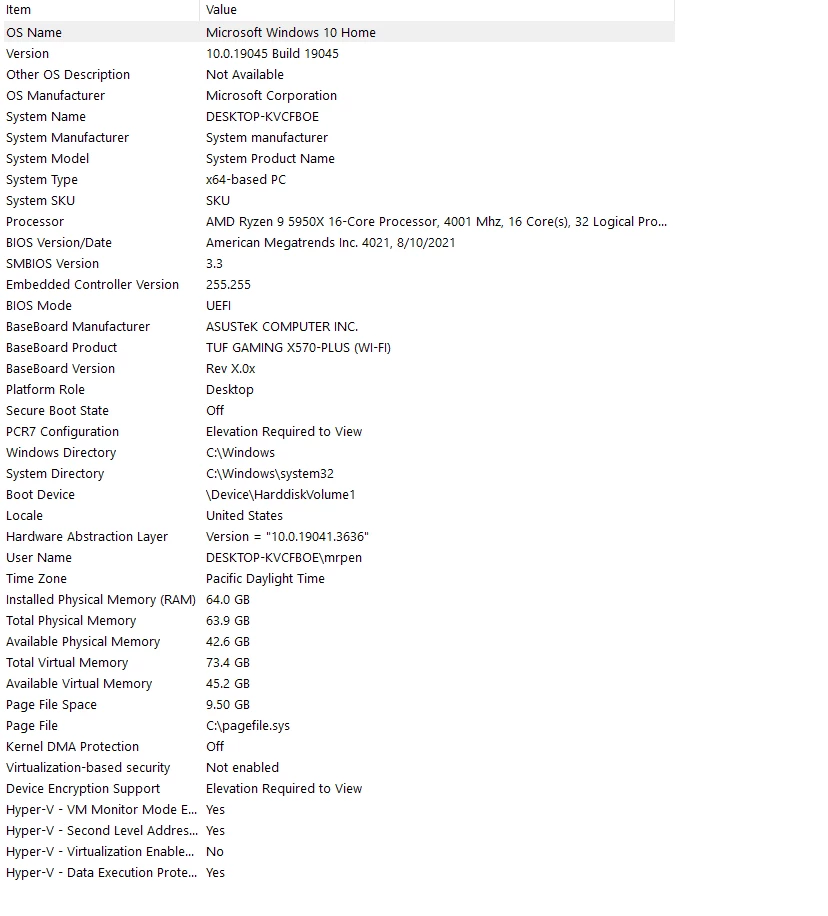
System info is below:


 AdChoices