

AndrewTheGreat
Known Participant
July 26, 2024

Premiere Pro: Source monitor scaling bug

  • July 26, 2024
  • 2 replies
  • 245 views

Another bug that accompanies Premiere Pro from version to version. 24.5, win11, i7-14700k, RTX4080, 64GBRam, SSDs with plenty of free scace.

The problem is as follows: if you work with 4K footage in a 1080p sequence, this is how the program monitor shows the footage:
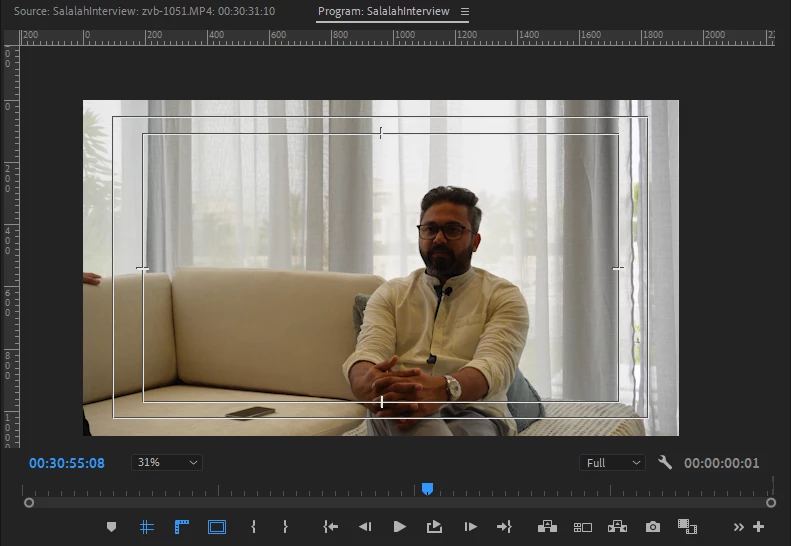
 

This is how the Source monitor shows the footage if you open it from your timeline by doubleclicking:
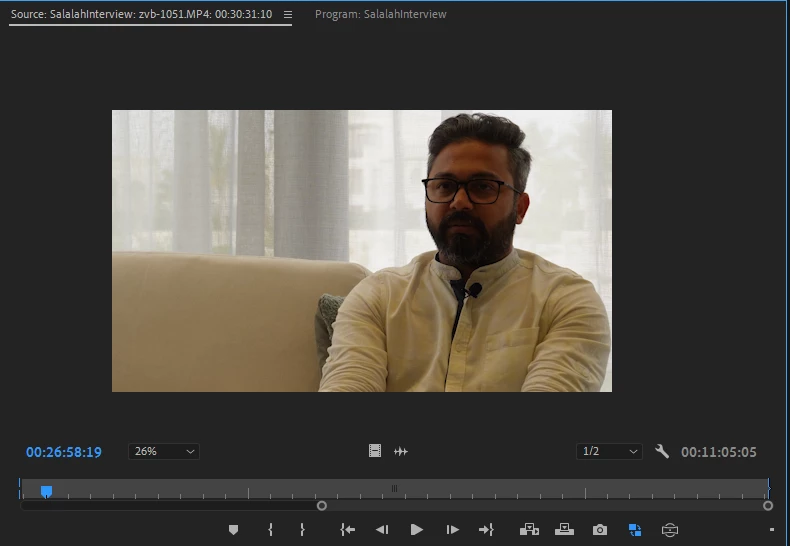
 

The image is always cropped though in the sequence it's autoscaled down to the 1920x1080 via Set to frame size in the Preferences.


If you open a clip from the project bin the source monitor shows the clip uncropped as it should.


2 replies

Kevin-Monahan
Community Manager
Community Manager
July 26, 2024

The status of this bug report has been updated.

Kevin Monahan - Sr. Community and Engagement Strategist – Adobe Pro Video and Audio
Kevin-Monahan
Community Manager
Community Manager
July 26, 2024

Hi Andrew,

I am glad you wrote that bug report; I can reproduce the issue. You're right, that seems to be broken. Notice that a match frame has the expected behavior, but double-clicking doesn't. Check that out.


I hope will take a closer look at this bug. It seems quite annoying. Sorry about the issue.


Thanks,
Kevin

Kevin Monahan - Sr. Community and Engagement Strategist – Adobe Pro Video and Audio