
Participant
February 11, 2026

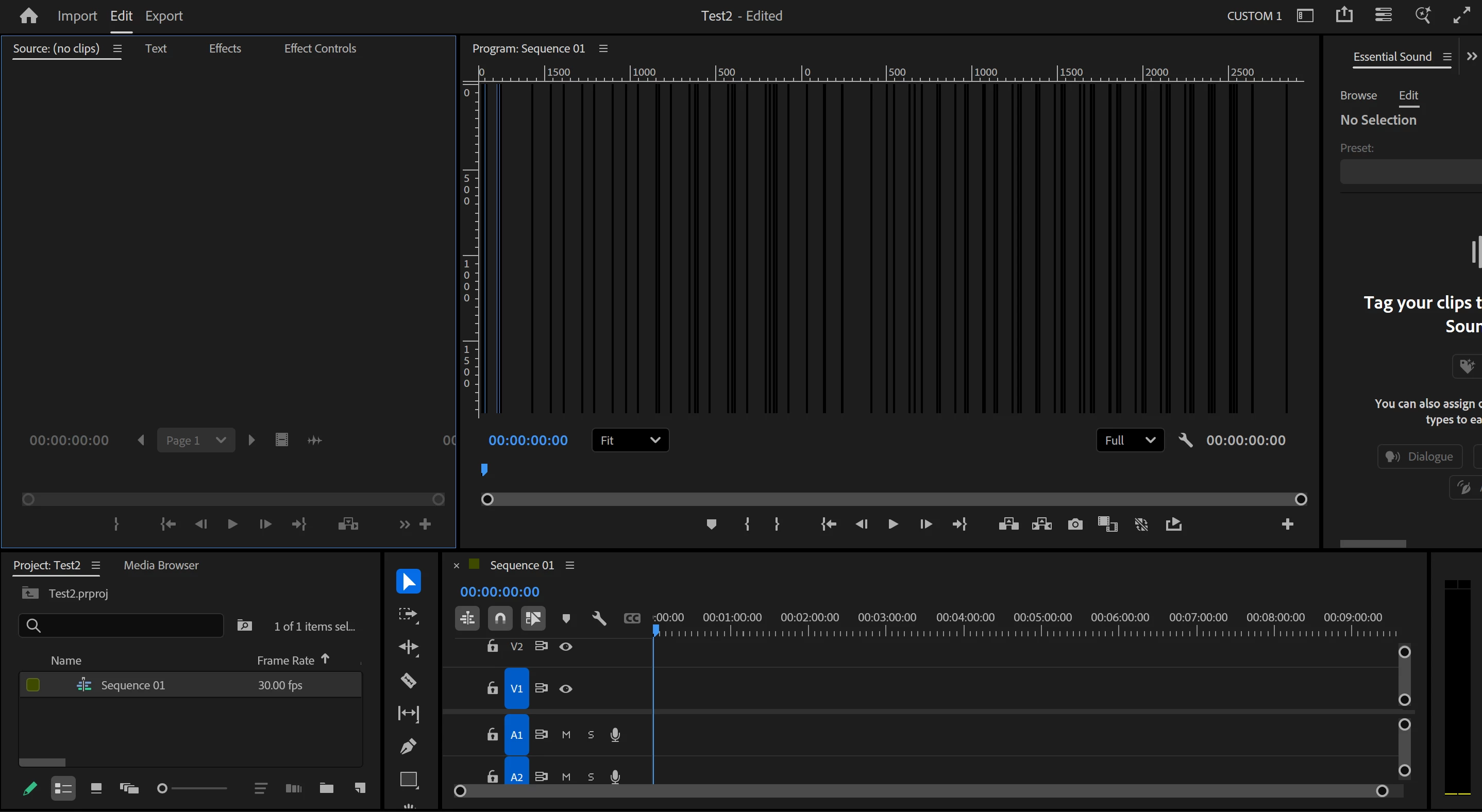
Premiere Program Monitor turns black or displays other visual glitches when the panel size is adjusted. Often accompanied by whole screen turning black momentarily or a crash.

  • February 11, 2026
  • 2 replies
  • 20 views

When adjusting the size of the Program Monitor panel in Premiere, the software almost always freezes, causes my screen to go black for a few seconds, and then comes back with the Program Monitor displaying a completely black, white or otherwise glitched visual. Premiere has to be restarted to fix this glitch. Often Premiere will crash or have to quit when this occurs, and there are occasional crashes when going to the export window.

Suspected to be a GPU/driver issue, though rolling back to older drivers and older versions of Premiere has not resolved this.

OS: Windows 11

Premiere version: 26.0

GPU: Intel (R) Arc(TM) 140V GPU (16GB)

GPU Driver: Intel® Graphics Driver 32.0.101.8425/32.0.101.8362 (WHQL Certified)

Screenshot of bug attached. Unable to capture in video as the bug causes screen recording to fail.
 

    2 replies

    John T Smith
    Community Expert
    Community Expert
    February 12, 2026

    >GPU Driver: Intel® Graphics Driver


    Do not count on Windows to be fully up to date when it comes to device drivers
    Go to the vendor site to be sure you have an updated driver for your graphic adapter
    There have also been reports in the past that the latest driver is not the best driver
     

    Intel https://downloadcenter.intel.com/product/211969/Intel-HD-Graphics-Family
    https://www.askwoody.com/newsletter/free-edition-working-with-the-intel-driver-support-assistant/
     

    Participant
    February 17, 2026

    I always download via the intel site for keeping the graphics driver updated.

    I have attempted rolling back drivers and adobe software to older versions but the issue was not resolved and it’s very time-consuming to keep installing different drivers and software when I need to get work done.

    Community Manager
    February 11, 2026

    Hi ​@BenCrombieNestCommerce
    I’m sorry you’re having the dreaded black screen issue.  I can see the crash report you sent 2 hrs ago.  Thanks for that!  It does seem to be graphics-related.  DO you have GPU Acceleration turned on/ off?  Did the issue start with the Premiere update?  I don’t know how advanced a Windows user you are, but you can try using the DirectX Diagnostic Tool to see if it provides more specific info about your GPU.  I’ve also reached out internally to see if anyone else is seeing this problem.  Sorry for the frustration, and thanks for reaching out.


    Participant
    February 12, 2026

    Hi Rach,

    Thanks for your response. I’ve tried switching off Hardware-accelerated GPU scheduling and Variable refresh rate in my system settings (hope these were the right ones to try) unfortunately the bug still persists, froze and crashed same as before.


    I will try investigating with DirectX Diagnostic Tool when my workload eases up a bit (fortunately Premiere remains useable) and try to share some more useful info. Please let me know if you have any other suggestions in the meantime.

    Thanks again!