


Known Participant
Nov 6, 2026 7:40 PM UTC
Investigating

Premiere saving over read-only files?

I would like to enquiry if it is possible that an update on Premiere Pro is allowing it to save over files marked as read-only.
I am running:

  • Premiere Version: 26.5.2 (Build 5)
  • Operating System: Windows 11 Pro, 25H2

and I have a project on a Synology Drive which I use as template.
t is set to read-only, when I used to try to save it on Premiere,  I would get an error (rightly so). 
But lately it seems Premiere is overriding that.
I mark a file as read-only, open it in Premiere, save it and the file is not marked as read-only anymore.

I open the same file with another machine running Win 10 and Premiere 25.5.2 (Build 5), and I cannot save over the file.

But, to add complications, if I move the file to the local desktop and try to save it in read-only mode, I get an unknown error.
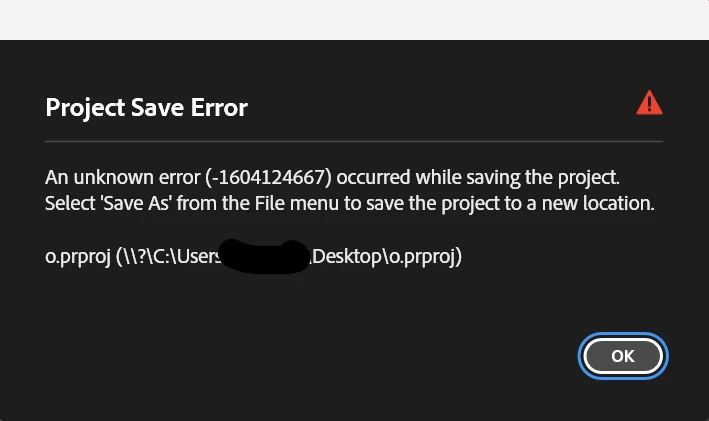

Could this be a Premiere issue? Anyone else experiencing this?

Thanks,

    2 replies

    Amy the Stuv
    Community Manager
    Community Manager
    Nov 6, 2026 8:24 PM UTC

    Hello ​@Iliocrandi 

    Welcome to the Premiere Forums. I have not seen any other reports of this issue and unfortunately I do not have a Synology to test on at my disposal. I have some testing steps you can take that I’ll copy below, but my other thought is to possibly bring your Templates into a Production. Premiere Productions introduce Project Locks, which is a visible lock file you can see and it forces that project to be Read Only when you open on a Ctrl - click or activate the red lock when the project is open. Importing a project into a Production will make a copy of that project. Read more about them here: https://helpx.adobe.com/premiere/desktop/get-started/preferences-and-settings/best-practices.html


    Below are some additional testing steps. Screen recordings of this behavior would be most helpful. Let me know if you need a private upload link to share them with us and I can privately message you one.


    Safe next steps

    1. Protect the template first. Keep an untouched backup and reproduce only with disposable copies. For normal editing, use Save As to create a working copy rather than saving over the template.
    2. Separate the variables. On the same machine and Premiere build, test copies at a local, non-synced path and in Synology Drive. If possible, compare Premiere versions on the same Windows version too; make a fresh copy for each version rather than round-tripping one project between versions.
    3. Check what “read-only” means in each test. Record the file’s Read-only setting before and after saving, and separately verify the account’s folder/file permissions and Synology Drive sync status. Don’t treat the Windows attribute, access permissions, and Premiere’s project-lock state as interchangeable.
    4. Try both save paths on a test copy. Compare Ctrl+S with Save As to a new filename. Note whether the project contents changed, whether the attribute cleared, and the exact error text.
    5. Capture a reproducible report. Include Premiere version/build, Windows version, Synology Drive client/version, project file type, exact path type (synced local folder or mounted share), steps, and screenshots or a short recording. If the issue reproduces reliably on a disposable file, add those details to the Community report.

    Keep us posted! Hopefully we can figure out what’s going on.

    Best,

    Amy

    Translate
    bbb_999
    Community Manager
    Community Manager
    Nov 6, 2026 7:45 PM UTC

    Premiere does not override OS-level or storage-level privileges; it runs with the privileges of the OS user who launched it.

    We have previously encountered delays/collisions/disagreement between updates made to files (and their privileges), when accessed from Synology and other NAS systems. 

    When you see correct honoring of read-only privileges when logging in from that other system, is that system accessing the Synology using the same Synology user account, as the one in use on the system that seems to not honor read-only privileges? [It’s definitely using a different OS user on that successful system, but different Synology users have different privileges too...]


    Translate