

Premiere taking forever to load projects
I regularly edit through Premiere for work though in an unorthodox manner by controlling my boss’s computer (which has Premiere) via Zoom. He has a Mac and my computer is Windows, so, with the remote control through Zoom, I can’t use any keyboard shortcuts with Premiere really.
Here’s a screenshot of the Mac info, just in case:
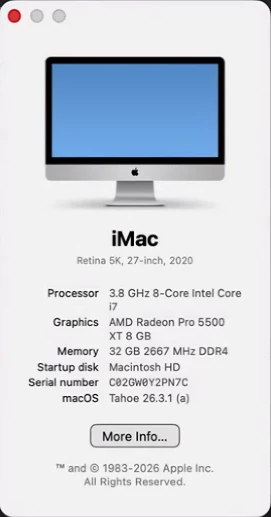
The issue I’m having is that my boss’s computer crashed during work and he eventually got it started back up and we got back on a Zoom call to keep working. After that though, Premiere was acting very slow, giving choppy playback, not accurately showing where on the timeline we were in playback, etc.
It was the end of the day though so we left it alone.
Normally, I export any projects we’re currently working on at the end of the day so he can review them before the next day, but Premiere was being so slow and strange, I wasn’t able to do that. (Mainly, importing anything into Media Encoder was taking ages.)
Reopening projects today showed the same kinds of issues. Everything was taking forever to open and once it did, it was stuck “Preparing Audio” for seemingly an infinite amount of time.
Half the time, waveforms for the audio wouldn’t be generated even if we could hear it. If I could finally hit play, it would play normally for a few seconds before suddenly getting choppy and inconsistent in the playback. Audio would suddenly drop out and come back, despite there being no issue with the timeline or project itself.
I went ahead and updated Premiere hoping that would fix it, but no luck. v26.2 gave me the same slow loading issue.
I also reinstalled v25.6.5, hoping going back to the previous version might help, but, again, no luck.
I tried other normal troubleshooting things like clearing the media cache, fully uninstalling and reinstalling, and having my boss restart his computer (and therefore our Zoom meeting).
I did notice that some of our audio files had different sample rates than the sequence’s sample rate, but it hadn’t been an issue at all before today. And it’s an issue in both v26.2 and v25.6.5 (the version where it was not previously an issue before today). So I’m a little unsure why that would suddenly cause these delays.
I tried other things like simply rendering out a timeline to see where that would get me and a render that would normally take just a few minutes was showing over an hour of estimated time. And that’s if it didn’t show me random error messages I was unfamiliar with, such as:
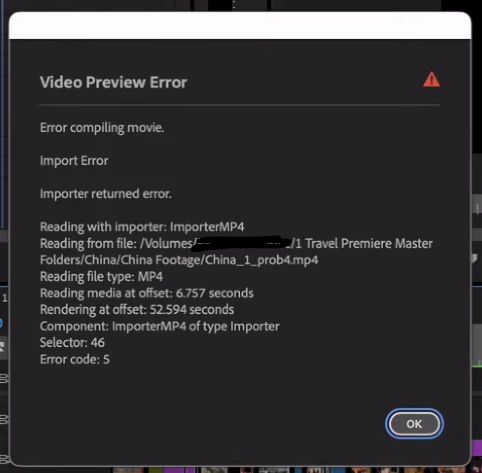
I eventually skipped rendering in Premiere altogether and decided to just send the timeline off to Media Encoder to see if it would fare any better, but Media Encoder struggled to even open the project. Again, a process that previously went very quickly.
I cleared the Media Cache on Media Encoder to see if that would help too.
I’m at a loss at this point.
I’m not sure if this is an issue with the Premiere program I’m running into or if it’s my boss’s computer having complications after it crashed yesterday. Everything else about the computer seems normal and is functioning fine, it’s just Premiere (and Media Encoder) that’s having issues.
Any and all help is more than appreciated.


 AdChoices