Inspiring
April 28, 2026

PROBELMA COM GERENCIAMENTO DE CORES / COLOR GRADING MANAGEMENT

  • April 28, 2026
  • 3 replies
  • 52 views

Gostaria de relatar um problema recorrente que venho enfrentando no Premiere Pro em relação ao gerenciamento de cores, especialmente ao trabalhar com arquivos gravados em S-Log3 / S-Gamut3.Cine.

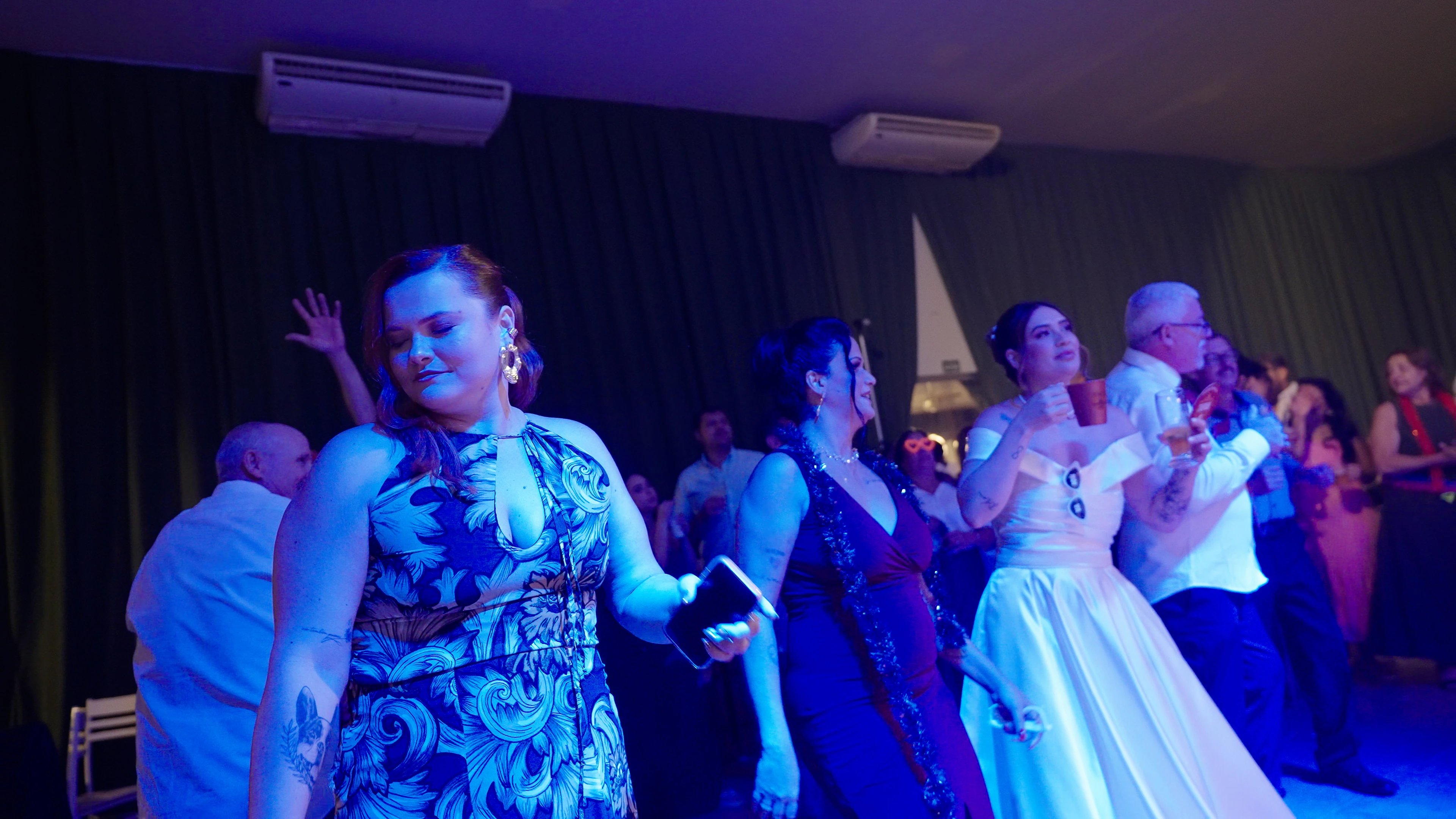
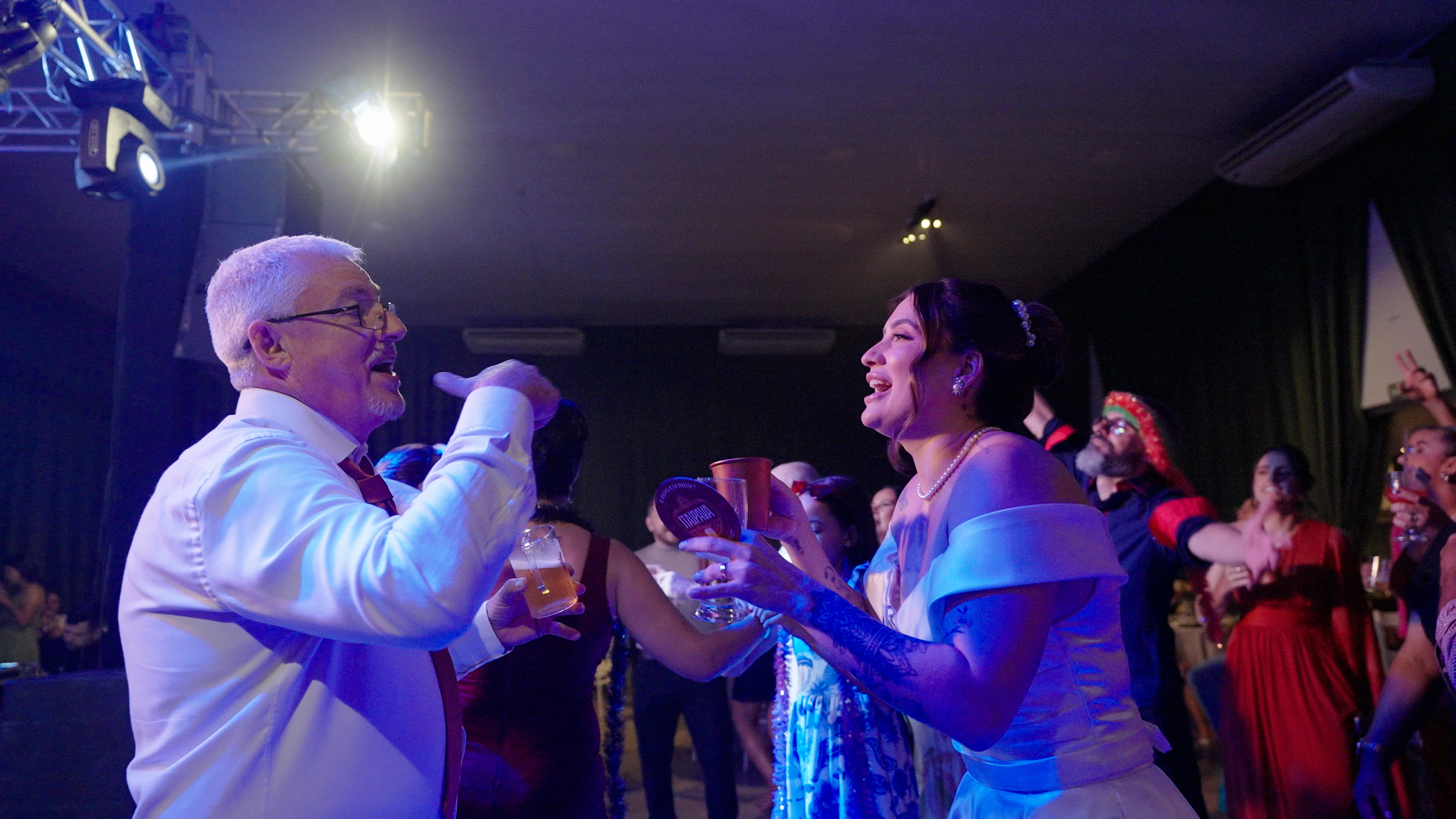
Ao utilizar a conversão automática do Premiere (tone mapping com preservação de matiz), o resultado apresenta cores bastante imprecisas, principalmente nos realces e nos tons de pele. Em situações de iluminação mais complexa, como pistas de dança ou ambientes com luzes coloridas, o problema se intensifica significativamente, gerando aberrações visuais indesejadas.

Ao alterar o método de mapeamento para “Canal”, há uma melhora perceptível na imagem. No entanto, essa configuração precisa ser ajustada manualmente clip por clip, o que torna o fluxo de trabalho inviável em projetos maiores. Não há uma forma clara de aplicar essa alteração globalmente em todo o projeto ou sequência.

Uma alternativa encontrada foi trabalhar com sequências em ACES, o que resolve parte do problema. Porém, essa abordagem não é ideal para nosso fluxo de trabalho, já que a grande maioria dos LUTs disponíveis no mercado (cerca de 99,8%) é desenvolvida para Rec.709.

Diante disso, acredito que seria extremamente útil a implementação de uma ferramenta semelhante ao “Color Space Transform”, como existente no DaVinci Resolve. Isso permitiria um controle mais preciso sobre as conversões de espaço de cor e evitaria esse tipo de inconsistência.

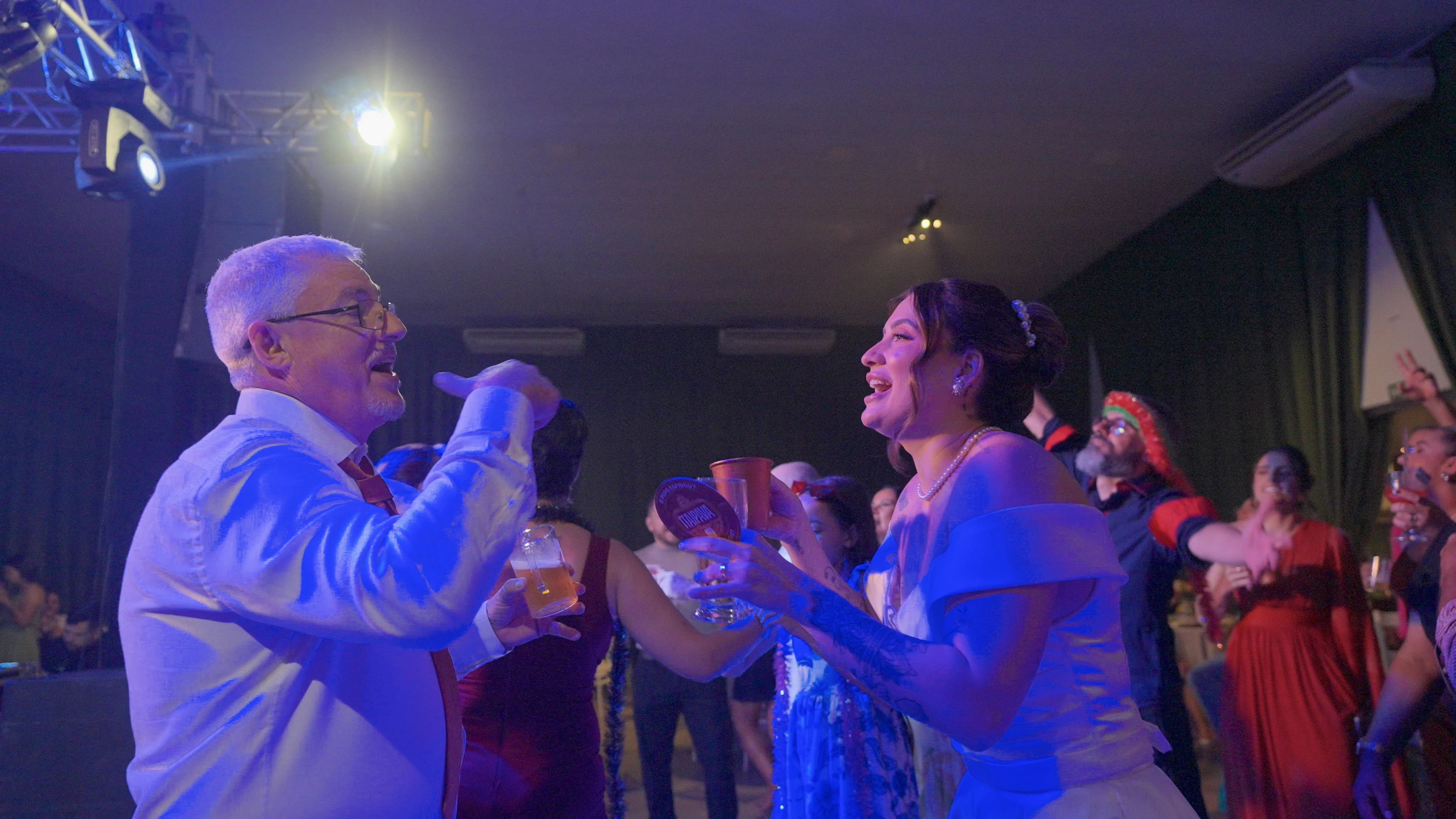
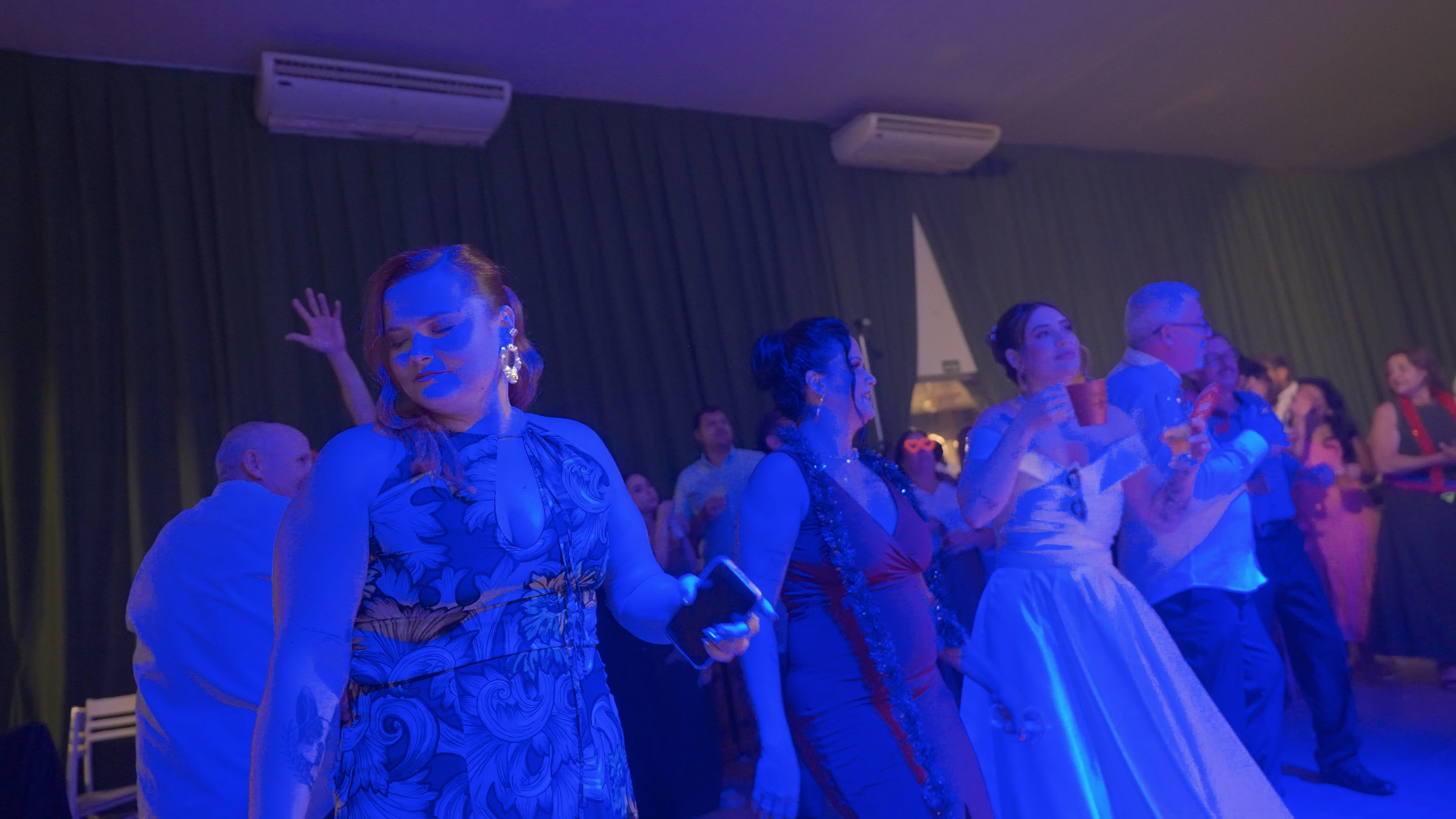
Anexarei exemplos comparando:

  • A conversão automática do Premiere
  • O LUT de conversão oficial da Sony

Agradeço pela atenção e espero que essa questão possa ser considerada para melhorias futuras no software.

.

.

.

I would like to report an ongoing issue I’ve been experiencing in Premiere Pro regarding color management, specifically when working with footage shot in S-Log3 / S-Gamut3.Cine.

When using Premiere’s automatic color conversion (tone mapping with hue preservation), the resulting colors are often inaccurate and unpleasant—especially in highlights and skin tones. The issue becomes significantly worse in complex lighting situations, such as dance floors or scenes with strong colored lighting, where visible color artifacts and inconsistencies appear.

Switching the tone mapping method to “Channel” improves the results to some extent. However, this setting must be adjusted manually on a clip-by-clip basis, which is extremely inefficient for larger projects. There is currently no clear way to apply this change globally across an entire sequence or project.

I have tested working in an ACES color workflow, which partially resolves the issue. However, this is not ideal for our workflow, as the vast majority of LUTs available (around 99.8%) are designed for Rec.709.

Given this, I strongly believe that Premiere Pro would benefit from a feature similar to DaVinci Resolve’s “Color Space Transform.” This would allow for more precise control over color space conversions and help avoid these inconsistencies.

I will attach examples comparing:

  • Premiere’s automatic conversion
  • Sony’s official conversion LUT

Thank you for your attention, and I hope this feedback can contribute to future improvements.
 

    3 replies

    IanB_360
    Community Manager
    Community Manager
    May 2, 2026

    Hi Vieira Aracatuba
    Thanks for all the details, and I am sure Neil was able to give some good insights into what you have going on. If you have time to send some of these details, that would be wonderfully helpful.

    • Steps to Reproduce: A numbered list of the exact steps needed to replicate the issue.
    • Expected Result: What should happen after the final step?
    • Actual Result: What actually occurred?
    • Screen Recording: If possible, include a recording of your screen showing the issue.
    • Premiere Version: How to find the exact version of Premiere you're using.
    • Operating System: Specify Windows or macOS, along with the version.
    • GPU Driver (Windows only): Please let us know your video card driver version. We recommend updating to the most recent version; for NVIDIA users, we strongly recommend the Studio version of the driver.
    • Video Format: If the issue relates to playback or export, please specify the format (and ideally share a sample video).

    Helpful Context 

    Comparing when and where the issue occurs helps us narrow down the cause:

    • Does it affect all projects or only some?
    • Does it affect new, empty projects?
    • When did the problem first begin?
      Here to help
      Ian


    R Neil Haugen
    Legend
    April 28, 2026

    In the upper of those two, you have Preserve RGB set, which means Premiere skips doing any CM for that clip.


    The lower one it’s off, but it looks like you still have input gamut compression on for the Sequence. Try that off.

    Everyone's mileage always varies ...
    Inspiring
    April 29, 2026

    In the upper of those two, you have Preserve RGB set, which means Premiere skips doing any CM for that clip.


    The lower one it’s off, but it looks like you still have input gamut compression on for the Sequence. Try that off.

    Yes, I've already tried turning it off, switching from luminance preservation to saturation, but nothing helps in these cases.
    When it's turned off, it gets even worse.
    The only thing that alleviates it is when I change the input tone mapping from hue to channel, but I have to do this individually for each clip. And that's practically impossible for those of us who work with weddings.

    I believe that Premiere's conversion system has this bug, because I've tested something like CST in other applications and it works perfectly.

    R Neil Haugen
    Legend
    April 29, 2026

    Have you tried selecting a group of these clips and changing a setting?

    Everyone's mileage always varies ...
    R Neil Haugen
    Legend
    April 28, 2026

    Make sure down in the Sequence settings to turn off Input gamut and color compression first. Have you tried that? If you’re using the Project management recognizing the media for input, you don’t want the Sequence settings for those on, as you get double-dipped color. NOT good.

    Everyone's mileage always varies ...
    Inspiring
    April 28, 2026

    Make sure down in the Sequence settings to turn off Input gamut and color compression first. Have you tried that? If you’re using the Project management recognizing the media for input, you don’t want the Sequence settings for those on, as you get double-dipped color. NOT good.

    Thank you, but I didn't understand.
    Color compression and input gamma are enabled, but the file has nothing in it; this is the raw slog file without any LUTs. Only with Premiere's automatic recognition, it should be better, shouldn't it?
    I sent an example of the raw file as Premiere recognizes it, and another with everything disabled and only with the file provided by Sony, so you can see the difference.
    Automatic mapping comes as hue preservation in the files automatically, and I would prefer it to come by channel. Is it possible to do this in the entire project? I can only do it manually in each separate file.