Participating Frequently
August 9, 2026

Project Window is missing
  • August 9, 2026
  • 10 replies
  • 111 views

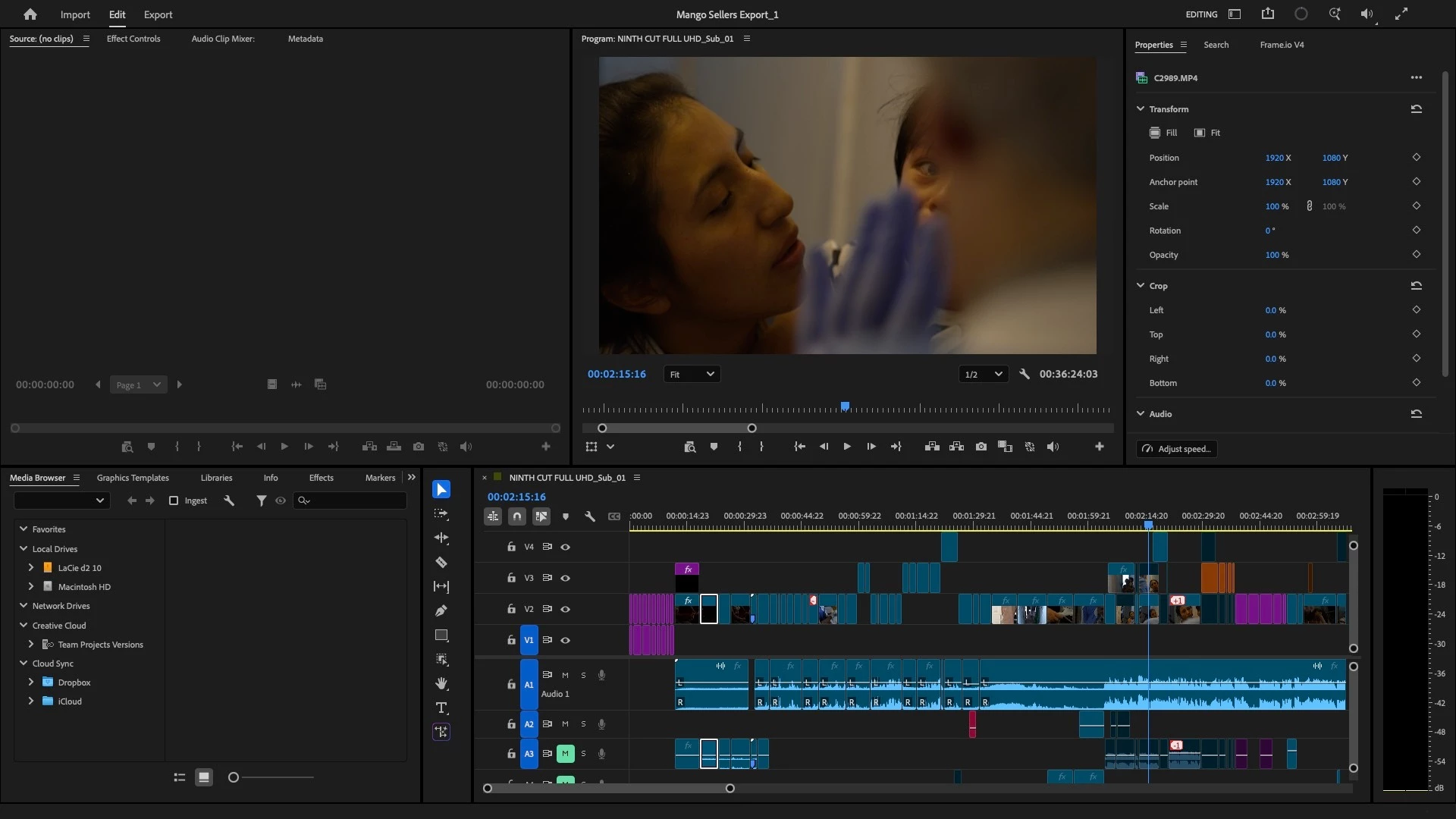
There’s no Project Window panel, and I can’t access my bins. Even after resetting the workspaces, the Project Window still doesn't appear.

    10 replies

    Amy the Stuv
    Community Manager
    Community Manager
    August 11, 2026

    ​@defaultx98ocvqysruk 

    Thank you for the notes, although I still have some followup questions.

    It can always help to know what system Premiere is trying to communicate with and when it comes to panels and interface issues, what monitors and resolutions are used for display.

    • Premiere Version: Find the exact version of Premiere you're using. In your case, please let us know what version you had upgraded to that presented this issue.
    • Operating System: Specify Windows or macOS, along with the version.
    • CPU (Mac Only): What M series chip are you using and if intel, include GPU.
    • GPU and Driver (Windows only): Please let us know your video card and driver version. We recommend updating to the most recent version; for NVIDIA users, we strongly recommend the Studio version of the driver.
    • Monitors What is your Monitor setup and Resolution of each Monitor?

    From some of your screenshots, it appears you have multiple projects with the same name. Is this the case? 

    Do you have 3 projects called Mango Sellers Export_4?
    Do you have 2 Mango Sellers Export_3 and one Untitled Project?


    Additionally, if you’re willing and able, I would truly appreciate a quick test utilizing keyboard shortcuts.


    If you were to add Either of these to your keyboard and utilize finding a Sequence when the Timeline Panel is Active or Finding a Source Clip if you Match Frame from one of those clips in the Timeline, it should automatically Open the Project Panel. If it does not, that tells us something.


    I would test myself but I can’t get the same issue to occur on my end, but that certainly doesn’t mean it isn’t happening. Hoping to find out what’s different and these questions could help.


    Thank you again, and sorry for the inconvenience.

    Amy

    Participating Frequently
    August 26, 2026

    Hi Amy,

    Thank you for following up. Here are my system details:

    • Premiere Pro: 26.3.2

    • macOS: Tahoe 26.5

    • CPU: Apple M4

    • Monitor: Single Dell 27" P2725H

    Regarding the multiple projects with the same name: I opened multiple copies/versions while troubleshooting the issue, which is why they appeared in the screenshots.

    I also tested Find Source Clip as you suggested. With a clip selected/match-framed from the timeline, Find Source Clip does not open the Project panel. Nothing happens and the Project panel remains missing.

    One additional data point that may be useful: I uninstalled Premiere 26.3.2 and installed Premiere Pro 25.0. When I open the exact same Mango Sellers project in 25.0, the Project panel and all of my bins appear normally. So at least on my system, the issue appears to be specific to the newer version rather than the project file itself.

    Thanks again for helping investigate this.

    Isaiah

    Amy the Stuv
    Community Manager
    Community Manager
    August 26, 2026

    Thank you for bringing this to our attention :)


    It’s interesting that Version 25 does not present this issue. I’m surprised you had to go back that far. Did you try just Version 26.0 or 26.2?


    What version was this original project created in?


    Also, I’d like to confirm that you did try to create a New Project in 26.3.2 and even the new project was missing the Project Panel?


    Since it seems to be Panel / Workspace specific, I’m wondering if you wouldn’t mind sharing just the project file, no media with us and I’ll see if I can see the Project Panel on my end?

    Participating Frequently
    August 10, 2026

    Also, here are my Chat notes:


    This screenshot gave me the clue we were missing.

    Your Project panel is working—but it's still showing:

    Project: Untitled

    even though the title bar says:

    Mango Miscellaneous_1

    That should never happen.

    When you open a different project, the Project panel should change to Project: Mango Miscellaneous_1 and show that project's bins. The fact that it stays on Untitled means Premiere is keeping the Untitled project open and not switching the Project panel to the active project.

    I think I know what's going on.

    Premiere allows multiple projects to be open at the same time. Each project gets its own Project panel. Right now, I think all of the Project panels except Untitled are simply closed.

    Here's what I want you to try:

    Go to:

    Window → Projects

    You should see something like:

    • Untitled.prproj

    • Mango Miscellaneous_1.prproj

    Click Mango Miscellaneous_1.prproj.

    If nothing appears, then instead double-click it if possible.

    If that still does nothing...

    Let's try something even simpler:

    1. Close the Untitled project (not Premiere).

      • Go to File → Close Project.

      • If it asks to save Untitled, choose Don't Save (assuming it's just the test project).

    2. Now the only open project should be Mango Miscellaneous_1.

    At that point, Premiere has no choice but to show that project's Project panel.

    One question before you do that:

    When you opened Mango Miscellaneous_1, did it ask if you wanted to keep the Untitled project open, or did it open without any prompt?

    That will tell me whether Premiere is in "multiple open projects" mode, which is exactly what your screenshots suggest. I think we're one step away from getting you back into Mango Sellers.


    I see it now. And this screenshot tells us something very specific.

    The title bar says Mango Sellers Export_3, but the lower-left panel is Media Browser, not Project. In other words:

    • ✅ The Mango Sellers project is open.

    • ✅ Your sequence is open.

    • ❌ The Project panel for this project is still closed.

    The Media Browser is simply occupying the spot where the Project panel normally lives.

    Try this exact sequence:

    1. Click anywhere inside the Media Browser panel.

    2. Go to Window → Projects.

    3. You should see Mango Sellers Export_3.prproj listed.

    4. Click it once.

    If nothing happens:

    • Right-click on the Media Browser tab.

    • See if there's an option like Close Panel or Close Panel Group.

    • After closing it, immediately go back to Window → Projects → Mango Sellers Export_3.prproj.

    If that still does nothing

    I think we've reached the point where we should create a brand-new workspace from scratch instead of trying to resurrect the old one.

    One more question before we do that:

    When you go to Window → Projects, how many projects are listed now?

    Is it just:

    • Mango Sellers Export_3.prproj

    or are there multiple entries?

    One thing I'd also like you to try

    Go to:

    Window → Workspaces → Assembly

    Then immediately:

    Window → Workspaces → Reset to Saved Layout

    If the Editing workspace metadata itself is corrupted for this project, switching to a completely different built-in workspace (Assembly) can sometimes force Premiere to recreate the Project panel.

    We're much closer than when we started. At this point, the project itself is clearly opening correctly—the only thing refusing to appear is the Project panel for that project. That's a much narrower problem than "the project is gone," and it's solvable.


    Thanks for hanging in there. At this point, I don't want you randomly clicking things anymore. We've actually narrowed this down a lot.

    Here's what we know:

    • ✅ Your projects open.

    • ✅ Your sequences are intact.

    • ✅ The Project panel works in principle (we saw it in the test project).

    • ❌ For your real projects, Premiere refuses to attach the correct Project panel.

    • ❌ Reinstalling Premiere didn't fix it.

    • ❌ Resetting the workspace only fixed the blank test project.

    This is now behaving like a project panel registration bug, not user error.

    I want to try one last diagnostic before we do anything invasive.

    Can you open the Premiere Console?

    Go to:

    Window → Console

    Does it open?

    If so, are there any red error messages when you switch between projects?

    The next thing I'd do is test the project on a different Premiere installation.

    Do you have access to:

    • another Mac,

    • or another user account on this Mac?

    The reason is simple:

    • If Mango Sellers Export_3.prproj opens normally elsewhere, we know your project is 100% healthy.

    • If it behaves the same way elsewhere, then the project file itself is damaged.

    Given everything you've shown me, I actually think the project is healthy.

    There's one thing in your screenshots that still bothers me.

    The title bar changes correctly:

    • Mango Sellers Export_3

    • Mango Miscellaneous_1

    …but the lower-left panel never changes from whatever was already there.

    That is not normal Premiere behavior.

    I would also like you to tell me:

    What version of macOS are you running?

    Apple menu → About This Mac

    And:

    Is this an Intel Mac or Apple Silicon (M1/M2/M3/M4)?

    My strongest suspicion now

    I think you've hit an actual Premiere bug, not a corrupted project.

    The reason I say that is:

    • the panel list knows the projects exist,

    • the title bar changes,

    • the sequences load,

    • but the Project panel instance never binds to the active project.

    That's not something an editor normally causes.

    One last question that could save us a lot of time:

    Can you zip and upload Mango Sellers Export_3.prproj (just the .prproj file, not the media)?

    I can't open it myself, but I can inspect the XML structure to see if there's anything obviously malformed or unusual about the workspace or project metadata. If the project file looks normal, I'll know with high confidence that we're dealing with a Premiere/UI issue rather than damage to your work.

    I know this has been incredibly frustrating, especially when you're so close to finishing Mango Sellers. The encouraging part is that every screenshot still shows your sequences opening correctly, which is a strong sign that the edit itself is still intact.

    Participating Frequently
    August 10, 2026

    In the meantime, I’ve uninstalled the latest version and am currently using version 25.0.0 (Build 61). I’ll reinstall once the bug is fixed.

    Participating Frequently
    August 10, 2026

    Yes, I’ve clicked the right arrow, and I’ve also done the following:

    - Clicked on “Window” > “Projects” and then clicked on the project I find there.

    - Even after clicking on my project, nothing happens.

    - I’ve done a reset saved layout.

    - I’ve even opened a new project. In that case, a project window appears for the NEW project, but the other project’s panel is still missing.

    Here are some screen shots:


    Amy the Stuv
    Community Manager
    Community Manager
    August 10, 2026

    Hello ​@defaultx98ocvqysruk 

    Please let us now if Averdahl’s suggestion helps you find the Project Window Panel.

    Best,

    Amy

    Averdahl
    Community Expert
    Community Expert
    August 9, 2026

    Click on the right arrow to reveal it.

    Or, go to Window > Projects and click on the project that you find there.