
Participant
Nov 12, 2026 3:59 PM UTC
Needs More Info

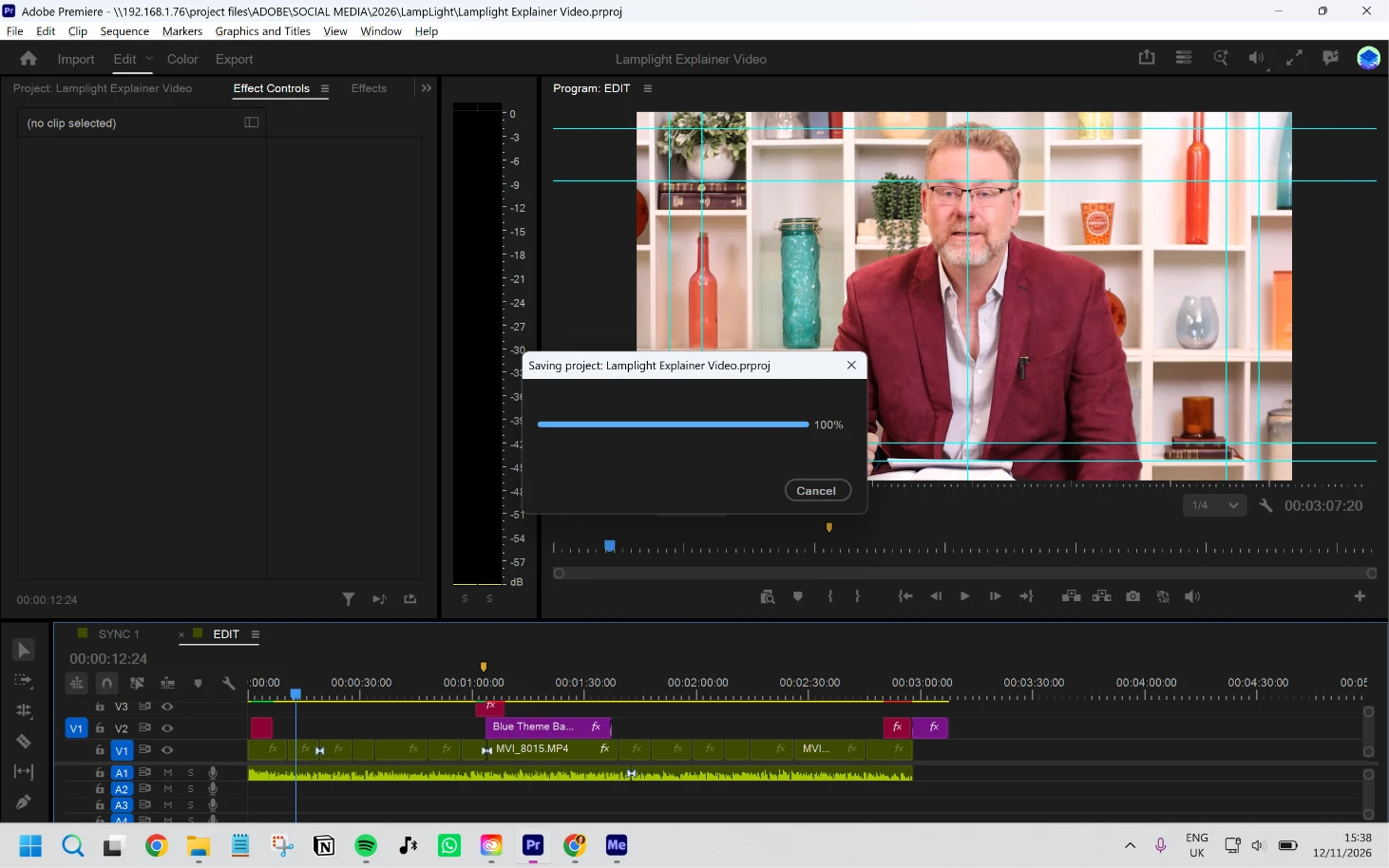
Project won't send to media encoder - stuck at saving

Since updating apps to the new 2027 versions, I have been unable to send a project to media encoder for rendering. I click ‘send to media encoder’ and there is an automatic popup in premiere for the project to be saved. It gets stuck at 100% saved and never progesses to send to media encoder. I have attempted to clear media cache, this made no difference. I have to export all my videos directly in premiere. 
 

I am using a MSI laptop. Not Apple.


    20 replies

    Participant
    Nov 14, 2026 2:03 PM UTC

    This has been happening to me every time I try to send a project from Premiere to Media Encoder since the update, and my Controlled Folder Access was already set to Off, so that isn’t the issue on my end.

    The one temporary workaround that works every time for me: instead of clicking Export and trying to send the Premiere sequence to Media Encoder and entering the endless filesave, open Media Encoder and drag the project file itself into Media Encoder, then choose the sequence to export.

    Translate
    Participant
    Nov 16, 2026 2:18 AM UTC

    Thank you for the workaround!!

    Translate
    Participant
    Nov 13, 2026 10:36 PM UTC

    Just updated to v27 and also this happened. Stuck here when trying to send multiple files for exporting on media encoder. 

    -Win 11

    -Nvidia studio driver 621.24

    -Videos files

    -Project size is around just a 100MB

    -Storage target is on an NVME 1TB

    -Dual monitor set-up 3440x1440p and 2560x1440p


    Translate
    FulStak Videditr
    Inspiring
    Nov 13, 2026 4:51 PM UTC

    Confirmed. It’s like fumbling the ball on a hike. Just found out and thankfully I have a second monitor so Premiere doesn’t dominate the primary monitor while having to do these in-app exports.


    Until this gets fixed, I will recommend no one else in the department updates to Premiere 27.0.

    Translate
    KatieToo
    Community Manager
    Community Manager
    Nov 13, 2026 6:26 PM UTC

    ​@FulStak Videditr May we also get your specs and details? I see you mentioned it is indeed with Premiere v27, but the rest will help them understand your setup better.

    What kind of dual monitors do you have, by the way?

    • Setup/OS: Please specify Windows 11/10 or Mac, plus what macOS, along with driver version/build.
      • GPU Driver version/build(Windows only): We recommend updating to the most recent version; for NVIDIA users, we strongly recommend the Studio version of the driver.
      • Mac Chip (Mac Only): what M-series chip? If Intel, please include GPU.
    • Media Files: video, images, etc. and what types (can check under Media Properties)
    • Project Size: About how big is your project file? Is it in a Production or Multicam? Approximately how many clips are involved in a rough estimate
    • Media Storage: Are your Scratch Disks set to your Documents folder or the same as project, and is this the same as the Media drive?


    Also, please let us know the following for helpful context:

    • Does it affect all projects or only some? What about new projects with a few sample clips?
    • Do you recall which Premiere this was last working in, when It started, and what might have changed? Any plugins, OS update, drivers, etc.
    • Are you also using third party plugins and/or extensions, and if so, which ones and are they currently up to date?
       

    Screen Recording: If possible, include a recording of your screen with Premiere in full, showing the issue as that helps us see exactly what might be happening.


    Sorry again for the troubles with that!
    Katie

    Translate
    FulStak Videditr
    Inspiring
    Nov 13, 2026 7:24 PM UTC

    Specs consist of:

    • Monitors: Dell U3824DW and Dell U2424H
    • Windows 11 Enterprise 10.0.26100 Build 26100
    • GPU - Nvidia Ada 3000
      • Manual clean install, latest production branch 621.14
      • Most recent version
    • CPU - Intel Ultra 9 185H
      • Manual clean install, most recent Pro version
    • vMix isolates H264 using RTX 4500 Nvidia encoding at 29.97 FPS and 30-bit rate with FHD resolution
      • Recent recording consists of at least 2 hours in unbroken length
      • Multi Cam, mainly a Close Up and Midshot
    • Total project source size is about 70 GB for recent export
      • Deliverables are 3-bit FHD for video
      • As well as lossless DNxHD master
    • Project file is 570 KB
    • Media storage on Dell machine is SSD at 4 TB
    • Answers to Questions:
      • I have not done any other projects yet with Premiere 27.0, not until next week
      • The previous version of Premiere had no problem sending to Media Encoder
      • No third part plugins for Premiere (only Optical Flares for AE)

    I was going to provide a screenshot, but when I loaded everything up and was able to send to Media Encoder, from Premiere. I don’t know if it reconnected, because I had thrown some audio into Media Encoder from Windows and that may have allowed Premiere and Media Encoder to reconnect again? Not entirely sure. But I may find out more next week when I start from a clean slate. I just started using version 27.0 yesterday.

    Translate
    Inspiring
    Nov 13, 2026 2:45 PM UTC

    I’ve been facing the very same problem with all sequences and projects. I’m using Windows 11 and my GPU is Nvidea RTX 3060

    Translate
    KatieToo
    Community Manager
    Community Manager
    Nov 13, 2026 6:21 PM UTC

    ​@Ulysses Oliveira Sorry to hear that! Did you try Kim’s recent comment with a workaround and if so, did that work for you? 

    If not, could we get more details about your setup and which Premiere? I see you’re on win11 with Nvidia RTX 3060. Which driver version and build?

    Might help to get more details on what % is it getting stuck on Save before going to Media Encoder or even a short screen recording of it happening so engineers can see exactly what’s going on.
     

    Also, please let us know the following for helpful context:

    • Does it affect all projects or only some? What about new projects with a few sample clips?
    • Do you recall which Premiere this was last working in, when It started, and what might have changed? Any plugins, OS update, drivers, etc.
    • Are you also using third party plugins and/or extensions, and if so, which ones and are they currently up to date?

    Thanks!
    Katie

    Translate
    Inspiring
    Nov 15, 2026 1:59 PM UTC

    Miraculously, It’s now working again

    Translate
    Participant
    Nov 13, 2026 1:48 PM UTC

    After installing v27, things went wrong here too. Adobe could no longer write to the C:\ drive – neither to the scratch disk nor to the projects I’d saved in Documents.

    Rolling back to v26 didn’t help either. The C:\ drive remained locked.

    Resolved as follows:

    - Start menu > Windows Security

    - Virus & threat protection.

    - Ransomware protection.

    - Manage ransomware protection.

    - If ‘Controlled folder access’ is set to ‘On’, click ‘Allow an app through Controlled folder access’.

    - + Add an allowed app.

    - Recently blocked apps.

    - Find ‘Adobe Premiere Pro.exe’ in the list.

    - Click the + sign.

    - Restart Adobe Premiere Pro.


    It’s working again (at least for me).

    Translate
    KatieToo
    Community Manager
    Community Manager
    Nov 13, 2026 6:18 PM UTC

    ​@Kim278279257ndf Thank you for providing that workaround! I’ll highlight so others can see it easier.

    Much appreciated,
    Katie 

    Translate
    Participant
    Nov 12, 2026 5:51 PM UTC

    I am experiencing a similar issue after updating to the 2027 versions on Windows.


    Versions: Adobe Premiere Pro 27.0.0 and Adobe Media Encoder 27.0.0.


    Steps: Open an existing project in Premiere, then choose Export > Send to Media Encoder.


    Actual result: The Saving Project dialog remains at 89% and the project is not sent to Media Encoder. In the observed attempt, Media Encoder had not opened yet. Unlike the original report, the progress stops at 89%, not 100%.


    The Cancel button works, and Save As also works. The problem occurs during the save step triggered by sending to Media Encoder; it does not prevent Save As. The project is stored in a local Dropbox folder, but I have not established whether that is related.


    Expected result: The save operation completes and the sequence is added to the Media Encoder queue.


    I have not yet verified whether this affects a new empty project or whether direct export or importing the project directly into Media Encoder works.


    Could the Adobe team investigate this behavior in 27.0 and advise whether there is a confirmed workaround or a planned fix? Thank you.

    Translate
    KatieToo
    Community Manager
    Community Manager
    Nov 12, 2026 8:37 PM UTC

    ​@太志長24063801 Thanks for documenting your AME issue with save stuck at 89% case with those steps and results. The fact that Cancel and Save As still work, while Send to Media Encoder hangs during that save step before Media Encoder opens, is useful to know. Hmm, the Dropbox location may be relevant.

    Could you test a copy of the project saved in a local folder that isn’t synced by Dropbox, then try Send to Media Encoder again? Does it still stop at 89%?

    That would be quite helpful.

    If it does, could we get a short screen recording so engineers can see exactly what might be happening?

    Along with that, let’s get a better understanding of your setup with the questions below -

    • Setup/OS: Please specify Windows 11/10 or Mac, plus what macOS, along with driver version/build.
      • GPU Driver version/build(Windows only): We recommend updating to the most recent version; for NVIDIA users, we strongly recommend the Studio version of the driver.
      • Mac Chip (Mac Only): what M-series chip? If Intel, please include GPU.
    • Media Files: video, images, etc. and what types (can check under Media Properties)
    • Project Size: About how big is your project file? Is it in a Production or Multicam? Approximately how many clips are involved in a rough estimate
    • Media Storage: Are your Scratch Disks set to your Documents folder or the same as project, and is this the same as the Media drive?


    Also, please let us know the following for helpful context:

    • Does it affect all projects or only some? What about new projects with a few sample clips?
    • Do you recall which Premiere this was last working in, when It started, and what might have changed? Any plugins, OS update, drivers, etc.
    • Are you also using third party plugins and/or extensions, and if so, which ones and are they currently up to date?


    Appreciated,
    Katie

    Translate
    JE321Author
    Participant
    Nov 12, 2026 4:40 PM UTC

    Thanks Katie, its all projects I’ve tried in the past couple days, new and existing.
    It was working fine in the latest version of the apps before the 2027 releases.
    No third party plugins.

    Specs:
    Windows 11 Home
    AMD Radeon Graphics Driver
    Drivers up to date


    Issue experienced in projects both with and without multicam.

    Projects include media types .wav .mp3 .mp4 .mov png jpg etc.

    Issue happens for short videos (3 clips) to longer videos (30+ clips).

    The file size for the project in the screenshot is 52kb but the clips and audio are a few GBs worth.

    Scratch disks are all set to the same as project.

    Thanks,
     

    Translate
    KatieToo
    Community Manager
    Community Manager
    Nov 12, 2026 8:33 PM UTC

    ​@JE321 Thanks for the detailed follow up. This helps narrow it down some. Sounds like it happens with both new and existing projects, with and without multicam, and across short or longer timelines. We attempted to test this on our side, but it was not recreating so wondering what else might be missing.

    1) Could you confirm the exact Premiere Pro and Media Encoder version/build numbers (can find that under Help > About Premiere for example)

    2) Confirm whether the project file is stored on a local drive, an external/network drive, or in a synced folder?

    2a) If it’s not local, could you test a copy of the project saved in a local folder, then try Send to Media Encoder again? Does it still get hung up at 100%? and then I wonder, what about a new project with sample clip to test against your project, tested locally as well?

    3) Also, when you choose Send to Media Encoder, is Media Encoder already open, or does Premiere get stuck before it launches?

    Thanks!
    Katie

    Translate
    JE321Author
    Participant
    Nov 13, 2026 9:54 AM UTC

    Hi Katie, 

    This has happened with both locally stored media and projects and ones on a central NAS drive that I access via ethernet.

    I manually open media encoder before I do my exports.

    Premiere 27.0.0 (Build 88)  and Encoder 27.0.0 (Build 72).

    Thanks,

    Translate
    KatieToo
    Community Manager
    Community Manager
    Nov 12, 2026 4:12 PM UTC

    Hi ​@JE321 

    Thanks for stopping by the Premiere forums and giving us those details about your issue with being unable to send to Media Encoder and the helpful screenshot. We’d like to get some more details to help us better troubleshoot.

    I’m especially curious if this happens in any project, even a new one with a sample clip, or just this project, let us know.

    I see you’re using MSI laptop with v27.0 Premiere. The rest just helps us understand your setup:

    • Setup/OS: Please specify Windows 11/10, along with your driver type and version/build.
      • GPU Driver version/build(Windows only): We recommend updating to the most recent version; for NVIDIA users, we strongly recommend the Studio version of the driver.
    • Media Files: video, images, etc. and what types (can check under Media Properties)
    • Project Size: About how big is your project file? Is it in a Production or Multicam? Approximately how many clips are involved in a rough estimate
    • Media Storage: Are your Scratch Disks set to your Documents folder or the same as project, and is this the same as the Media drive?


    Also, please let us know the following for helpful context:

    • Does it affect all projects or only some? What about new projects with a few sample clips?
    • Do you recall which Premiere this was last working in, when It started, and what might have changed? Any plugins, OS update, drivers, etc.
    • Are you also using third party plugins and/or extensions, and if so, which ones and are they currently up to date?
       

    Screen Recording: If possible, include a recording of your screen with Premiere in full, showing the issue as that helps us see exactly what might be happening.

    We do hope to help!
    Katie

    Translate