



OlliProdutora
Participating Frequently
May 8, 2026

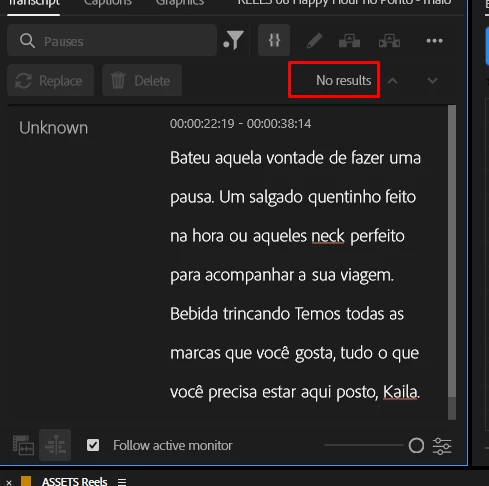
Removing pauses within the Premiere text panel isn't working properly. It worked fine in previous versions; I'm having to use AutoCut or DaVinci Resolve to make my automatic cuts. Please fix this.

  • May 8, 2026
  • 5 replies
  • 141 views

After updating to version 2026, the option to remove pauses after transcription is malfunctioning. I'm having to use third-party programs, even though it worked fine in version 2025.
 

    5 replies

    Daniel Lange
    Known Participant
    June 23, 2026

    This is still an issue in 26.3 - have there been any discussions about this internally?

    Stan Jones
    Community Expert
    Community Expert
    May 27, 2026

    @OlliProdutora,


    Thanks for posting the additional information. That is helpful. Having the screenshots is great.


    >  When he finds it, he removes it, but leaves a lot of pause behind.


    So sometimes, pauses are detected.


    The extra space left is, I think, by design and has been increased in the latest version. I suspect 26.2.0, but I don’t really know. There is another thread on that issue:


    Can you post a link to a short clip that shows the problem? The one that produced the extra space when deleted would be particularly helpful. Exporting an audio only version would be fine; just from the source clip without editing. If you can’t post it publicly, you can send a link through a private message. (Just click on my name.)


    Stan


    OlliProdutora
    Participating Frequently
    May 27, 2026


    I am attaching the same audio used in this screenshot, which was also sent previously.

    https://community.adobe.com/questions%2D729/removing%2Dpauses%2Dis%2Dhighly%2Dinconsistent%2D1624460?postid=7668840#post7668840#post7668840
     

    Regarding this article, that's exactly what I'm experiencing with the pauses.

    Daniel Lange explained it perfectly.

    However, as a native Portuguese speaker, I've noticed a huge improvement in the transcription and I don't intend to revert to the previous version. What's bothering me is what Daniel explained and the lack of pause detection. Could you pass this on to support?

    Stan Jones
    Community Expert
    Community Expert
    May 24, 2026

    @OlliProdutora,


    I’m sorry you did not get a response before. Thanks for providing the screenshots; those are helpful.


    Let me clarify first. Your screenshot shows NO pauses, but some gaps in audio that look long enough to have identified a pause. Is the issue that no pauses are identified even with the .01 level set? Or that you see pauses but you can’t remove them.


    Stan


    OlliProdutora
    Participating Frequently
    May 26, 2026

    That's it. Premiere doesn't recognize pauses even with the lowest level set (0.01). This makes my editing slower.
    I'm using Adobe Premiere version 26.2.2 (Build 3).


    IanB_360
    Community Manager
    Community Manager
    May 24, 2026

    Hi ​@OlliProdutora 
    Does it fail to remove the pauses on all files? Or is it having trouble with certain files? 
    Here to help
    Ian

    OlliProdutora
    Participating Frequently
    May 26, 2026

    In all files.

    The Premiere transcription has improved significantly in terms of accents and correct spelling. However, it's having a lot of difficulty finding pauses in all files.
    When he finds it, he removes it, but leaves a lot of pause behind.


    OlliProdutora
    Participating Frequently
    May 8, 2026