Known Participant
March 19, 2026

Render & Replace with Object mask -> Resulting footage has offset Alpha

  • March 19, 2026
  • 4 replies
  • 48 views

Steps to reproduce: 

  1. Add footage to timeline
  2. Animate footage position
  3. Add Object Mask
  4. “Render+replace” as Cineform 12Bit+Alpha
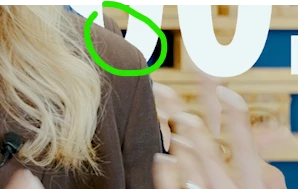
  5. Resulting footage has offset Alpha
    before render & replace
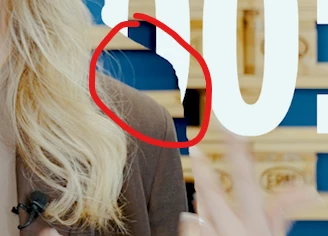
     
    rendered & replaced footage with offset alpha


    I think, the position-animation is not being considered at rendertime.
    Please fix and invest in better QA. 


Windows 11 25H2, Build 26200.7462
Nividia RTX 4090, Studio Driver 591.74
Single 4K Monitor
AMD Threadripper 3970X, 128 GB RAM
Premiere Pro 26.0.2 (Build 2)

    4 replies

    IanB_360
    Community Manager
    Community Manager
    March 19, 2026

    Hi ​@pablo__0231 
    Can you share the media and the project file with the object mask applied? It would help us greatly to see exactly what you have on your end. Do you know if the object mask is set to clip or frame? 
    Here to help.

    Ian

    Ron Rigler
    Community Manager
    Community Manager
    March 19, 2026

    As a workaround, can you try setting the Source to Individual Clips in the Render and Replace dialog?

    Ann Bens
    Community Expert
    Community Expert
    March 19, 2026

    Hope this gets fixed in the next update.

    Ann Bens
    Community Expert
    Community Expert
    March 19, 2026

    What kind of animation did you apply?

    Is render and replace correct when not animating the footage?


    Some time ago a reported something similar with warp stabilizer, object mask and render and replace on the beta forum. Engineer stated this was a known issue.

    Known Participant
    March 19, 2026

    Hi ​@Ann Bens
    Two position-keyframes, so quite a simple animation.

    In my view, that the whole point of “Render & Replace”: 

    • Add various effects and animations to a clip
    • bake all that live effects down via render&replace
    • Performant timeline without live effects

    So Render&Replace needs to be aware of everything going on with a clip. 

    Ann Bens
    Community Expert
    Community Expert
    March 19, 2026

    Could you please answer my question.