


Inspiring
June 4, 2025

Rendering heavy Effects Failing

  • June 4, 2025
  • 20 replies
  • 1088 views

For a little while now on the v25.4 beta I've been experiencing an issue when rendering sequences. Usually to prores (with alpha), but have also encountered it less frequently attempting to render to h264/5.
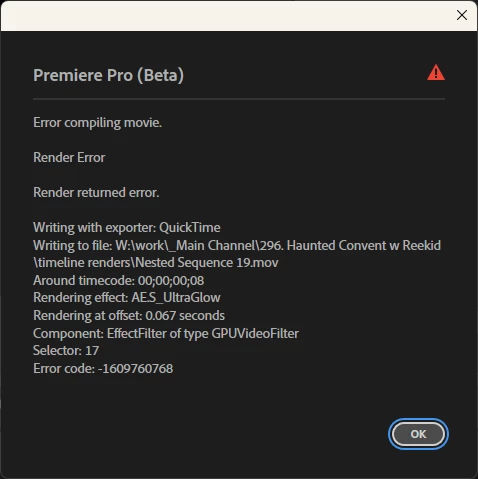
I'll try to render out a sequence and it will do seemingly nothing for anywhere from 10-30s then pop up with an error similar to the one I've attached below. The error below was generated by a sequence that contained nothing but a text element with the sapphire ultraglow effect applied

This issue does not occur if I hold shift during boot and set software only rendering, nor does it occur on v25.0

1. v25.4 (build 38)
2. Windows 11 | 10.0.22631 build 22631 - rtx 4080 (latest studio drivers), amd 7900x, 96gb ram, working off an ssd
3. I haven't completely locked down the pattern yet, but I seem to be running into it with sapphire's UltraGlow (latest version) a lot, but as noted previous versions of premiere do not encounter the issue with the exact same sequence, and disabling gpu rendering also results in no error
I will continue to investigate what might be causing the issue as it seems like only certain things are triggering the error currently
20 replies

Tom_editAuthor
Inspiring
July 31, 2025

and just for the sake of covering my bases, here's a screenrecording from a fresh project file; link

Tom_editAuthor
Inspiring
July 31, 2025

okay I hit send on a message and it just vanished so hopefully this doesn't come through twice

hey @Fergus H  you don't even need any footage or anything, simply add a text layer to a sequence, add S_UltraGlow then try to render it out to a prores4444+alpha file and it will error like shown in this video (v25.3)

Everything else I believe I've more or less already touched on. But happy to provide anything more specific if you need it.

Fergus H
Community Manager
Community Manager
July 31, 2025

@Tom_edit I think you're saying in your last post that you are now seeing this issue in the release version of v25.3 of Premiere Pro. If that's the case, would you be willing to provide us with more detailed information, as outlined here: https://community.adobe.com/t5/premiere-pro-bugs/how-to-report-a-problem/idi-p/13361863


In particular, it would be very useful to get a project and media from you that we can use to attempt to replicate the issue. We don't need the 3rd-party extensions; we have those already. 


Regard,

Fergus

Tom_editAuthor
Inspiring
June 16, 2025

issue is now occurring in the v25.3 public build

Tom_editAuthor
Inspiring
June 13, 2025

haven't had any mogrt issues personally. Try yourself, hold shift while opening premiere, there's an option at the bottom of the window that appears to force software rendering

Known Participant
June 13, 2025

I'm having this issue with *any* mogrt in the project file. Did software rendering fix this issue at least?

Tom_editAuthor
Inspiring
June 13, 2025

no idea if resolved currently, it's an intermittent issue and I don't use these effects all that frequently in my work - haven't used effects like that since I made the post but still keeping it in mind moving forward

Known Participant
June 13, 2025

Did you get help or find a fix?

Participant
June 4, 2025

I have the same issue!! With very basic effects or mogrts. It now takes x4-5 to render anything!

Tom_editAuthor
Inspiring
June 4, 2025

Will edit this with any other findings;
also occurring:
- S_Shake