
Participant
Nov 24, 2026 4:57 PM UTC
Acknowledged

Right clicking on a clip in the timeline causes the "Clip" options to not display properly. Instead of showing all of the options, I have to scroll down to reveal them.

Usually, when you right click on a clip or audio file in the time line, the options that show up should be full displayed. Instead the show up like this:
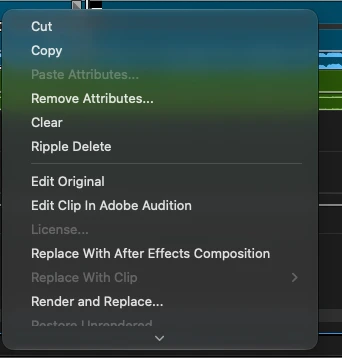
This is because the menu is hitting the bottom of the screen. I shouldn’t have to scroll down every time I want to access the other settings, it should just display all of the options in full like before.

1 reply

KatieToo
Community Manager
Community Manager
Nov 24, 2026 5:51 PM UTC

Hi ​@Drew285250923okv 

Thanks for reporting in about this right click menu issue, and we have already filed a bug report on that. An investigation is currently ongoing, and we’ll add this onto the report.

May we get your setup details to add onto that report? See below -

  • Premiere Version: What is the exact Premiere version and build you’re using? Help > About Premiere or Premiere > About Premiere
  • Setup/OS: Please specify Windows 11/10 or Mac, plus what macOS, along with driver version/build.
    • GPU Driver version/build(Windows only): We recommend updating to the most recent version; for NVIDIA users, we strongly recommend the Studio version of the driver.
    • Mac Chip (Mac Only): what M-series chip? If Intel, please include GPU.
  • Media Files: video, images, etc. and what types (can check under Media Properties)
  • Project Size: About how big is your project file? Is it in a Production or Multicam? Approximately how many clips are involved in a rough estimate
  • Media Storage: Are your Scratch Disks set to your Documents folder or the same as project, and is this the same as the Media drive?


Also, please let us know the following for helpful context:

  • Does it affect all projects or only some? What about new projects with a few sample clips?
  • Do you recall which Premiere this was last working in, when It started, and what might have changed? Any plugins, OS update, drivers, etc.


Once any update with more details for a fix is available or should they need anything else, we’ll return to this post.

Thank you again for your time helping to report on this!
Katie

Translate